

Memegen AI
Reverie AI · Video · Chatbot
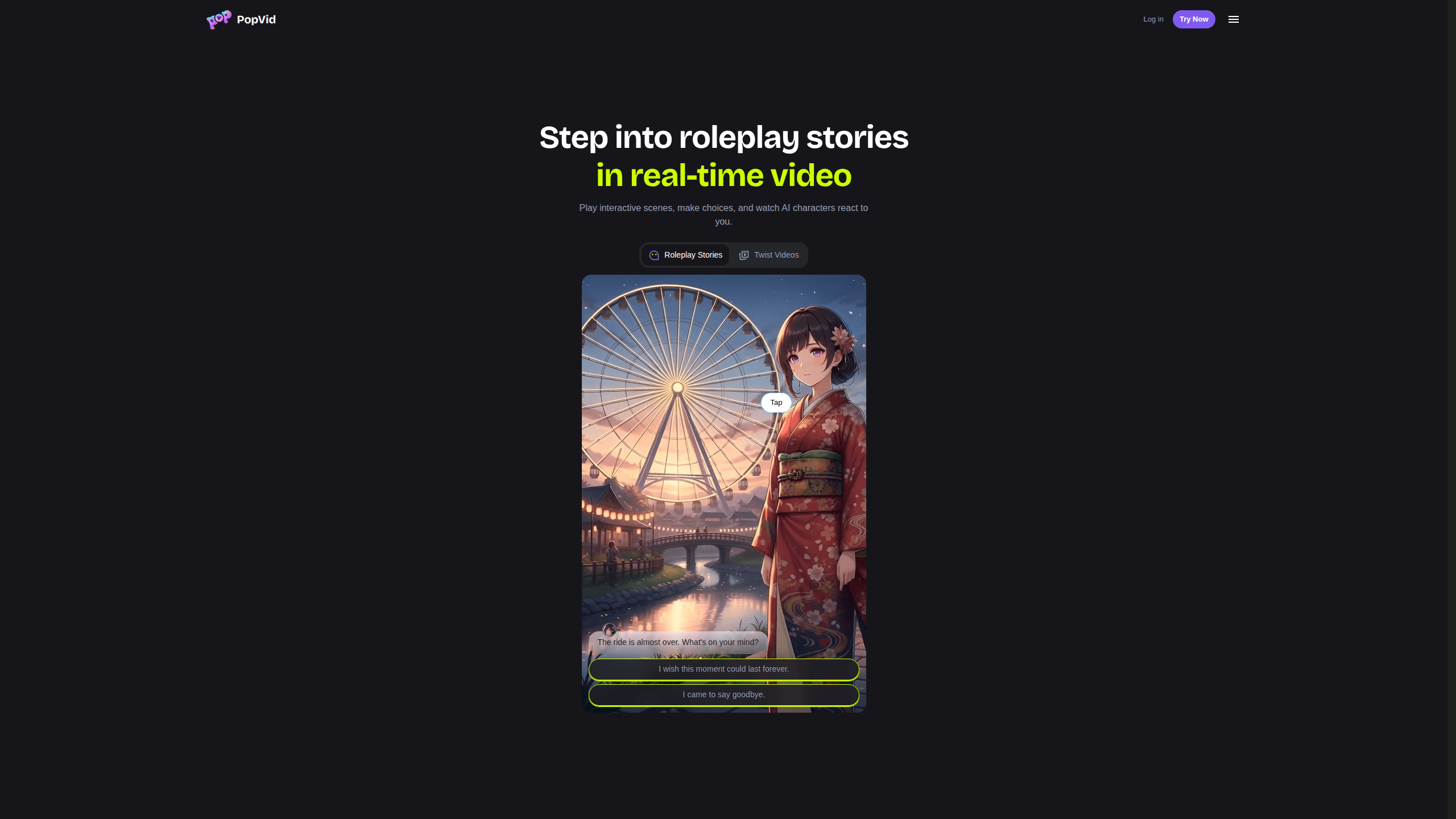
Memegen AI is an AI video roleplay platform, known publicly as PopVid AI, where interactive stories play out in real-time video instead of plain text. You pick a community-made scene, choose how your character responds, and watch AI characters react on screen as the plot shifts. It's built for people who want something more immersive than a chatbot. It also doubles as a small creation studio for images, videos, and your own roleplay stories.
About Memegen AI
What Is Memegen AI
Memegen AI, branded on the web as PopVid AI, takes the idea of AI chat and adds a camera. Instead of reading walls of text, you watch characters act out scenes in AI-generated video. Your replies decide what happens next. It's like being inside a movie you control. Reverie AI, a California company, runs the service, and it's aimed at adults only.
The core loop is community-driven. Creators publish roleplay stories across genres like anime, romance, fantasy, sci-fi, drama, and mafia, and anyone can jump into one and play. You don't write a prompt from scratch unless you want to. There's also a "twist" mechanic, where you take an existing video and give it a surprise ending, a funny angle, or a whole new direction. Others can build on your twist in a chain. Simple as that.
The biggest limitation is availability and maturity. It's a web-only product with no mobile app. Some of its creation tools are still marked as coming soon. And it's an 18+ service. If you want a polished, finished app, this isn't there yet.
Getting Started
- Open the official site in a desktop browser and confirm you meet the 18+ age requirement.
- Browse the popular roleplay stories or the trending twists feed and pick one that fits your mood.
- Choose how your character responds when the story pauses for your input.
- Watch the AI characters react in video and keep playing to branch the plot.
- Optional: use the creation tools to make an image, generate a video, or build your own roleplay story to share.
Product Information
A quick look at Memegen AI's pricing, supported platforms, and performance.
Best for
The users, tasks, and scenarios where this tool fits best.
Users
- Interactive-story fans who find plain-text AI chat flat and want characters that actually move and react on screen.
- Aspiring creators with no editing background who want a quick way to turn an idea into a short AI video or a playable scene.
- Community members who enjoy remixing other people's work, since the twist-chain format rewards building on what someone else made.
Tasks
- Playing a roleplay story
- Twisting a video
- Generating visuals
- Building a roleplay story
Scenarios
- A quick creative break when you want to be entertained rather than scroll a feed.
- Brainstorming a short video concept without opening a full editing suite.
- Testing a story idea and seeing how an audience twists it in unexpected directions.
Key features
Real-Time Video Roleplay
The headline feature is roleplay that plays out as video rather than text. When the story reaches a decision point, you choose how your character responds. Then the AI characters act out the consequence on screen. Each playthrough can go differently, so replaying the same scene often leads somewhere new. That branch-on-choice design separates it from a standard chatbot.
Community Story Library
PopVid hosts a growing library of stories made by users. Genres span anime, romance, fantasy, lifestyle, sci-fi, LGBTQIA, drama, mafia, yandere, paranormal, and idol. You can browse by what's popular and start playing without writing a single prompt. Because the catalog comes from the community, what's available shifts as creators publish new scenes.
The Twist Mechanic
Twisting is the platform's most distinctive idea. When you see a community video you like, you can give it a surprise ending, a funny take, or a completely new direction, and then others who watch your version can twist it again and again until the original clip turns into a long co-directed chain that grows funnier or stranger with every new link. Don't know what to write? One-tap templates give you a starting point.
Image and Video Creation Tools
The creation side covers more than roleplay. You can generate visuals from a text prompt in seconds, turn a static image into a short cinematic video, or launch a roleplay story from scratch, all without leaving the same browser tab or learning a timeline tool that most casual users will never need anyway. It's a light studio, not a pro editor. That keeps the learning curve low.
Built for Adult, Consensual Play
PopVid states plainly that it's for users 18 and over, and its terms prohibit illegal, non-consensual, exploitative, or abusive content. That rule shapes what the community can publish. Worth knowing before you invest time in the platform. It signals a moderated space, not an anything-goes playground.
Open World Adventures (Coming Soon)
A listed upcoming feature promises open world adventures, where you design interactive worlds and let others explore what you imagined. It's not live yet. Treat it as a roadmap item rather than something you can use today.
Pros and cons
Pros
- Video reactions make roleplay feel more like a film scene than a text exchange, which keeps attention longer.
- The community library means you can start playing immediately without prompt-writing skills.
- Twist chains turn passive viewing into active creating, and they're genuinely fun to follow.
- Everything lives in the browser, so there's nothing to install.
- Image, video, and roleplay tools sit in one place, so you don't switch apps.
Cons
- There's no mobile app, so you can't play on your phone or tablet on the go.
- Some creation tools and the open world feature are still marked coming soon, which means the platform isn't finished.
- It's an 18+ service, so it's off-limits for younger users and some classrooms.
Frequently asked questions
It's used for interactive video roleplay. You pick a community story, choose your character's responses, and watch AI characters act out the outcome in real-time video. You can also create images, short videos, and your own roleplay scenes, including twist videos.
Related content
Explore related tools, skills, and articles for Memegen AI.
Memegen AI Alternatives

Vadu AI
Vadu AI · Image · VideoVadu AI is a web-based AI video generator that turns written prompts or still images into short clips, and it can also generate images on its own. You type what you want, pick a model and style, and the platform renders the result in minutes. A free plan covers light testing, while paid tiers run from $9 to $77.40 per month based on how many credits you burn.

Mykaraoke Video
MyKaraoke Video · VideoMykaraoke Video is an online karaoke video maker and lyric video maker that turns any song into a finished, lyrics-synced video right in your browser. It handles the slow part for you. The AI pulls vocals out of the mix and locks the lyrics to the beat, then lets you customize background, fonts, and colors before exporting in 1080p MP4. If you make lyric videos for social media, party nights, or music promotion, it skips the software installs and manual timing work entirely. Want a karaoke video generator that doesn't eat your whole evening? That's the pitch here.

Finalframe
Finalframe · VideoFinalframe is a set of free, browser-based tools for grabbing exact frames out of a video clip. Its best-known feature, the Final Frame Extractor, lets you extract the last frame of any video so you can use it as the starting image for AI video tools like Luma Dream Machine, Runway, or Kling. Want to keep a clip going? That last frame is your starting point. The tool runs locally in your browser, needs no sign-up, and costs nothing. A separate paid AI video-generation app from the same team is currently offline while it's rebuilt.