

Mentara
Mentara · Leaning · Business
Mentara is an AI coaching platform where founders practice investor pitches, roleplay tough conversations, and track goals with instant feedback.
About Mentara
What Is Mentara
Mentara is a web-based AI coaching platform built specifically for startup founders. Instead of hiring an expensive human coach, you book short practice sessions and talk to an AI coach that pushes back on vague answers, asks about your metrics, and hands you a written report afterward.
The product frames itself as an always-available companion for founder challenges. That covers fundraising nerves as much as the softer stuff, like a hard conversation with a co-founder. The stated goal is to make coaching that usually costs a lot of money available around the clock. Ambitious, sure. But the pitch is fair.
There are real limits worth knowing up front. This is a young product, and its public roadmap is still filling in. The team says it's starting with the YC Interview Simulator as its first tool, with co-founder dynamics and customer conversation training planned next. So today the deepest coverage sits in pitch and interview prep. Everything else is a promise.
Getting Started
- Create an account on the Mentara website and log in.
- Pick a practice theme, then choose the AI coach you want to work with.
- Upload your pitch deck as a PDF if you're running a pitch or interview simulation.
- Choose when to start, then talk through a roughly 10-minute session.
- Review your session report and feedback, then schedule the next round.
Product Information
A quick look at Mentara's pricing, supported platforms, and performance.
Best for
The users, tasks, and scenarios where this tool fits best.
Users
- Founders new to AI founder coaching
- First-time founders
- YC applicants
- Solo co-founders
Tasks
- Investor pitch practice
- Pitch deck analysis
- Co-founder conversations
- Goal tracking
Scenarios
- Pre-fundraising prep
- Interview season
- Post-session review
Key features
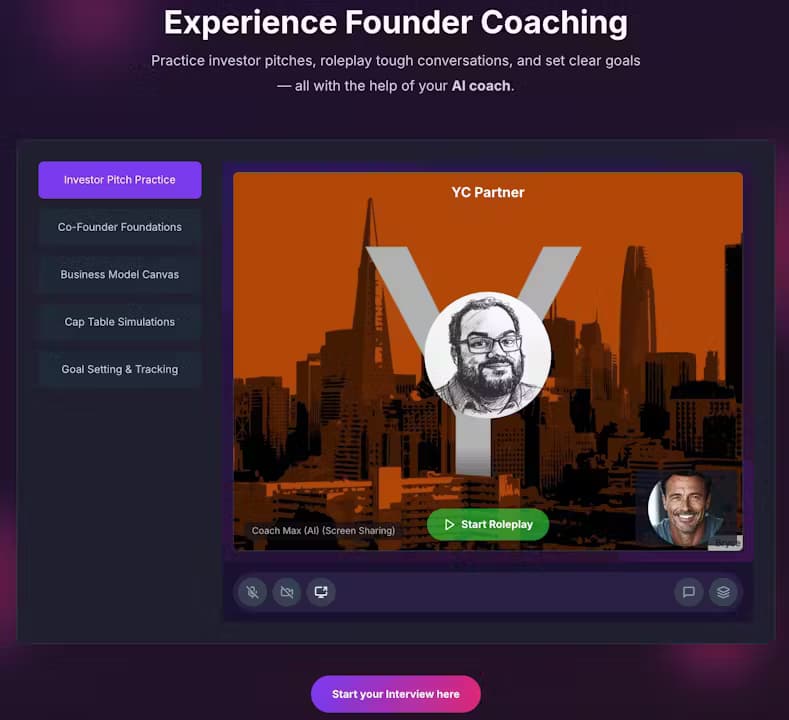
YC Interview Simulator
The YC Interview Simulator runs conversational 10-minute interview sessions built around the sort of questions an accelerator panel would ask. It pushes on your metrics and challenges vague answers rather than letting them slide. You get instant feedback after each run, so you can immediately adjust and go again. Ten minutes. Real pressure. No panel watching.
Investor Pitch Practice
This mode lets you rehearse your investor pitch through repeated attempts. You upload a pitch deck as a PDF first, and the tool analyzes it alongside your live delivery. Feedback lands in two places: how you actually presented, and how the deck itself holds up. Run it three times in a row and you'll hear the weak slide before the AI even names it.
Co-Founder Foundations
Co-founder friction rarely shows up in a pitch meeting, but it sinks plenty of companies. This scenario set lets you practice hard conversations around equity splits, responsibilities, and performance reviews. It's a way to find your wording before the stakes are real. Awkward now beats disastrous later.
Business Model Canvas and Cap Table Simulations
Beyond talking, Mentara includes structured exercises like the Business Model Canvas and Cap Table Simulations. These walk you through the numbers and frameworks an early-stage founder needs to explain clearly, which is often the difference between a confident answer and a rambling one. If you've ever blanked on your own cap table mid-meeting, you'll understand why this matters.
Session Reports and Feedback
Every session produces a written report you can revisit. Reports score things like investment readiness and break down your strengths and weak points. The AI coach also recalls your previous session summary, so follow-up conversations build on what you already covered instead of starting cold. That continuity is the part most practice tools miss, and it's why a second session feels different from a first.
Goal Setting and Tracking
Goal Setting & Tracking turns coaching into an ongoing routine rather than a one-off. You set founder goals, and each session picks up from where you left off. Over time, that gives you a running record of what you committed to and whether you followed through.
Pros and cons
Pros
- Practice sessions are short, so you can fit a run into a lunch break.
- Instant feedback after each session keeps the learning loop tight.
- Roleplay scenarios cover founder situations well beyond fundraising.
- Written session reports give you something concrete to review later.
- You can start with 2 free practice sessions before paying anything.
Cons
- It's a web-only tool, so there's no mobile app for practicing on the go.
- The product is early, and several promised features like customer conversation training aren't out yet.
- There's no public API, so you can't wire sessions into your own tools.
- Deeper insight features sit behind an upgraded account, which limits what the free tier shows.
Frequently asked questions
Mentara is an AI coaching platform for startup founders. You use it to practice investor pitches, rehearse difficult conversations, prepare for accelerator interviews, and track your goals with feedback after each session.
Related content
Explore related tools, skills, and articles for Mentara.
Mentara Alternatives
Coddy
Coddy · Coding · LeaningCoddy is a gamified platform to learn to code through short interactive lessons in 20+ languages, with a browser editor, an AI tutor and free certificates.

Marv
Cameron (independent developer) · Coding · Productivity · LeaningMarv is an AI cursor companion for Windows and Mac. It sees your screen, answers out loud, and draws arrows and highlights that show you the next click.

Teachoo
iAsk AI · Leaning · ChatbotTeachoo is a free AI homework helper that walks students through math, science, writing and coding problems one step at a time, with photo input, hints and flashcards.