
MimicPC
MimicPC · Video
MimicPC is a cloud AI workspace that runs ComfyUI, Stable Diffusion WebUI, and other open-source tools in your browser on rented GPUs, with hourly rates from $0.29.
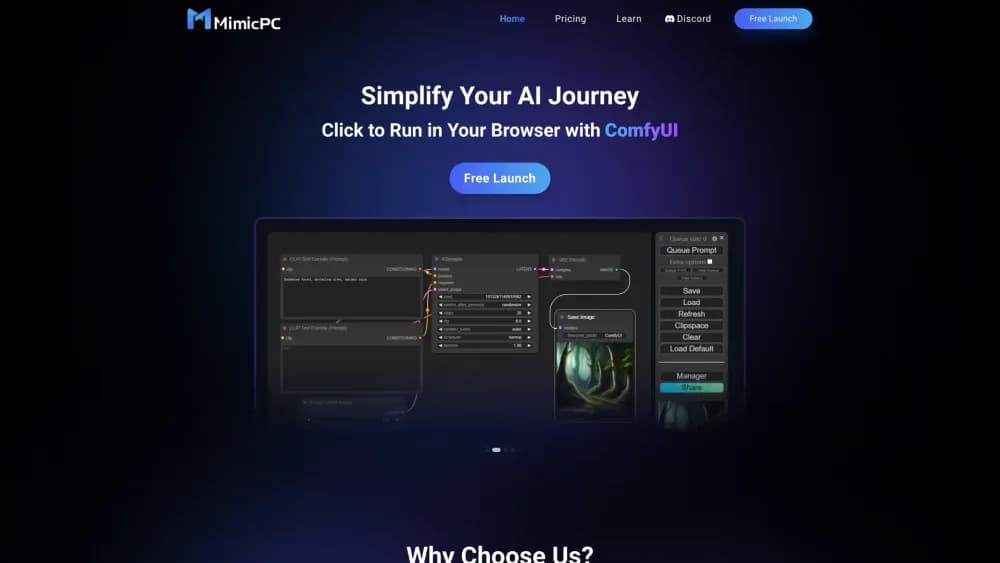
About MimicPC
What Is MimicPC
MimicPC is a browser-based cloud computer built for open-source AI software. You pick a machine, open a pre-installed app such as ComfyUI or Stable Diffusion WebUI, and work inside a remote Linux desktop. Nothing gets installed on your laptop, and no NVIDIA card is required on your end. This is the practical answer for Mac owners, Chromebook users, and anyone whose GPU tops out at 8GB of VRAM.
The platform covers five jobs: image generation, face swapping, model training, audio, and video. Each one comes with the usual open-source names already configured. ComfyUI ships with a node set and model downloads ready to go, and you can add your own checkpoints, custom nodes, or extensions when a project needs them. A workflow library lets you open someone else's graph and run it without rebuilding the pipeline by hand.
Two things set the boundaries. First, this is rented hardware, so cost tracks clock time. Idle machines still burn credit unless you shut them down. Second, the apps stay open-source tools, which means the learning curve stays too. ComfyUI is still ComfyUI once it loads in the browser. If you want a one-click generator with no node graph, the AI Generator section is closer to that, but the depth lives in the raw apps.
Getting Started
- Create an account at mimicpc.com. The Starter tier includes a $0.5 trial credit and 50GB of private storage, so you can test the setup before adding funds.
- Open the app catalog and pick a tool. ComfyUI, WebUI, Fooocus, FaceFusion, Kohya_ss, and Ollama WebUI are among the 20+ pre-installed options.
- Choose a GPU machine. Medium is a T4 with 16GB of VRAM, Large and Large-pro run L4 or A10 cards at 24GB, and Ultra uses an L40S with 48GB. Instant Access starts the machine right away, Bargain Access waits for spare capacity at a lower rate.
- Load a workflow or start from a blank graph, then run your job. Outputs land in your private storage, where you can keep them or download them.
- Shut the machine down when you finish. Billing runs by the hour while it's on, so stopping it is the main way to control spend.
Product Information
A quick look at MimicPC's pricing, supported platforms, and performance.
Best for
The users, tasks, and scenarios where this tool fits best.
Users
- Mac and laptop owners without an NVIDIA GPU
- Hobbyists who generate in bursts
- Designers testing open-source models
- Small studios running client work
Tasks
- Running ComfyUI workflows without a local install
- Training a LoRA on your own images
- Face swapping in photos or short clips
- Generating voice or music clips
Scenarios
- A weekend of experimentation before buying hardware
- Rendering a batch of product images overnight
- Demonstrating a workflow to a client or class
Key features
Pre-installed Open-Source Apps
More than 20 AI applications come ready to run, including ComfyUI, Stable Diffusion WebUI, WebUI Forge, Fooocus, InvokeAI, SwarmUI, FaceFusion, AI-Toolkit, Kohya_ss, RVC, and Ollama WebUI. The value is in skipped setup: Python versions, CUDA drivers, and dependency conflicts are handled before you log in. You still get a normal desktop, so you can open a terminal and change things.
Custom Models and Nodes
You can upload checkpoints, LoRAs, VAEs, and custom nodes, then keep them in private storage between sessions. That matters for anyone working with a fine-tuned model that isn't on Hugging Face, or a node pack the base image doesn't include. Storage persists, so a 12GB checkpoint doesn't need re-uploading every visit.
Four GPU Classes
The machine list runs from a T4 with 16GB of VRAM to an L40S with 48GB, with L4 and A10 options in the middle. The Ultra tier exists for FLUX workflows and video jobs that overflow 24GB. MimicPC's own comparison table puts the Medium card slightly below an RTX 3060 and the Ultra card near a 4090 Ti with double the memory.
Instant and Bargain Access
Each machine has two rates. Instant Access spins it up on demand at $0.49 to $1.99 per hour. Bargain Access queues you for spare capacity at $0.29 to $1.19 per hour and may take longer to start. For a batch render you can walk away from, the cheaper mode is usually the right call.
Workflow Library
A shared library of ready-made graphs covers common jobs like upscaling, character consistency, and video generation. You can open a workflow, run it, then fork it into your own version. Templates remove the blank-canvas problem that stops most ComfyUI beginners in the first hour.
Workflow to App Conversion
MimicPC includes a tool that turns a finished ComfyUI workflow into a simplified app with only the important fields exposed. It's aimed at creators who want to hand a generator to a client or an audience without teaching them node graphs. You keep the workflow, they see a form.
Pros and cons
Pros
- No local GPU needed, which opens ComfyUI and LoRA training to Macs, thin laptops, and older machines.
- Setup time is close to zero. The apps, drivers, and model paths are already configured, so the first image is minutes away instead of an evening away.
- Hourly pricing fits intermittent use. A two-hour session on the Medium machine costs under a dollar at the bargain rate.
- The 48GB Ultra tier handles FLUX and video workflows that would need a very expensive card to run locally.
- Private storage keeps models and outputs between sessions, and 50GB is included from the free tier.
Cons
- You pay for wall-clock time, not compute. A forgotten session left running overnight can cost more than a month of a subscription plan.
- Bargain Access adds queue time, so it isn't reliable for a deadline. Instant Access costs roughly 70% more per hour.
- The platform gives you open-source tools, not polished consumer software. ComfyUI still expects you to understand nodes and model placement.
- No public API is documented, so teams that want to call generation from their own code should look elsewhere.
- Orders are non-refundable, which makes the trial credit the only risk-free way to test the service.
Frequently asked questions
It's a cloud desktop for open-source AI software. You rent a GPU machine by the hour, open apps like ComfyUI or Stable Diffusion WebUI in a browser, and run them as if they were installed on a local PC.
Related content
Explore related tools, skills, and articles for MimicPC.
MimicPC Alternatives

ngram 2.0
ngram · Video · Marketingngram 2.0 is an AI video generator for teams. It turns a prompt, a screen recording, or a product URL into a narrated explainer, product demo, or AI avatar video, and every scene stays editable.

OpenScreen 2
OpenScreen (open-source project) · Video · ProductivityOpenScreen 2 is a free, open-source screen recorder and demo video editor for Windows, macOS, and Linux, with automatic zooms, styled frames, local captions, and agent edits.

Skreno
Skreno · Video · ProductivitySkreno is a browser screen recorder that captures a tab, a window or your whole display, then attaches AI transcripts, summaries and console logs to one share link.