

Missive
Missive · Productivity
Missive is a collaborative email client that turns shared inboxes into a team workspace, blending email, SMS, and chat with comments, assignments, and an AI assistant that drafts replies.
About Missive
What Is Missive
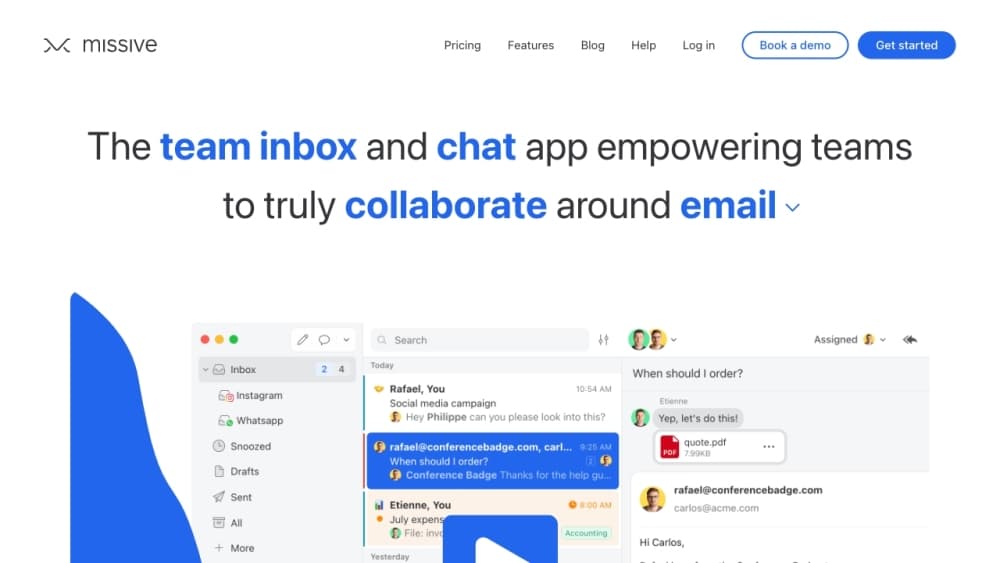
Missive is an email client built for teams, not just individuals. The email collaboration tool takes the inbox you already use and adds a layer of collaboration on top: anyone on the team can see an incoming message, discuss it in a private comment thread, assign it to the right person, and send a reply once it's ready. The client connects email alongside SMS, WhatsApp, Instagram, and live chat, so customer conversations that used to live in five different apps sit in one place.
The core problem Missive solves is coordination. Standard inboxes hide who's handling what, so teams forward messages around and hope nothing slips. Missive makes each email a shared object with visible status, so you can tell at a glance whether a request has been answered or is still waiting.
The main limitation is fit. Missive shines for teams that live in email and need visibility across many hands. A solo freelancer or someone who just wants a prettier Gmail may not need the extra layer, and the collaboration features only pay off once a few people share the same inbox.
Getting Started
- Create a team account and start the 30-day free trial of the Productive plan, no credit card needed.
- Connect your email accounts. Missive works with Gmail, Outlook, and any IMAP provider, and you can add SMS, WhatsApp, or social channels too.
- Invite teammates and set up a shared inbox or team space for the work you handle together.
- Turn incoming messages into assignments, add private comments, and let the built-in AI assistant draft replies for approval.
- Create rules to automate repeat tasks, then send and track responses without leaving the inbox.
Product Information
A quick look at Missive's pricing, supported platforms, and performance.
Best for
The users, tasks, and scenarios where this tool fits best.
Users
- Customer support teams
- Small businesses and agencies
- Sales and ops staff
- Solo founders growing a team
Tasks
- Answering a shared support address
- Drafting replies with context
- Triaging a busy inbox
- Migrating from another inbox tool
Scenarios
- A small team buried in forwarded email
- A support desk hitting slow response times
- A growing business that texts and emails customers
Key features
Shared Inboxes With Private Comments
The heart of Missive is the shared inbox, where a whole team can read an incoming message and talk about it in a comment thread the customer never sees. You can @mention a colleague to pull them in, share the draft before it sends, and keep the discussion attached to the exact email it belongs to. This is what replaces the endless forwarding that plagues standard clients.
Assignments and Team Visibility
Any email can become a task with an owner and a due date. A calendar view shows who has a heavy load and who's free, so you can move work around before someone burns out. Internal read statuses let managers follow a conversation without stepping into it, which helps when you need to stay informed but not in the way.
AI Assistant With Real Inbox Access
Missive's assistant isn't a generic chatbot bolted onto the sidebar. It reads threads and attachments, checks your calendar for conflicts, and searches across connected accounts, so a draft arrives with context already gathered. You can set tone and style instructions once, and every AI draft follows them, whether it comes from a veteran or a new hire.
MCP Integrations and Bring-Your-Own-Key
Through the Model Context Protocol, the assistant can look up billing history in Stripe, pull a doc from Notion, or create an issue in Linear, all without leaving the conversation. You choose how to power it: prepaid Missive AI credits for instant setup, or your own API key from OpenAI, Anthropic, or Google. If you don't connect a provider, the AI features stay hidden.
Rules and Automations
You can build up to 1,000 rules that trigger on incoming messages, from auto-assigning a ticket to sending a follow-up later. Canned responses let the AI start from your team's approved template library, so replies stay consistent. The point is to make the repetitive parts run on their own, like clockwork, without you touching them.
Multi-Channel and 25+ Integrations
Missive pulls email, SMS, WhatsApp, Messenger, Instagram, and live chat into one stream, so customers reach you however they prefer. Over 25 apps connect as well, covering CRMs, project tools, and video calls, so the context you need sits next to the message. You won't be switching tabs to find who a customer is or what they last ordered.
Pros and cons
Pros
- Shared inbox with private comment threads cuts internal forwarding almost entirely.
- Assignments, due dates, and workload views make team capacity visible at a glance.
- AI assistant reads threads, attachments, calendar, and connected tools before drafting.
- Rules and templates automate routine replies so quality stays consistent.
- Works across Gmail, Outlook, IMAP, SMS, and social channels in one place.
Cons
- No free tier, only a 30-day trial, so small teams must budget for seats after the test.
- Starter caps at 5 users, which means growing teams jump to the higher-priced tiers early.
- AI features require the Productive plan or above, adding cost for teams that want them.
- Migration from some tools takes setup effort, especially for complex custom workflows.
Frequently asked questions
Missive is a team email app that combines shared inboxes with internal chat, task assignment, and an AI assistant. Teams use it to handle support, sales, and client communication without forwarding messages around.
Related content
Explore related tools, skills, and articles for Missive.
Missive Alternatives

Swms
Swms AI · Writing · Productivity · BusinessSwms is an AI safety compliance tool that turns a plain description of a job into ready-to-use safety documents. Describe your project, trade, and known hazards, and it writes a safe work method statement, job hazard analysis, safe work procedure, RAMS, or safety data sheet in seconds. It also ships with Oscar, a chat assistant that answers workplace safety questions in any language. Teams in construction, mining, transport, and warehousing use it to cut the paperwork that usually eats into a workday.

Wordly AI Translation
Wordly · Voice & Language · ProductivityWordly AI Translation is a real-time AI translation and captioning platform built for meetings, conferences, and events. It delivers live translation, captions, transcripts, and summaries in more than 60 languages, and attendees join by scanning a QR code or opening a link instead of using dedicated headsets. The platform works with Zoom, Microsoft Teams, Google Meet, and Webex, and it's designed for organizations that want multilingual access without hiring human interpreters for every session. Simple as that.

Rows
Rows (Superhuman) · Productivity · BusinessRows is an AI spreadsheet and data analysis tool that imports live data from more than 50 sources, then lets you work with it using plain language instead of SQL queries or nested formulas. You can pull numbers out of PDFs, connect ad platforms, databases, and bank accounts, and ask the AI to build reports, merge datasets, or set up models that recalculate themselves. It runs in the browser, works like a spreadsheet, and now sits under the Superhuman umbrella.