

MixVio AI
Orvyno LLC · Video
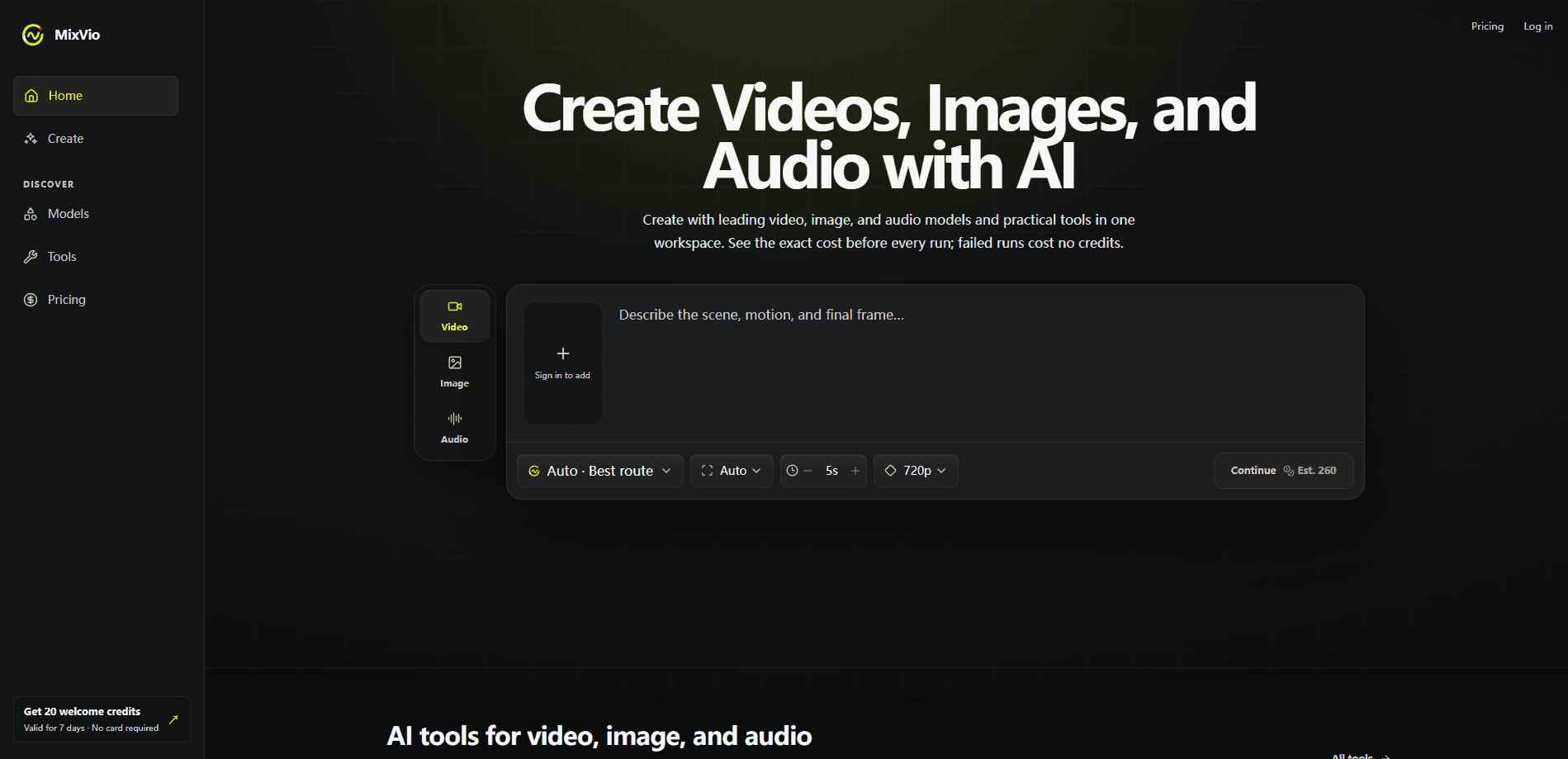
MixVio AI is a browser-based workspace where you generate and edit video, image, and audio with a catalog of leading AI models in one place. Instead of hopping between separate apps for a clip, a product photo, or a voiceover, you pick a model, see the exact credit cost, and run everything from the same screen. It suits independent creators, marketers, and small teams who want the output of several tools without juggling several subscriptions.
About MixVio AI
What Is MixVio AI
MixVio AI is a multimodal creative workspace, run by Orvyno LLC, that pulls video, image, and audio generation into a single interface. You don't pick models in the dark. The platform lists them by their real provider names, like Seedance, Kling, Veo, GPT Image, and Seed Audio, and shows what each run will cost before you commit. That transparency is the core pitch. Most rival platforms hide how many credits a generation eats until after it finishes.
The tool is built for people who need a finished asset, not a research project. Independent creators use it to make social clips and thumbnails, marketers use it for campaign and product visuals, and creative pros use it to compare models side by side while refining an idea. So what does the free tier actually get you? Every new account receives 40 welcome credits that last 7 days, and free image and voice outputs carry a MixVio watermark. The one catch worth knowing upfront is pricing, which is credit-based and metered per model.
Getting Started
- Create an account at mixvio.ai. The Free plan needs no credit card and gives you 40 welcome credits valid for 7 days.
- Pick a task type: video, image, or audio. Video starts on MiniMax H3 at 5 seconds and 768p, image on GPT Image 2, and audio on Eleven v3.
- Choose a model from the catalog and check the credit quote the Generate button shows before you submit.
- Run the generation, then edit or refine the result with the built-in tools if you need to.
- Download your asset on a paid plan to avoid the MixVio watermark on images and voiceovers.
Product Information
A quick look at MixVio AI's pricing, supported platforms, and performance.
Best for
The users, tasks, and scenarios where this tool fits best.
Users
- Independent creators
- Marketers and small businesses
- Creative professionals
Tasks
- Generating short videos with a text to video prompt or a reference image
- Producing product-ready images and edits on the AI image generator side
- Creating voiceovers in multiple languages with the AI audio generator
- Making original music
Scenarios
- Kicking off a content week
- Testing a campaign concept
- Polishing a rough idea
Key features
Multimodal Generation in One Workspace
MixVio AI covers video, image, and audio from a single dashboard, so you don't switch apps between a clip and its thumbnail. You generate across all three, then edit and improve the result with a growing toolkit inside the same interface. For anyone who used to keep three browser tabs and two or three separate billing accounts open just to finish a single short project, that consolidation is the main draw.
Transparent Credit Pricing Before Every Run
The Generate button shows the exact credit quote, and the dollar equivalent, before you submit. Costs vary by model. Veo 3.1 Lite starts at 10 credits, MiniMax H3 at 12, and Seedance 2.0 Standard at 26. You see the number first, so a run never surprises your balance.
No-Charge Failed Runs
If a generation fails or you cancel it safely, the reserved credits are released automatically. MixVio reserves the quoted credits at submission and returns them when a run doesn't complete. That matters. AI generations do fail sometimes, and paying for a failure is a common frustration on credit-based platforms.
Access to Leading Third-Party Models
The catalog spans well-known providers, with live routes including Seedance, Kling, Veo, GPT Image, and Seed Audio. MixVio identifies each model by its actual provider name rather than rebranding it as its own. No fake labels. You can pick a default or swap to a compatible model at any point in the workflow.
Edits and Refinement Tools
Beyond raw generation, MixVio includes editing tools that let you adjust and expand on what you produce. The AI video editing side covers the common touch-ups: trim a clip, tweak a frame, or build on an audio track. It won't replace a full pro editing suite. Still, it saves a trip to another tab.
Multilingual Voiceovers
The audio side handles voiceovers in multiple languages, which is handy for creators targeting more than one market. You can add narration to a video project without opening a separate voice tool. Big time-saver. Free-tier voiceovers carry an audible MixVio disclosure, so check the plan if that matters.
Retained Access to Paid Work
Uploads and results are private by default, and paid creations stay accessible after you cancel, as long as your account stays active and you stay within the platform's storage limits. Free-plan outputs, by contrast, expire after about 7 days. That's a real gap. For anyone building a content library, it's worth planning around.
Pros and cons
Pros
- Video, image, and audio generation live in one workspace. Less tool-switching.
- Exact credit cost and dollar equivalent show before every run, so spending is predictable.
- Failed or safely canceled runs release reserved credits automatically.
- Generations are private by default, and paid work stays accessible after cancellation.
- A real free tier: 40 welcome credits, no credit card required.
Cons
- Everything runs on credits, so heavy users have to watch balances closely or upgrade.
- Free-plan images and voiceovers carry a MixVio watermark, which rules out some commercial uses.
- Free-plan outputs expire after about 7 days. You can't treat it as free storage.
- There's no public API, so it can't be wired into automated pipelines.
Frequently asked questions
Short videos from text or a reference image, product-ready images and edits, voiceovers in multiple languages, and original music. Live model routes include Seedance, Kling, Veo, GPT Image, and Seed Audio.
Related content
Explore related tools, skills, and articles for MixVio AI.
MixVio AI Alternatives

Vadu AI
Vadu AI · Image · VideoVadu AI is a web-based AI video generator that turns written prompts or still images into short clips, and it can also generate images on its own. You type what you want, pick a model and style, and the platform renders the result in minutes. A free plan covers light testing, while paid tiers run from $9 to $77.40 per month based on how many credits you burn.

Mykaraoke Video
MyKaraoke Video · VideoMykaraoke Video is an online karaoke video maker and lyric video maker that turns any song into a finished, lyrics-synced video right in your browser. It handles the slow part for you. The AI pulls vocals out of the mix and locks the lyrics to the beat, then lets you customize background, fonts, and colors before exporting in 1080p MP4. If you make lyric videos for social media, party nights, or music promotion, it skips the software installs and manual timing work entirely. Want a karaoke video generator that doesn't eat your whole evening? That's the pitch here.

Finalframe
Finalframe · VideoFinalframe is a set of free, browser-based tools for grabbing exact frames out of a video clip. Its best-known feature, the Final Frame Extractor, lets you extract the last frame of any video so you can use it as the starting image for AI video tools like Luma Dream Machine, Runway, or Kling. Want to keep a clip going? That last frame is your starting point. The tool runs locally in your browser, needs no sign-up, and costs nothing. A separate paid AI video-generation app from the same team is currently offline while it's rebuilt.