

MoodBoardly
MoodBoardly · Image
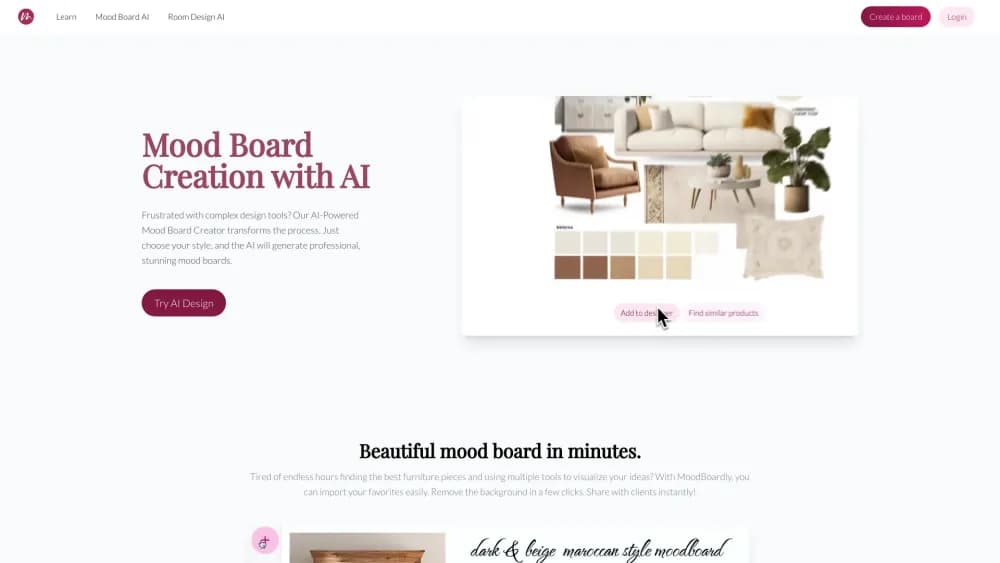
MoodBoardly is an AI mood board creator for interior design, fashion and branding. It generates boards from a short brief, then helps you refine them and build a product shopping list.
About MoodBoardly
What Is MoodBoardly
MoodBoardly is a browser-based mood board maker aimed at people who need a visual direction before they commit to buying anything. You describe the room, outfit or event you're planning, pick a style, and the AI returns four board concepts. The one you keep can be cleaned up, upscaled and pushed into an editor that holds products, palettes and text in one place.
It ships as a three-part suite. Mood Board AI handles generation, the Mood Board Editor handles layout and the shopping list creator, and MyRoomDesigner.AI takes the finished board and turns it into a room render. The company, run by founders Marta Herget and Gabor Herget, started with the editor in 2020 and added the AI layer as image models improved.
Limits are mostly about volume and control. Free accounts generate boards at no cost, but board saves, background removals and one-click product imports are capped at one to three uses a month, and the clean-up and upscale tools sit behind a paid plan. The AI reads your prompt, not your house. Colors and furniture come back as suggestions, so a board is a starting point rather than a measured plan.
Getting Started
- Sign up for a free account at moodboardai.com. No card is needed, and the AI generator works on the free plan.
- Describe what you're planning and choose a style such as modern, vintage or minimalist. Add details like materials, lighting or a specific theme.
- Pick one of the four generated boards, then refine it with Change Prompt, Clean Up or Upscale until the direction looks right.
- Open Find Similar Products to match items in the board with real furniture and decor, then send the board into the Mood Board Editor.
- Add products, set up your palette, and export a shopping list you can share with a client, partner or landlord.
Product Information
A quick look at MoodBoardly's pricing, supported platforms, and performance.
Best for
The users, tasks, and scenarios where this tool fits best.
Users
- Interior designers working on client concepts
- Homeowners planning a renovation
- Fashion and styling creatives
- Brand and event teams
Tasks
- Turning a vague brief into options
- Building a room shopping list
- Testing a color palette
- Cleaning up a generated image
- Turning a board into a 3D view
Scenarios
- A living room refresh on a tight timeline
- A property listing that needs styling direction
- A wedding or event theme pitch
- A kids' room or nursery plan
Key features
AI Mood Board Generation
Describe the space, the mood and the materials in plain language, and the generator returns four board concepts to choose from. You can adjust the prompt and regenerate as many times as your plan allows, so a first idea can be pushed in a different direction without starting over.
Prompt Refinement and Regeneration
The Change Prompt control lets you add a detail like plants, curves or a fairytale theme and see the board update. It's the fastest loop in the product for people who know the feeling they want but not the vocabulary.
Clean Up and Find Similar Products
Clean Up removes and replaces individual items in a generated image, and Find Similar Products selects an object in the board and surfaces real furniture and decor that match its style. That link from inspiration to something you can actually buy is the main reason to use this tool over a plain collage app.
Mood Board Editor
The editor takes AI boards or a blank canvas and handles layout, typography, palettes and product placement. Crop, flip, duplicate and background removal tools keep the board tidy, and every board can be exported as PNG, JPEG or PDF.
Shopping List Creator
Each product you place can carry a price, and the automated shopping list creator assembles them into a shareable document. For designers, that turns a mood board into a budget conversation. For homeowners, it's a buying plan you can hand to a partner.
MyRoomDesigner.AI
The room design module detects the layout in a board or photo, then lets you add or swap furniture and materials through a chat. Output can be upscaled for presentation, which covers the gap between a flat board and a room clients can picture.
Color Palette Generator
The AI color palette tool pulls a working scheme from your board or builds one from scratch, and saved palettes can be reused across projects. It's free to use and useful for keeping materials, paint and fabric in the same range.
Pros and cons
Pros
- The AI generator, the editor and product matching live in one account, so a concept can move from idea to shopping list without exporting anything.
- Product suggestions come with real items, which makes a board something you can price rather than just admire.
- A free plan exists and covers the AI generator, so you can test output quality before paying anything.
- Room and style categories are broad, from nursery and home office to wedding styling and food photography.
Cons
- The free tier is tight. One board a month, one background removal and three product imports isn't enough for an active project.
- Pro-level tools like Upscale and Clean Up are locked behind a subscription, so the free generators can't be finished to presentation quality.
- Refunds aren't offered on AI generations once they run, which makes bulk regeneration a paid gamble.
- The tool runs in a browser only. There's no desktop app and no offline mode.
Frequently asked questions
MoodBoardly covers interior design, fashion, wedding styling, food branding and photography mood boards. It also handles specific rooms such as living rooms, bedrooms, kitchens, bathrooms, home offices, nurseries, kids rooms, yoga studios and gardens.
Related content
Explore related tools, skills, and articles for MoodBoardly.
MoodBoardly Alternatives

Tractionwave
TractionWave · Image · MarketingTractionWave is an AI attention heatmap tool for static ads. Upload a PNG or JPG and it returns predicted attention, ranked hotspots, and fixes before you spend budget.

Imejis.io
Imejis.io · Image · MarketingImejis.io is an AI design studio for agents and marketing teams. Describe an image in plain words, and it writes the copy, builds the layout, reflows it to every size, then exports a finished file.

Layoutr
Van Dijk Ontwikkeling · Image · China AILayoutr is a browser floor plan tool that scales your own plan, places furniture at true size, shows the room in 3D and renders it with AI.