

MyIP AI
MyIP.ai · Leaning · AI Assistant
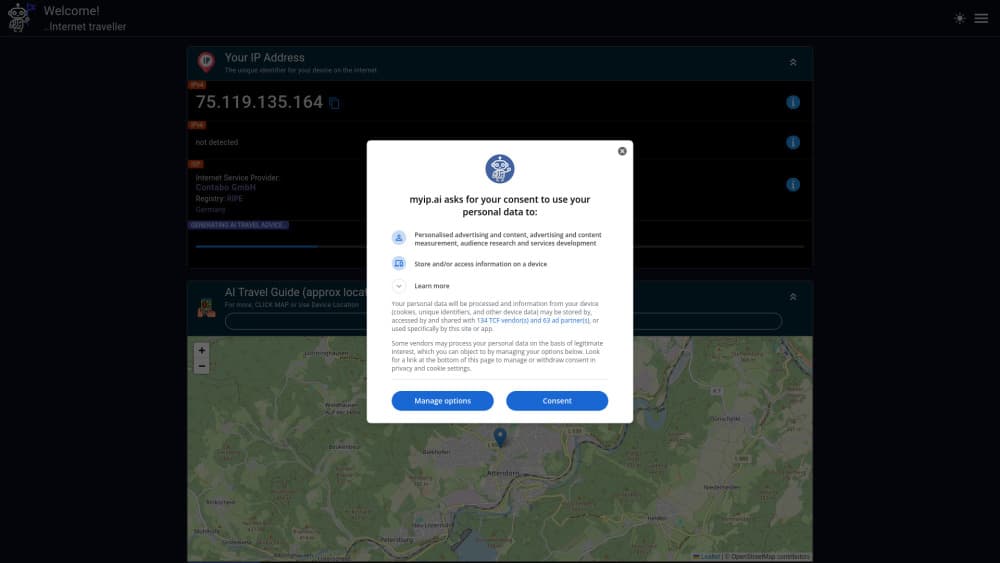
MyIP AI is a free web tool that shows your IPv4 and IPv6 address with full network, ASN, port and location details, then generates an AI travel guide for any spot on the map.
About MyIP AI
What Is MyIP AI
MyIP AI answers a question people type into search engines every day: what is my IP address. It reads your connection in real time and lays out the IPv4 address, the IPv6 address, the network block, the ASN, the ISP, the client port and an approximate location on a map. Nothing to install, no account to create.
The tool also does something most IP checkers skip. An AI tour guide named Hal writes a short travel guide for whatever spot you point at on the map, covering what to see, local landmarks, weather and living standards. A public knowledge base collects these guides by country, so you can browse instead of guessing.
The limits are worth knowing. Location is approximate, pulled from your network block rather than GPS, so it can land on the wrong city. The travel guides read as helpful summaries, not as vetted itineraries, and there is no login to save your history.
Getting Started
- Open myip.ai in any browser. Your IPv4 and IPv6 addresses load on the first screen.
- Scroll the panels to read your network block, ASN, ISP, port and device details, or copy any value with one click.
- Click the map or allow device location to pick a place for the AI travel guide.
- Let Hal generate the guide, then copy the permanent link if you want to share it.
Product Information
A quick look at MyIP AI's pricing, supported platforms, and performance.
Best for
The users, tasks, and scenarios where this tool fits best.
Users
- Everyday users checking their IP
- VPN and proxy users verifying a connection
- Travelers curious about a destination
Tasks
- Finding your IPv4 and IPv6 address
- Looking up an ASN or ISP
- Reading your browser and device profile
Scenarios
- Quick network troubleshooting
- Checking a VPN is doing its job
- Planning a trip without opening five tabs
Key features
Instant IP address lookup
The page reads your connection and shows the IPv4 and IPv6 address side by side as soon as it loads. Each one copies with a single click, and the tool also offers the masked forms when you need the network notation rather than the plain address. It is the plainest version of the "what is my IP address" question answered without a form.
Full network information
Below the address, MyIP AI reports the network block, the address range with its start and end, the total and usable address counts, and the client port. This is the layer people usually have to hunt for elsewhere. Seeing the range tells you the size of the block your address sits in, which matters when you are tracking down where a connection really comes from.
ASN and ISP details
The tool names the autonomous system number, the ISP and the country registry behind your address. An ASN is the identifier that tells the internet which network traffic belongs to, so this panel answers which provider and which network you are on. It is useful for anyone comparing what their VPN claims against what the network actually reports.
Location and map view
MyIP AI gives you an IP location readout on an OpenStreetMap view and lists the country, region, city, timezone, postcode and coordinates. You can click the map or use device location to move the pin. The location comes from the network block, so it is approximate, and the tool says so in its own captions rather than pretending to be exact.
AI travel guide with Hal
Hal, the site's AI tour guide, writes a travel guide for whichever location you select. It covers what to visit, local landmarks, weather and living standards, and returns a permanent link you can copy and share. The whole generator runs on the same free page, and the guides are also published into a browseable database by country.
Browser, device and screen info
A separate panel lists your user agent, browser name and version, operating system, platform, device type, screen resolution and browser viewport. Each field copies on click. It is a quick way to capture the exact details support teams ask for, without digging through settings menus.
Public API and travel guide database
The site exposes JSON endpoints for IP data that developers can call directly. Alongside it, a knowledge base stores the generated travel guides plus reference pages on IPv4, IPv6, NAT, ISP and ASN. That makes the travel side something you can explore by country instead of only generating one pin at a time.
Pros and cons
Pros
- Shows IPv4 and IPv6 together, along with the network block and ASN, which many IP checkers leave out.
- Free and login-free for every feature, including the AI travel guide, with no visible paywall.
- One-click copy for each value, so grabbing your address, masked address, network or coordinates takes seconds.
- Generates a shareable permanent link for each travel guide, and stores past guides in a browseable database.
Cons
- Location is approximate because it comes from the network block, not GPS, so the city can be wrong.
- The AI travel guides are generated summaries rather than checked itineraries, so treat them as a starting point.
- There is no account, which means no saved history or favorites across visits.
- The travel guide feature sits next to a networking tool, so visitors looking for only one of the two may find the other out of place.
Frequently asked questions
MyIP AI reads your connection and displays your public IPv4 and IPv6 address at the top of the page, along with the network block, ASN, ISP, port and an approximate location. You can copy any of these values with a single click.
Related content
Explore related tools, skills, and articles for MyIP AI.
MyIP AI Alternatives
Coddy
Coddy · Coding · LeaningCoddy is a gamified platform to learn to code through short interactive lessons in 20+ languages, with a browser editor, an AI tutor and free certificates.

Marv
Cameron (independent developer) · Coding · Productivity · LeaningMarv is an AI cursor companion for Windows and Mac. It sees your screen, answers out loud, and draws arrows and highlights that show you the next click.

Teachoo
iAsk AI · Leaning · ChatbotTeachoo is a free AI homework helper that walks students through math, science, writing and coding problems one step at a time, with photo input, hints and flashcards.