

Narrative
Narrative AI Inc. · Video
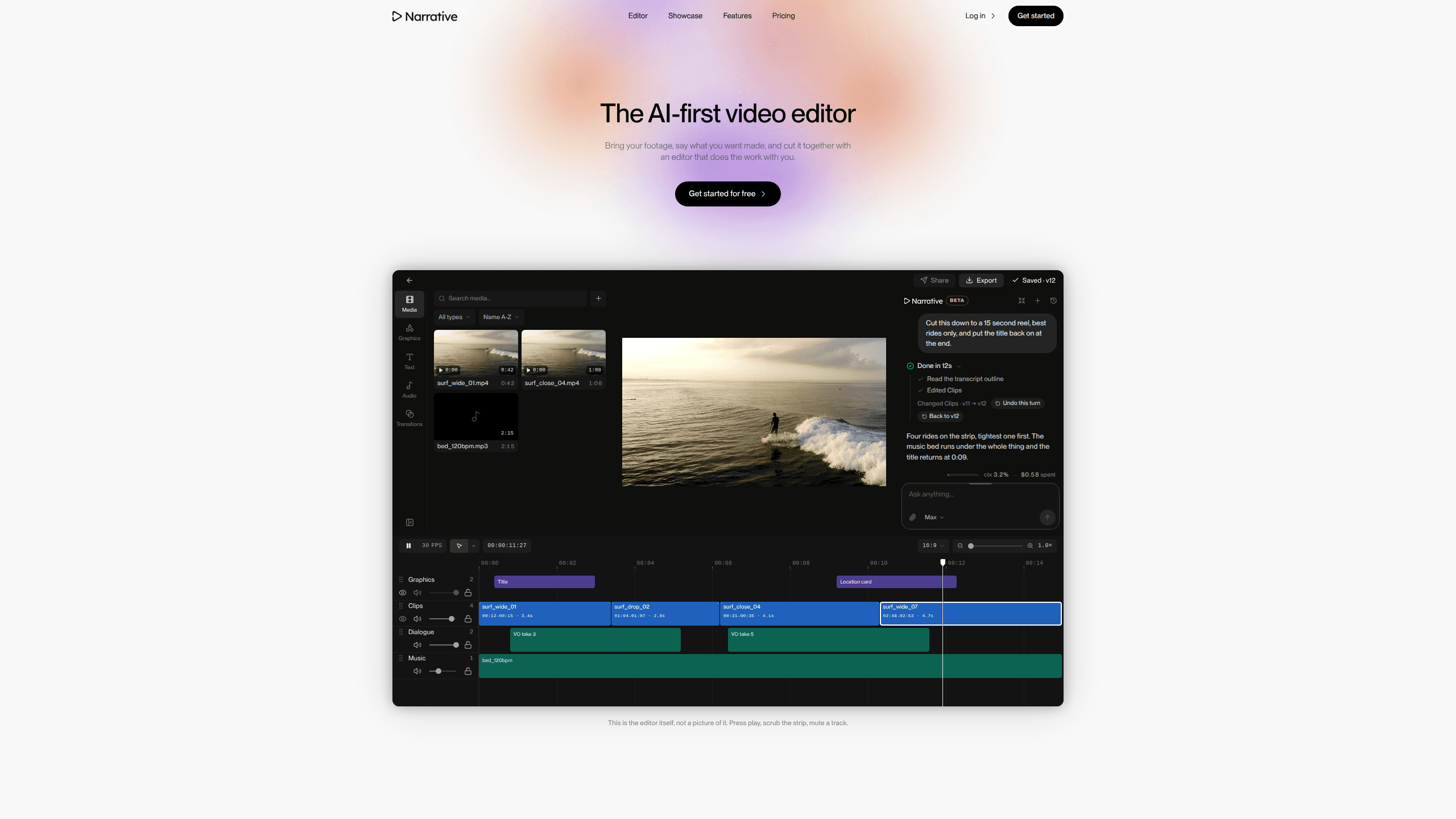
Narrative is an AI-first video editor built by Narrative AI Inc. that lets you bring your own footage, describe the edit you want in plain language, and get a finished cut back on a timeline you can still open and change. Instead of dragging clips around a menu, you type something like "make a 15 second reel of the best rides, title at the start, music under it" and the editor reads your transcript, picks the shots, and tells you what it did. That's text to video edit in practice, without the timeline work. It runs in the browser and is aimed at creators who have hours of footage and not hours of spare time.
About Narrative
What Is Narrative
Narrative is a chat-based video editing tool. You upload your own clips and audio, then ask for the edit you want in a sentence. The agent reads your footage, makes the cut, and reports back what changed.
That single loop is the whole idea. There's no preset menu of effects to hunt through. Anything you'd say to a human editor, you can say to this one, and it works from the words. Each turn saves as a version, so you can step back to any earlier stage or reset the project.
The main limit is that it's not a replacement for frame-level precision work. If you need to key a green screen by hand or sync a dozen multicam angles shot by shot, you'll still want a traditional editor alongside it. So where does Narrative fit? The messy middle: raw footage in, watchable cut out. That's the sweet spot.
Treat it as an AI editing tool first and a timeline second. The company is Narrative AI Inc., the product launched publicly in September 2026, and there's a free tier to try before you pay.
Getting Started
- Create an account with your email or a third-party login, or grab the iOS app if you'd rather work on a phone.
- Upload your footage and any music you plan to use.
- Open the chat box and describe the edit in plain words: length, tone, which moments matter, where the title goes.
- Watch the result land on the timeline, then ask for changes the same way you asked for the first cut.
- Pick your aspect ratio and speed mode, then export or share the finished video.
Product Information
A quick look at Narrative's pricing, supported platforms, and performance.
Best for
The users, tasks, and scenarios where this tool fits best.
Users
- Solo creators sitting on hours of raw footage
- Wedding and event filmmakers with tight turnaround
- Sports and media teams who need coverage fast
Tasks
- Turning a two-hour shoot into a short vertical reel
- Cutting a rough cut to the beat of a track
- Pulling the strongest lines out of an interview
- Making a trailer-style version of boring footage
Scenarios
- You filmed a weekend trip and want a shareable highlight before Monday
- A podcast episode needs a clip for social
- A product demo needs the same edit in both 16
Key features
Chat-Based Editing
You describe the edit and the editor does the work. Ask for a supercut, a rough cut, or a vertical reel, and it reads your footage, makes the cut, and explains what it changed. The point is that you never learn a menu to get a result. It's automatic video editing driven by words.
Works From the Transcript
Narrative reads the spoken words in your clips. That's how it finds the goal in a 90-minute match or the best line in an interview. No scrubbing required. If your footage has talking in it, this is the feature doing most of the heavy lifting.
Edit by Version
Every turn you take saves as a version. You can step back to any earlier cut or put the project back to how a turn left it. When you're experimenting, that means you can try something risky and undo it without losing the version you liked.
Speed Modes
You pick how much thinking the edit gets. Fast is for small changes, Balanced covers most edits, and Max is for long footage and hard briefs. If a cut isn't landing, moving up a mode is usually the first thing to try. It's that simple.
Aspect Ratio Switching
Start in 16:9 and ask for 9:16 whenever you want. In the vertical version, both speakers stay in the shot, stacked. That saves you rebuilding a horizontal edit for social from scratch.
Motion Graphics and Titles
Titles, location cards, and lower thirds come from the same chat box. You ask for a title at the start or an end card at the close, and it places them on the timeline at the times you named.
Music and Beat Matching
Drop in a track and ask it to cut to the beat. Narrative analyzes the music and ramps your edits to land on the hits. It also keeps the music bed running under the rest of your edit instead of fighting it. Good rhythm, minimal effort.
Pros and cons
Pros
- You get a finished edit from a sentence, which is the fastest path from raw footage to something watchable.
- Every change is a saved version, so experimenting costs you nothing and nothing is permanent.
- It reads the transcript, so it can find the right moment in long footage without you scrubbing for it.
- The vertical conversion keeps both speakers in frame, which removes the most annoying part of repurposing for social.
- A free tier lets you test the workflow on real footage before paying.
Cons
- It's chat-first, so precise frame-level trimming like matching a cut to a specific syllable still means reaching for a traditional editor.
- There's no public API documented, so you can't wire the editing step into your own pipeline yet.
- The credit-based model means heavy users who push a lot of long footage through it should watch what they're spending rather than assume a flat monthly cap.
Frequently asked questions
It's an AI video editor that takes your own footage and turns a spoken description into a finished cut on a timeline you can still edit. You bring the clips, describe what you want, and it makes the edit and tells you what it changed.
Related content
Explore related tools, skills, and articles for Narrative.
Narrative Alternatives

Vadu AI
Vadu AI · Image · VideoVadu AI is a web-based AI video generator that turns written prompts or still images into short clips, and it can also generate images on its own. You type what you want, pick a model and style, and the platform renders the result in minutes. A free plan covers light testing, while paid tiers run from $9 to $77.40 per month based on how many credits you burn.

Mykaraoke Video
MyKaraoke Video · VideoMykaraoke Video is an online karaoke video maker and lyric video maker that turns any song into a finished, lyrics-synced video right in your browser. It handles the slow part for you. The AI pulls vocals out of the mix and locks the lyrics to the beat, then lets you customize background, fonts, and colors before exporting in 1080p MP4. If you make lyric videos for social media, party nights, or music promotion, it skips the software installs and manual timing work entirely. Want a karaoke video generator that doesn't eat your whole evening? That's the pitch here.

Finalframe
Finalframe · VideoFinalframe is a set of free, browser-based tools for grabbing exact frames out of a video clip. Its best-known feature, the Final Frame Extractor, lets you extract the last frame of any video so you can use it as the starting image for AI video tools like Luma Dream Machine, Runway, or Kling. Want to keep a clip going? That last frame is your starting point. The tool runs locally in your browser, needs no sign-up, and costs nothing. A separate paid AI video-generation app from the same team is currently offline while it's rebuilt.