

Neat Photo (Beta)
Copihue Studio · Image · Leaning
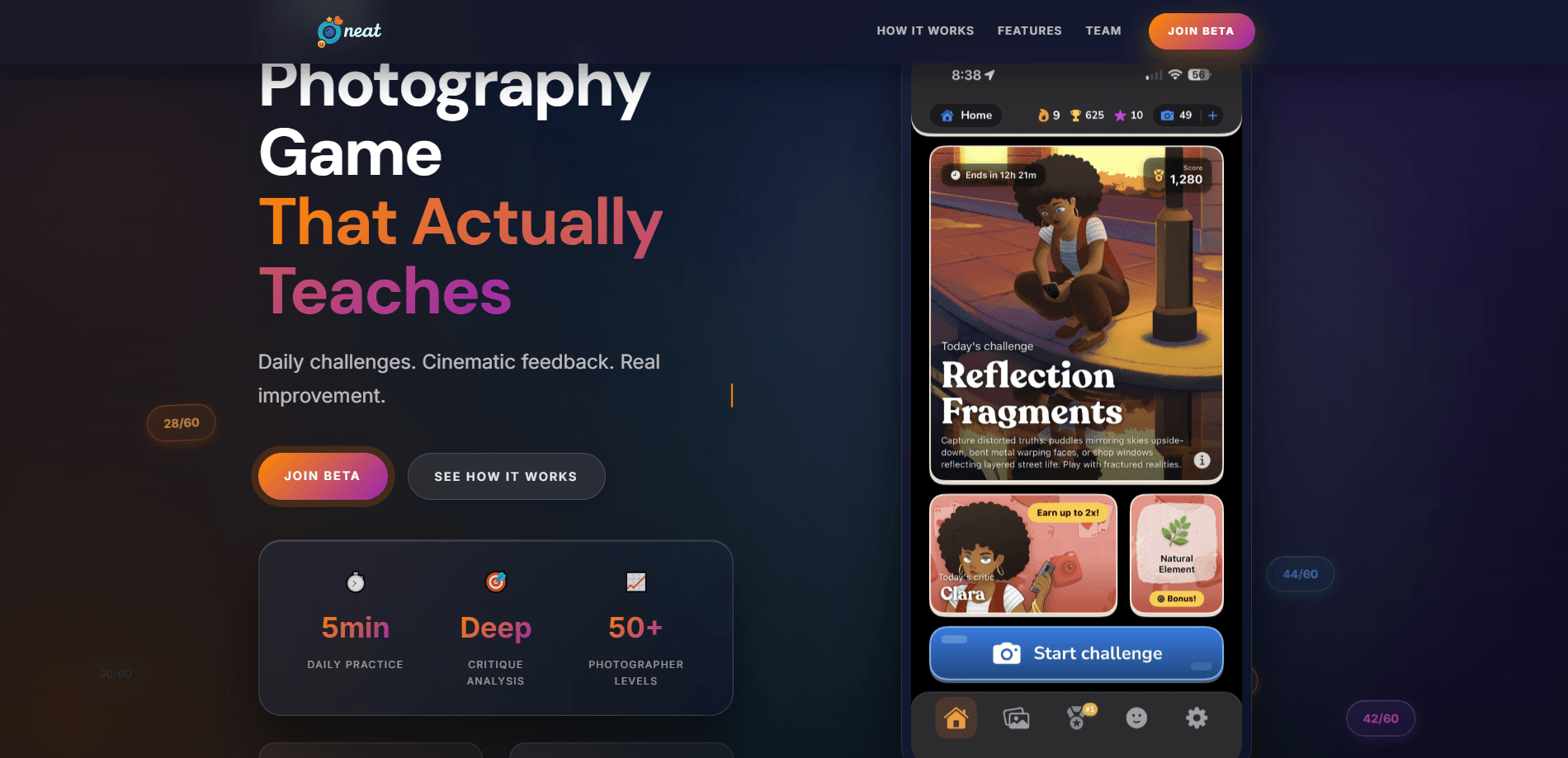
Neat Photo (Beta) is a photography learning app for iPhone that turns daily practice into a habit. Each day it drops a fresh theme, hands you three shots to spend, then runs your photos through an AI critic that explains exposure, focus, and composition in plain language. Leaderboards, rarity-tiered emoji collecting, and streaks sit on top to keep you coming back. It's a gamified photography app built for people who own a decent camera phone and want an artist's eye, not another set of filters.
About Neat Photo (Beta)
What Is Neat Photo (Beta)
Neat Photo (Beta) is an iOS app from Copihue Studio, a team that spent fifteen years making mobile games. They took what they know about habit loops and pointed it at photography. You get a themed challenge every morning, a small number of shots to spend, and voice-narrated feedback that tells you why a frame worked or fell flat.
The core idea is scarcity as a teaching tool. You can't spray twenty photos and hope one lands. Three shots a day forces you to slow down and think before you press the shutter. Think of it as an AI photography coach that shows up every morning, not a filter you lean on after the fact. The AI critics rotate, so the feedback shifts between composition, light, and storytelling instead of repeating the same notes.
The biggest limitation is the platform. Neat Photo (Beta) runs on iPhone and is listed on the App Store in eighteen countries, so Android users are out of luck for now. It's also a beta, which means features can shift and the occasional bug shows up. And because you shoot inside the app, you can't submit your existing camera roll photos and ask for a critique.
Getting Started
- Install Neat Photo (Beta) from the App Store and create an account.
- Open the app after the 9 AM reset to see the day's theme and your AI critic.
- Read the bonus targets, then head out and shoot within your three-shot limit.
- Submit a photo and listen to the voice critique before its score appears.
- Check the leaderboard and your emoji collection, then come back tomorrow to keep the streak alive.
Product Information
A quick look at Neat Photo (Beta)'s pricing, supported platforms, and performance.
Best for
The users, tasks, and scenarios where this tool fits best.
Users
- Beginners who own a phone but never learned framing
- Hobbyist photographers stuck in a slump
- People who need a reason to practice
Tasks
- Learning composition basics
- Building a daily shooting habit
- Practicing under a theme
Scenarios
- A five-minute break during a commute or lunch walk
- Weekend photo walks
- Practicing with a specific critic in mind
Key features
Daily Themed Challenges
Every morning at 9 AM Neat Photo (Beta) drops a new theme, like "Urban Shadows," along with a set of bonus targets. The theme narrows what you shoot that day, and the targets act as a rough roadmap so you're not staring at a blank screen wondering where to start.
Three Shots a Day
You get three film rolls per challenge, and that's it. The limit is the whole point. It makes each frame feel like it costs something, which pushes you to think about light and framing before you commit instead of deleting your way to a keeper.
Voice-Narrated AI Critique
Submit a photo and an AI critic talks you through it, covering exposure, focus, composition, and how well the shot matched the theme. This is the part that makes it a real photo composition trainer, not just a scoreboard. The critics rotate, so the feedback changes tone and priority from day to day rather than hammering the same point. It treats the critique as teaching, not scoring.
Photo Coach Visual Markers
Alongside the spoken feedback, the app overlays markers that show where a composition could improve. Seeing an arrow or a guide line on your own photo lands harder than a written note, and it's the fastest way to connect advice to a specific decision you made.
Rare Emoji Collection
Neat Photo (Beta) hands out emojis for good shots, sorted into four rarity tiers, Pokemon-style. Collecting pulls you toward themes and targets you might otherwise ignore, and the rarer drops give the daily routine a small dose of surprise.
Leaderboards and Streaks
Daily scores feed a leaderboard, so you can measure yourself against other players. Streaks track consecutive days of practice. Both systems work on the same lever: a visible number that makes quitting feel like losing progress.
50+ Photographer Levels
The app maps your progress across more than fifty levels. It's a slow ladder, but a clear one, and it gives beginners a sense that small daily gains are adding up even when a single photo doesn't feel like a breakthrough.
Pros and cons
Pros
- The three-shot limit genuinely improves how you think before shooting, which is hard to learn any other way.
- AI critiques explain the "why" behind a score, so you come away knowing what to do differently.
- Rotating critics keep feedback varied, which stops the advice from going stale.
- Gamification actually works here: streaks and emoji hunts make daily practice stick.
- Five-minute sessions fit into a busy day, so there's no excuse to skip.
Cons
- iPhone only. If you shoot on Android, there's no version for you right now.
- No import from your camera roll, so you can't get critiques on photos you've already taken with another app or camera.
- It's a beta, so expect rough edges and occasional bugs.
- The game layer can pull focus from learning if you start chasing emojis more than better photos.
Frequently asked questions
Yes. Neat Photo (Beta) is free to download and use, with an optional paid tier if you want more from the experience. You can practice daily without paying.
Related content
Explore related tools, skills, and articles for Neat Photo (Beta).
Neat Photo (Beta) Alternatives

X Ray Interpreter
X-ray Interpreter · ImageX Ray Interpreter is a web-based AI radiology tool that turns X-rays, CT scans, MRI, ultrasound, and PET images into plain-language reports. You upload a scan, get a preliminary X-ray interpretation in moments, then ask follow-up questions if something needs explaining. It works as a second opinion and a learning aid, not as a medical diagnosis.

Aieasypic
AIEasyPic · ImageAIEasyPic is an AI image generator that turns plain text prompts into finished artwork in seconds. You can also train custom models on your own photos, swap faces in existing images, and create short video clips from text, all from a browser. It suits casual creators who want quick visuals and hobbyists who want to build a personal model without touching any code.

Chargen
Chargen · ImageChargen is an AI character generator and worldbuilding toolkit built for Dungeons & Dragons and other tabletop RPGs. It turns a one-line idea into a painted character portrait, spins up NPCs, monsters, maps and encounters from the same session, and keeps every creature's details close at hand. The tabletop RPG art side runs on a credit system called Gold, while the text generators stay free for everyone.