

NeuraVid
NeuraVid · Video
NeuraVid is an AI video analysis platform and video summarizer that transcribes footage, runs semantic search across spoken words and visuals, and turns long recordings into summaries and highlights.
About NeuraVid
What Is NeuraVid
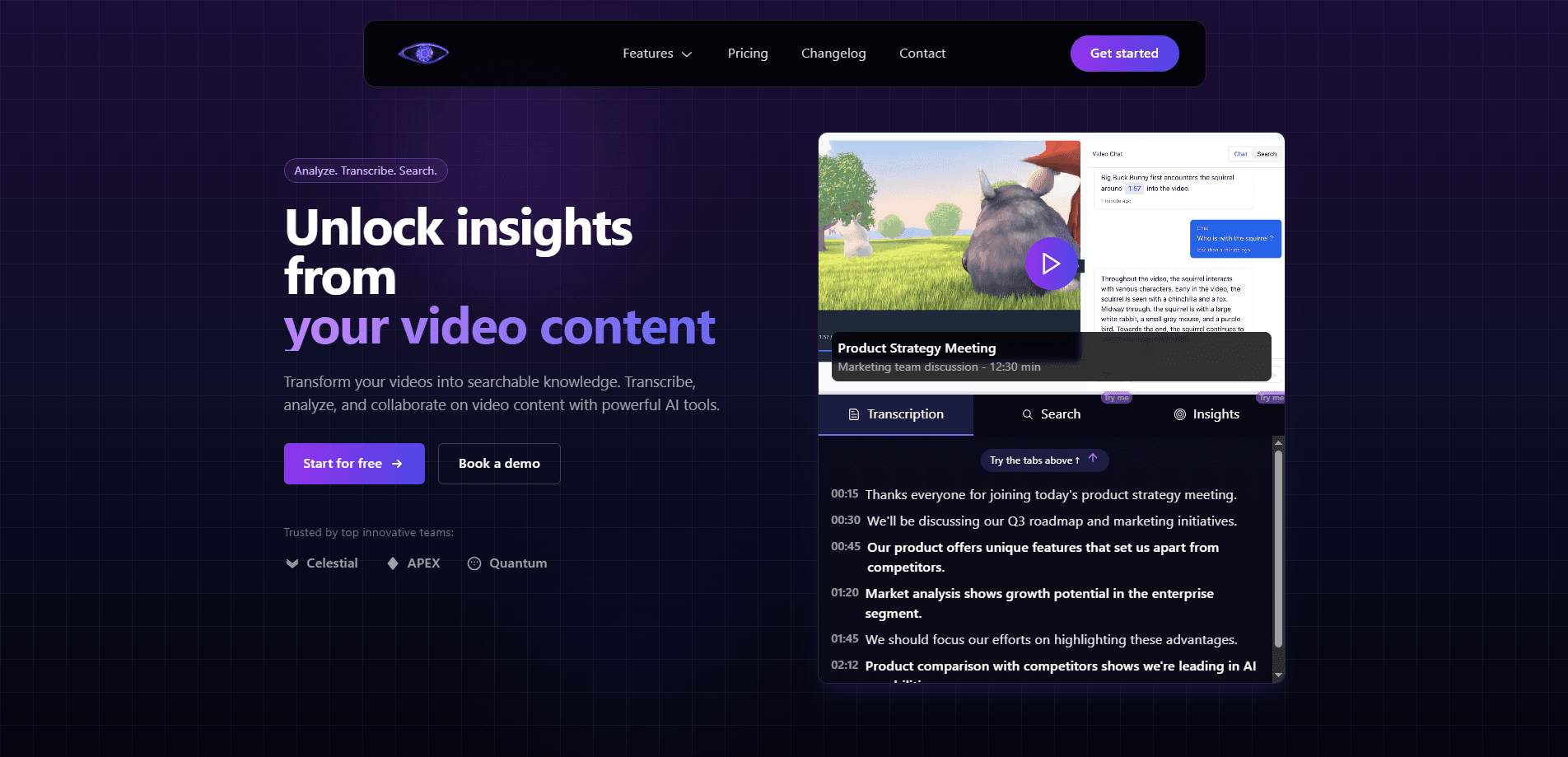
NeuraVid is a web-based AI video analysis platform from an independent team that launched it in 2025. It watches video content the way a search engine reads text: it transcribes speech, indexes what's on screen and in the audio track, and lets you query the whole thing in plain language. Search for "the part where the founder talks about pricing" and it jumps to that moment.
The tool targets people who sit through hours of footage for a living. Researchers, editors, journalists and operations teams all end up scrubbing timelines to find one quote or one clip, and that work scales badly. NeuraVid replaces the scrubbing with search, chapters and an AI assistant that answers questions about the video without you watching it end to end.
A few limits are worth knowing before you commit. The platform is web only, so there's no desktop app or mobile app to install. Transcription has a processing cost, and the free plan caps how much video you can run through it. And the company is small, so catalog size and API maturity sit below what a large vendor would offer.
Getting Started
- Create an account on the NeuraVid website and pick the free plan if you're testing it out
- Upload or link the video you want analyzed, then wait for the transcription and indexing to finish
- Search for moments, scan the auto-generated chapters, or ask the AI assistant a question about the content
- Export the transcript, the summary or the highlighted clips you need, or turn on Ephemeral Mode first if the footage is sensitive
Product Information
A quick look at NeuraVid's pricing, supported platforms, and performance.
Best for
The users, tasks, and scenarios where this tool fits best.
Users
- Researchers and analysts
- Video editors and content teams
- Journalists
- Students and educators
- Meeting-heavy teams
Tasks
- Transcription
- Semantic search
- Summarization
- Highlight extraction
- Q&A over video
Scenarios
- A two-hour interview needs one quote
- Repurposing a webinar into clips
- Reviewing an NDA-bound recording
- Studying a recorded lecture
- Multilingual interviews
Key features
AI Transcription
NeuraVid turns speech into searchable text with automatic speaker identification and word-level timestamps. The company puts its accuracy at about 98%, and the speaker labels matter for interviews and meetings where you need to know who said what. Timestamps let you cite a moment precisely rather than pointing at a rough spot in the timeline.
Semantic Video Search
The search goes past keyword matching. You can look for objects, sounds, spoken words or contextual moments, and NeuraVid returns the parts of the video that fit the meaning of your query. That's the difference between a transcript you scroll and a database you question. For footage where you half-remember a scene but not the wording, it saves the most time.
AI Video Assistant
A chat interface sits on top of each video. You ask questions, request a summary, or pull specific information out, and the assistant answers from the content itself. It means you can extract what a video contains without watching it in full, which is the whole point for people who process footage faster than they can view it.
Smart Chapters and Summaries
NeuraVid splits long videos into chapters and writes a short summary for each. Long recordings become navigable, so you can jump to the section on the topic you care about. For courses, meeting recordings and webinars, this is often the first thing you touch before deciding whether to watch a portion in full.
Highlight Detection
The platform identifies key moments and highlights you might want to share or repurpose. Instead of scrubbing for the punchy section, you get a set of candidate clips to review. Content teams use it as a starting point for turning a long video into short-form pieces, then finish the cut themselves.
Visual and Audio Recognition
Beyond speech, NeuraVid reads the frame and the audio track. It identifies objects, people and scenes, and it detects music, sound effects and specific audio events. That extra layer means you can find a moment by what's visible or audible, not only by what was said, which helps when the clip you want has no useful dialogue.
Ephemeral Mode
Sensitive footage can be processed in a privacy-first mode where files are deleted after analysis, leaving the insights and results but not the video itself. For teams handling NDA-bound recordings, legal material or confidential meetings, it removes the worry about a copy of the file sitting in the cloud. It also means you lose the ability to re-query the source later.
Pros and cons
Pros
- Semantic search finds moments by meaning, so you don't need the exact words to locate a scene
- Speaker identification and word-level timestamps make the transcript usable for citation and editing
- Ephemeral Mode answers a real privacy need for sensitive or NDA-bound footage
- Automatic chapters and summaries make long recordings navigable without a full watch
- A free plan lets you test the workflow on a limited amount of video before paying
Cons
- It's web only, so there's no desktop or mobile app for offline work
- The free plan caps video processing, and the Starter tier still limits you to five projects
- API access and larger processing needs sit on the higher tiers, which raises the cost for heavy users
- As a small, newer platform, its catalog and integration list trail what bigger video vendors offer
Frequently asked questions
NeuraVid is an AI video analysis platform. It transcribes video, runs semantic search across spoken words, visuals and audio, generates chapters and summaries, and lets you ask an AI assistant questions about the content. It's built for anyone who processes long footage and needs to find or extract moments quickly.
Related content
Explore related tools, skills, and articles for NeuraVid.
NeuraVid Alternatives

Vadu AI
Vadu AI · Image · VideoVadu AI is a web-based AI video generator that turns written prompts or still images into short clips, and it can also generate images on its own. You type what you want, pick a model and style, and the platform renders the result in minutes. A free plan covers light testing, while paid tiers run from $9 to $77.40 per month based on how many credits you burn.

Mykaraoke Video
MyKaraoke Video · VideoMykaraoke Video is an online karaoke video maker and lyric video maker that turns any song into a finished, lyrics-synced video right in your browser. It handles the slow part for you. The AI pulls vocals out of the mix and locks the lyrics to the beat, then lets you customize background, fonts, and colors before exporting in 1080p MP4. If you make lyric videos for social media, party nights, or music promotion, it skips the software installs and manual timing work entirely. Want a karaoke video generator that doesn't eat your whole evening? That's the pitch here.

Finalframe
Finalframe · VideoFinalframe is a set of free, browser-based tools for grabbing exact frames out of a video clip. Its best-known feature, the Final Frame Extractor, lets you extract the last frame of any video so you can use it as the starting image for AI video tools like Luma Dream Machine, Runway, or Kling. Want to keep a clip going? That last frame is your starting point. The tool runs locally in your browser, needs no sign-up, and costs nothing. A separate paid AI video-generation app from the same team is currently offline while it's rebuilt.