
NeuroVidz
NeuroVidz · Video
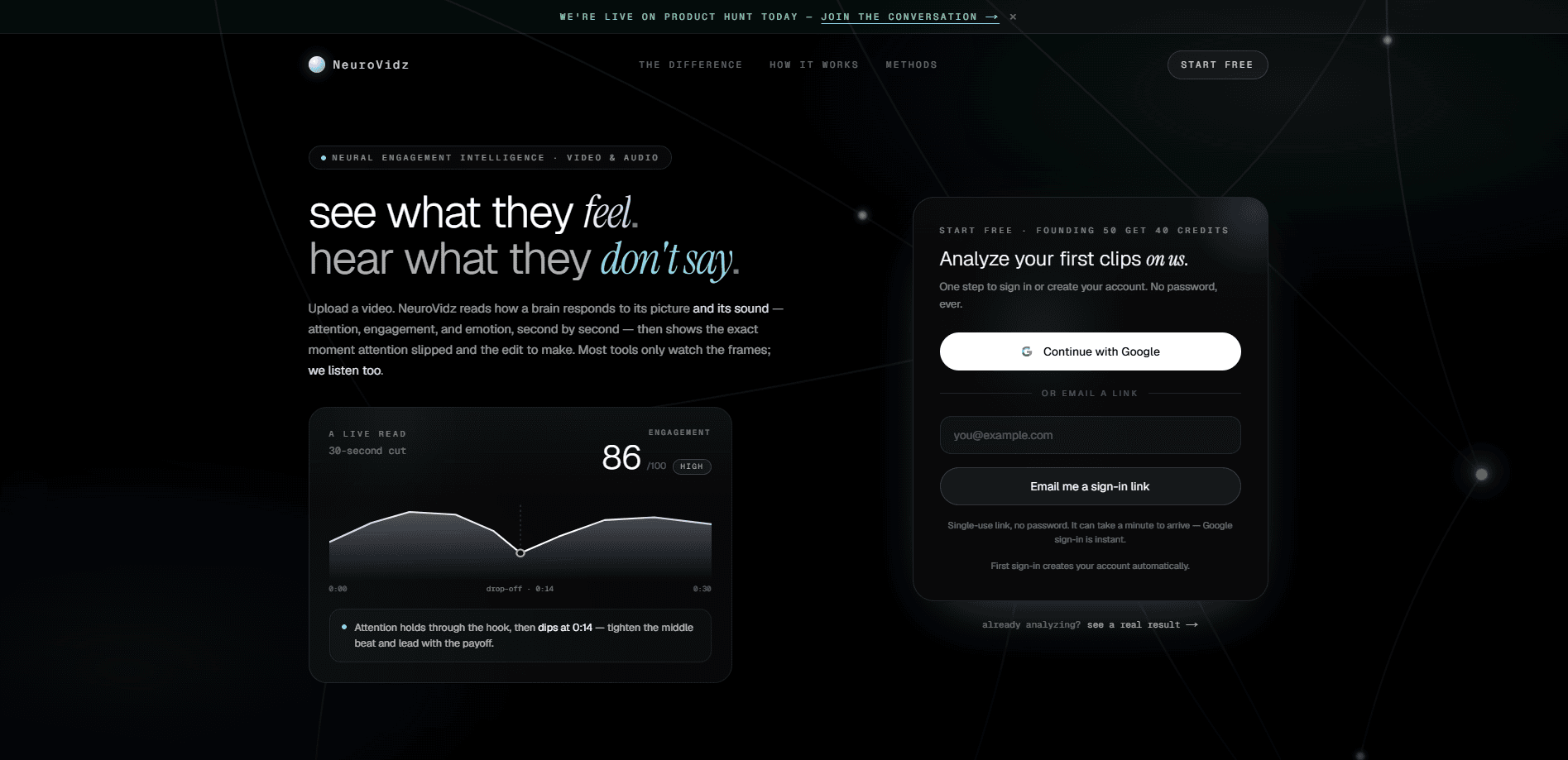
NeuroVidz is an AI video engagement analyzer that reads both the picture and the sound of a clip to predict how a viewer's brain responds, moment by moment. It returns an attention timeline, a 0-100 engagement score, and an emotion track, then points to the second where focus slips and the edit that would fix it. Think of it as video attention analysis you can run before publishing. Editors, marketers, and creators use it to test a cut before it goes live rather than guessing after the views come in.
About NeuroVidz
What Is NeuroVidz
NeuroVidz is a web-based analysis tool for video and audio. You upload a clip, and it maps the perceptual signals inside it to a model of brain response, so you get a read on attention, engagement, and emotion instead of a raw view count.
The problem it targets is simple. Most feedback arrives too late. By the time retention graphs show a drop, the edit is already published. That's a rough way to learn. NeuroVidz moves that feedback to the timeline, second by second, so the drop-off becomes an editing decision you can still act on.
The biggest limit is scope. The tool reads clips up to three minutes per analysis, so longer footage has to be trimmed to the section you care about. It also reads signals and predicts response; it doesn't tell you the story to tell. Not by a long shot. The creative calls stay with you.
Getting Started
- Create an account at neurovidz.com and start with the free starter credits.
- Upload a clip as mp4, mov, webm, or an audio-only file. Anything over three minutes needs the target section selected.
- Let the analysis run. A read takes about three minutes, extracting roughly 39 signals per second.
- Review the attention, engagement, and emotion tracks, then open the suggested edits for the moment attention slipped.
- Re-cut, re-upload, and compare the new score against the old one before you publish.
Product Information
A quick look at NeuroVidz's pricing, supported platforms, and performance.
Best for
The users, tasks, and scenarios where this tool fits best.
Users
- Video editors
- Social media marketers
- Content creators and YouTubers
- Podcasters with video
Tasks
- Finding the drop-off
- Scoring an edit
- Reading emotion over time
- Comparing versions
Scenarios
- Pre-launch review
- Ad testing
- Course and tutorial editing
- Client work
Key features
Attention and Drop-Off Tracking
NeuroVidz shows where focus holds and the exact second it slips. That second-by-second read turns a vague "the middle drags" into a specific cut point, so you know what to trim rather than editing the whole section.
Engagement Score from 0 to 100
The engagement score moves with what's actually happening on screen and in the sound, not just the visuals. A flat take and a gripping one can look alike from frames alone, and this score is built to tell them apart. It's a single number you can track across versions. That's the point.
Emotion Timeline
The tool lays out the emotional shape of a clip second by second. When it can't read a moment with confidence, it says so instead of attaching a fake label, which matters when you're using the read to justify an edit. You don't get guesses.
Video and Audio Analyzed Together
Audio-only clips run at half the credit rate, and full clips read both the voice, music, and beat alongside the picture. The voice, the music, the held silence before a punchline: all of it feeds the score. Frame-only tools miss that half of the signal. That's a real gap.
Suggested Edits, Not Just Scores
Each read comes with the specific edits to make in your next cut, tied to the moment attention slipped. You get a starting point for the revision instead of a chart you have to interpret yourself. Why does that matter? Because a score without a next step is just a number.
No Charge for an Abstained Read
If the system can't analyze a clip with confidence, it abstains, and an abstained analysis never costs a credit. Uploads that error out mid-processing refund their credits automatically, so you only pay for delivered analysis.
Prepaid Credits That Don't Expire
Pricing runs on prepaid credit packs with no subscription and no monthly reset. One credit covers about 30 seconds of video, rounded up, and unused credits wait for your next clip rather than disappearing at the end of a billing cycle.
Pros and cons
Pros
- Reads picture and sound together, so the score reflects audio cues that frame-only tools can't see.
- Points to the exact second focus slips, which makes the feedback easy to act on in an edit.
- Credit packs with no subscription and no expiry, so you pay per clip instead of per month.
- Abstained and failed analyses don't cost credits, which lowers the risk of testing a rough cut.
- Handles audio-only files at half the credit rate, useful for podcasts and voiceovers.
Cons
- Clips are capped at three minutes per analysis, so long footage has to be sectioned by hand before you can read it.
- Packs aren't always in stock; the pricing page shows credit packs go unavailable from time to time, which can pause new purchases.
- Focuses on engagement and emotion signals rather than storytelling advice, so you still need to make the creative calls yourself.
- No public API, so teams that want to run analyses inside their own pipeline can't automate the workflow yet.
Frequently asked questions
It measures attention, engagement, and emotion across a clip, second by second, by mapping perceptual signals from the picture and the sound to a model of brain response. You get an attention and drop-off track, a 0-100 engagement score, and an emotion timeline rather than a single view count.
Related content
Explore related tools, skills, and articles for NeuroVidz.
NeuroVidz Alternatives

ngram 2.0
ngram · Video · Marketingngram 2.0 is an AI video generator for teams. It turns a prompt, a screen recording, or a product URL into a narrated explainer, product demo, or AI avatar video, and every scene stays editable.

OpenScreen 2
OpenScreen (open-source project) · Video · ProductivityOpenScreen 2 is a free, open-source screen recorder and demo video editor for Windows, macOS, and Linux, with automatic zooms, styled frames, local captions, and agent edits.

Skreno
Skreno · Video · ProductivitySkreno is a browser screen recorder that captures a tab, a window or your whole display, then attaches AI transcripts, summaries and console logs to one share link.