

NotebookLM Tools Chrome Extension
NLMTools · Productivity
NotebookLM Tools is a free browser extension that upgrades Google NotebookLM and its successor, Gemini Notebook, with the controls Google never shipped. It adds an on-page toolbar for exporting, copying, merging, and renaming sources, plus bulk URL import, source folders, saved prompts with slash commands, cross-notebook search, and podcast playlist management. More than 100,000 NotebookLM users run it, and every feature stays free, with an optional Pro license for early access and multi-device sync.
About NotebookLM Tools Chrome Extension
What Is NotebookLM Tools Chrome Extension
NotebookLM Tools is a third-party browser extension that fills the gaps inside Google NotebookLM, the AI research assistant renamed Gemini Notebook in July 2026. NotebookLM is great at reading your sources and answering questions, but it never gave you a way to manage large libraries: no folders, no bulk import, no way to reuse a good prompt. This extension adds those management layers directly on the notebook page, so you don't have to leave Google's interface to organize your work.
It runs on Chrome, Firefox, Edge, Brave, Arc, and Opera. That's a wide net. It supports both the new notebook.google.com address and the old notebooklm.google.com from version 1.9.4 onward, so the domain move Google completed in August 2026 doesn't break anything.
The main limit: it's an add-on, not a replacement. It doesn't stand alone. Every action still happens inside Google's product, and anything you can't already see in a notebook (view-only shared notebooks, for instance) stays out of reach. The extension needs permission to read and change NotebookLM pages, which is how it injects the toolbar and reads your notebook data locally.
Getting Started
- Install the extension from the Chrome Web Store (or the Firefox Add-ons page), then pin it to your browser toolbar.
- Open NotebookLM or Gemini Notebook and sign in with your Google account. The extension reads whichever account the tab is signed into.
- Look for the new toolbar on the notebook page. From there you can export sources, copy them into another notebook, or open the full settings panel.
- Import your research in bulk by pasting a list of URLs at once, then drop sources into folders to keep long projects tidy.
- Optionally save your best prompts as slash commands, or activate a Pro license key from the extension header to get multi-device sync.
Product Information
A quick look at NotebookLM Tools Chrome Extension's pricing, supported platforms, and performance.
Best for
The users, tasks, and scenarios where this tool fits best.
Users
- Students running multiple research notebooks
- Researchers and analysts juggling 20+ notebooks
- Podcast listeners who follow Audio Overviews
- Teams on shared or public notebooks
Tasks
- Bulk source import
- Reusing prompts
- Organizing long research
- Merging notebooks
- Language switching
Scenarios
- Setting up a fresh research notebook with a dozen sources already lined up.
- Rebuilding a bibliography when a course requires new reading each week.
- Keeping a podcast backlog in order while you listen on the go.
- Working across two Google accounts in separate tabs, each acting as the account it's signed into.
Key features
On-Page Notebook Toolbar
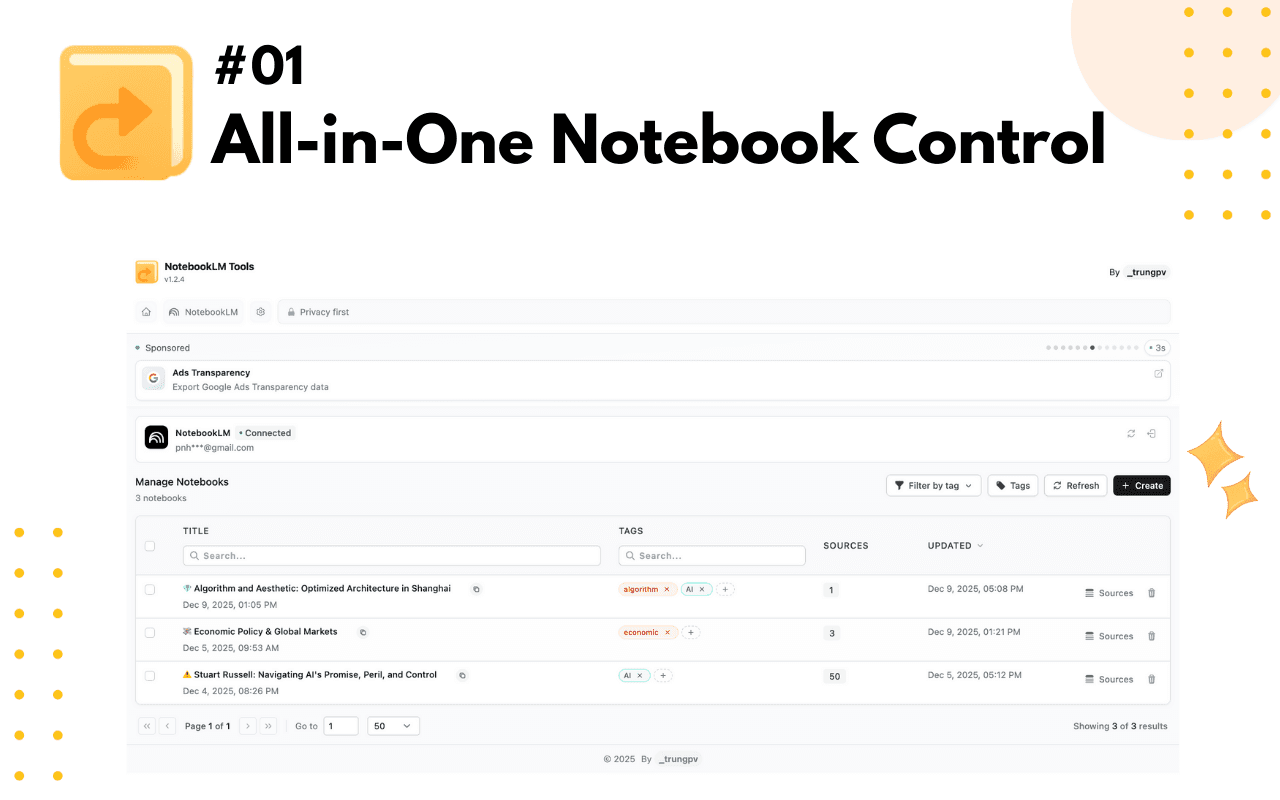
The core of the extension is a toolbar that lives inside the notebook page. It gives you Export sources, Export Studio, Copy to notebook, and More actions without leaving Google's interface, and the same controls work on public and link-shared notebooks you can open. It feels native.
Bulk Source Import
Instead of pasting URLs one by one, you hand the extension a whole list and it loads each source in turn. No more copy-paste marathons. For anyone building a research notebook from a reading list or a set of competitor pages, this alone saves real time.
Source Folders
You can create up to 50 folders inside a single notebook and drag sources between them. That's plenty. It's the organizational layer NotebookLM lacks, and it matters most once a notebook passes a dozen sources and scrolling stops being workable.
Saved Prompts with Slash Commands
Save up to 100 prompts and recall them with a slash command. If you find yourself typing the same instruction, such as "summarize this source in three bullet points," across notebooks, this turns it into one keystroke. Retyping gets old fast.
Notebook Collections and Tags
Group notebooks into Google-native collections that sync with your account, bulk-assign them, and filter with a "Not in a collection" view. It's clean. A tags-to-collections converter migrates your local tags in one click, so you don't lose the system you already built.
Cross-Notebook Search
Search across every notebook you've made instead of opening them one at a time. It beats clicking around. It's the difference between remembering a fact and finding where you filed it. Big time-saver.
Studio Generation
Trigger quizzes, flashcards, slides, reports, and mind maps from the extension rather than hunting through NotebookLM's own menus. One click. Generation still runs on Google's side, so your Google plan decides what's available.
Dark Mode and Language Switching
A built-in dark mode handles long evening sessions, and the panel switches NotebookLM's interface across 80+ languages without digging through Google's settings. Nice for night owls. Small touches, but they add up.
Pros and cons
Pros
- Free for all features, with no paywall on the useful ones; Pro only adds sync and early access.
- Bulk import, folders, and saved prompts solve the three biggest gaps in NotebookLM.
- Works across six browsers and both the old and new NotebookLM addresses.
- 14-day refund policy on the paid license, and each key activates on up to five devices.
- Podcast playlist management is a rare feature that no native NotebookLM option covers.
Cons
- It needs permission to read and change NotebookLM pages, which puts a lot of trust in a third-party add-on.
- View-only shared notebooks stay read-only, so some shared research can't be exported.
- Pro's $29/year or $59 lifetime license adds little beyond sync and early features, so the paid tier is hard to justify for casual users.
Frequently asked questions
Yes. Every feature is free. So what does Pro buy you? The optional license, at $29/year or $59 lifetime, only removes upgrade banners, adds multi-device sync, and gives early access to weekly features.
Related content
Explore related tools, skills, and articles for NotebookLM Tools Chrome Extension.
NotebookLM Tools Chrome Extension Alternatives

Swms
Swms AI · Writing · Productivity · BusinessSwms is an AI safety compliance tool that turns a plain description of a job into ready-to-use safety documents. Describe your project, trade, and known hazards, and it writes a safe work method statement, job hazard analysis, safe work procedure, RAMS, or safety data sheet in seconds. It also ships with Oscar, a chat assistant that answers workplace safety questions in any language. Teams in construction, mining, transport, and warehousing use it to cut the paperwork that usually eats into a workday.

Wordly AI Translation
Wordly · Voice & Language · ProductivityWordly AI Translation is a real-time AI translation and captioning platform built for meetings, conferences, and events. It delivers live translation, captions, transcripts, and summaries in more than 60 languages, and attendees join by scanning a QR code or opening a link instead of using dedicated headsets. The platform works with Zoom, Microsoft Teams, Google Meet, and Webex, and it's designed for organizations that want multilingual access without hiring human interpreters for every session. Simple as that.

Rows
Rows (Superhuman) · Productivity · BusinessRows is an AI spreadsheet and data analysis tool that imports live data from more than 50 sources, then lets you work with it using plain language instead of SQL queries or nested formulas. You can pull numbers out of PDFs, connect ad platforms, databases, and bank accounts, and ask the AI to build reports, merge datasets, or set up models that recalculate themselves. It runs in the browser, works like a spreadsheet, and now sits under the Superhuman umbrella.