

npm i -g hotcell
Sina Meraji · Coding
hotcell (installed with `npm i -g hotcell`) is a self-hosted sandbox manager for running several isolated AI-agent workspaces on hardware you already own. A Mac Mini, a cloud VM, or a bare-metal box becomes a fleet of cells. Each one is a separate container where an agent can run commands and clone repos. The part that stands out is key safety. Sandboxes reach LLMs and GitHub through a gateway that swaps a short-lived per-cell token for the real key, so your API keys never sit inside a sandbox. That's real API key security, not a promise.
About npm i -g hotcell
What Is hotcell
hotcell is a command-line self-hosted sandbox manager for AI agents, and it works like a lightweight agent sandbox SDK you run yourself. You install it globally through npm, run a 30-second guided setup, and you get a live view of every cell on the machine. Each cell is an isolated container with its own filesystem, branch, and shell, so one agent's mistakes don't spill into another's work.
The product solves a real problem for people running coding agents in volume. Spinning up five agents on one repo usually means five machines or a mess of shared credentials. hotcell gives you five isolated agent workspaces on one box instead, with a gateway that keeps real API keys on the host and hands each sandbox only a short-lived token. That's the whole pitch, and it holds up.
The main limit is that it's built for people comfortable with a terminal. Setup runs through Docker, so you need a working Docker runtime, and the default socket handling assumes a standard install. If you're on colima, OrbStack, or podman, you set DOCKER_HOST yourself before starting. No dashboard for non-technical users. There's no point-and-click alternative either.
Getting Started
- Install the CLI with
npm i -g hotcell, then runhotcellto launch the guided first-time setup. - Add a provider key on the host, for example
hotcell keys add openrouter, or bulk-import an existing.envfile withhotcell keys import .env. - Create cells in bulk, such as
hotcell create -n 5 --repo https://github.com/you/app --branch, giving each cell its own branch of the same repo. - Open a shell inside any cell with
hotcell terminal <id>, then run your agent there, for instancecd app && opencode. - Tear everything down with
hotcell rm --allwhen you're done; the containers vanish and your repo stays untouched.
Product Information
A quick look at npm i -g hotcell's pricing, supported platforms, and performance.
Best for
The users, tasks, and scenarios where this tool fits best.
Users
- Developers running coding agents on their own hardware
- Small teams that want shared compute without shared credentials
- Solo builders testing multi-agent workflows
Tasks
- Parallel feature work on a single repository
- One-shot scripted jobs
- Benchmarking agent sandboxes
Scenarios
- Kicking off overnight agent runs on a desktop Mac Mini instead of paying for cloud sandboxes.
- Isolating a risky agent task so it can't touch your main working directory or your saved credentials.
- Running an agent fleet on a bare-metal box where you'd rather not trust a third-party sandbox host with your API keys.
Key features
Sandboxes That Keep API Keys on the Host
This is the feature hotcell is built around, and it's really API key security by design. Instead of copying a real API key into each sandbox, the gateway holds the key and gives every cell a short-lived per-cell token. When an agent calls an LLM, the request goes through the gateway, which swaps the token for the real key. If a sandbox is compromised, the attacker gets a token that expires, not your OpenRouter or OpenAI key. Big difference.
One Command, Many Isolated Cells
hotcell create -n 5 spins up five separate containers from a single command. Each cell gets its own branch, and you can watch live per-cell progress while they provision. Because the progress is reported per cell, a slow setup won't falsely time out the way a single global timeout would. That's a small detail. It saves real headaches.
Keyless Git Push with Egress Control
When you enable --egress, each cell's git origin is wired through the gateway automatically. That means git push works without a GitHub token ever entering the sandbox. The flag also implies the gateway routing for LLM calls, so one setting covers both credentials. One flag, two problems solved.
OpenCode Preinstalled
Adding --opencode to a create command installs OpenCode in each cell and points it at the gateway, and this flag implies --egress too. For teams running the same coding agent across many tasks, that removes a manual install step from every fresh cell.
One-Shot Create, Run, Destroy
The hotcell run command creates a cell, runs your command inside it, and destroys the cell when the command finishes. It's useful for throwaway checks like a linter pass, where you don't want a container lingering afterward.
Live Fleet View
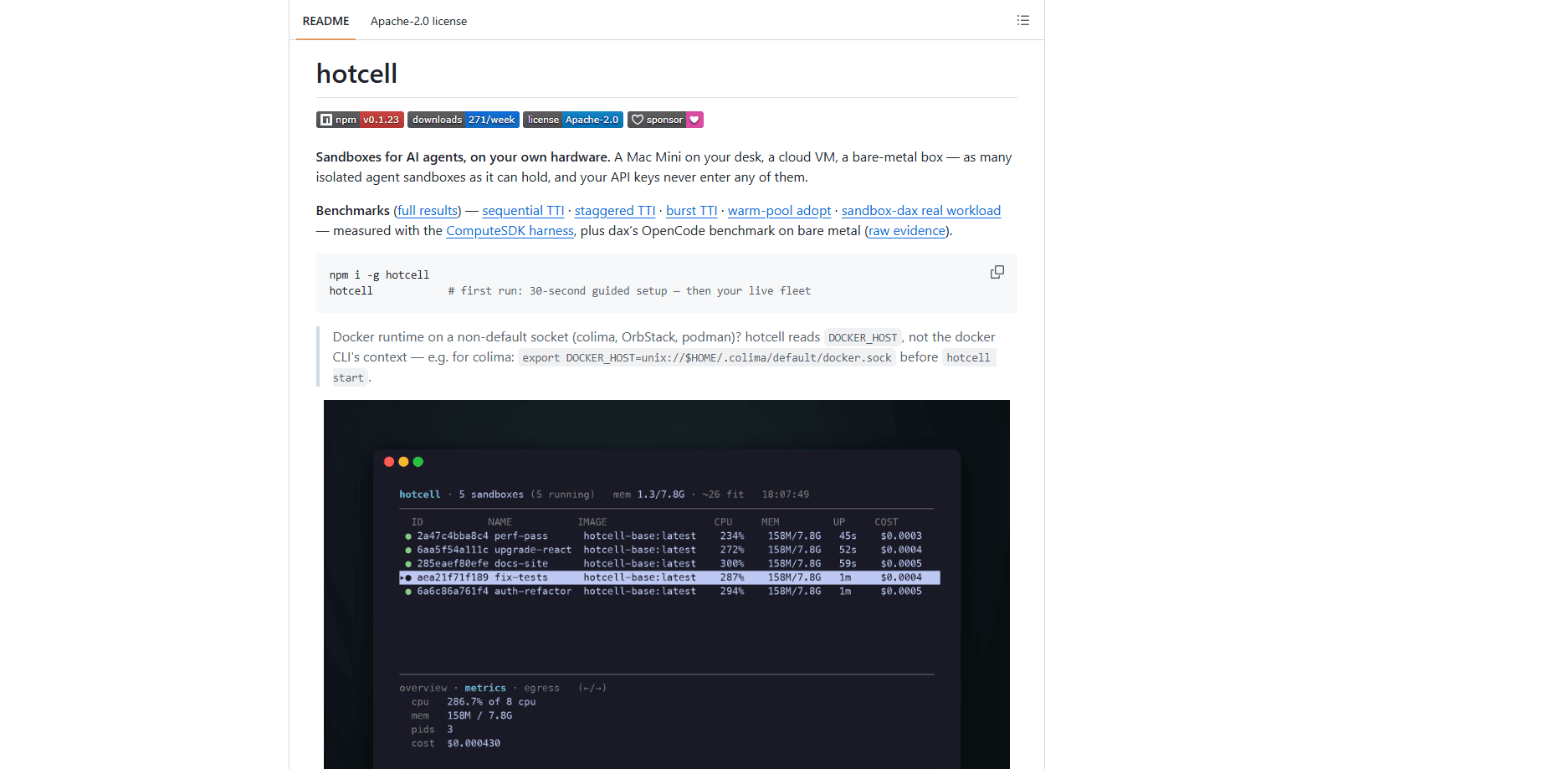
The terminal UI shows every running cell at once, with live memory use and a per-cell cost estimate. Which agent is hogging resources? You can see it before one cell starves the others. If you're running five agents on one box, that visibility matters more than any single benchmark number.
Bulk Key Import from .env
hotcell keys import .env reads a standard environment file and maps variables to providers, so OPENAI_API_KEY becomes the openai provider automatically. It saves you from adding keys one at a time when you first set up a host. Setup stays quick. That's the point.
Pros and cons
Pros
- Real API keys stay on your host, and each AI agent sandbox only ever holds a short-lived token.
- One machine runs many isolated agent workspaces, which cuts hardware cost for parallel agent work.
- Live per-cell progress and a fleet view make it easy to see what each sandbox is doing.
- Command-line design is fast to script, and bulk key import shortens first-time setup.
- Apache-2.0 license and public benchmarks let you inspect the code and compare performance.
Cons
- There's no graphical dashboard, so non-technical users will find the terminal workflow hard to approach.
- You must run Docker, and non-default sockets like colima, OrbStack, or podman need manual `DOCKER_HOST` setup.
- It solves a narrow problem, so if you only run one agent occasionally, the fleet tooling adds little.
- Documentation lives in the GitHub repo, which is lighter than a full product site with support channels.
Frequently asked questions
hotcell runs multiple isolated AI-agent sandboxes on hardware you own. You install it through npm, and it turns a Mac Mini, cloud VM, or bare-metal box into a fleet of separate cells, each with its own filesystem and shell.
Related content
Explore related tools, skills, and articles for npm i -g hotcell.
npm i -g hotcell Alternatives
Forefront
Forefront · CodingForefront is a web platform for building with open-source AI. It lets you fine-tune leading open-source language models on your own data, evaluate how they perform, and run them through an API or export them to host yourself. Developers who want the convenience of a closed-source platform but insist on owning their models and data are the target audience here.

Startkit
StartKit.AI · CodingStartkit is a boilerplate for building AI SaaS and AI wrapper products. Think of it as an AI startup boilerplate with the boring parts already wired up: authentication, Stripe and Lemon Squeezy payments, usage limits, transactional email, and an AI API starter that talks to OpenAI, Anthropic, Groq, or Llama. You clone the repo, set your price, and start on the part of your product that people actually pay for. It's Next.js under React and Tailwind, so most of the boilerplate code already feels familiar.
Testim
Tricentis · CodingTestim is an AI-powered test automation platform for building and running end-to-end tests across web, mobile, and Salesforce applications. It leans on machine learning to keep tests stable when an interface changes, so teams spend less time fixing broken selectors. Not bad for an automated testing tool you can start using today. You create tests by recording actions in a browser, then optionally add JavaScript when you need more control. It's a solid pick for busy QA teams.