

Oksuro
STUDIO JT · Image
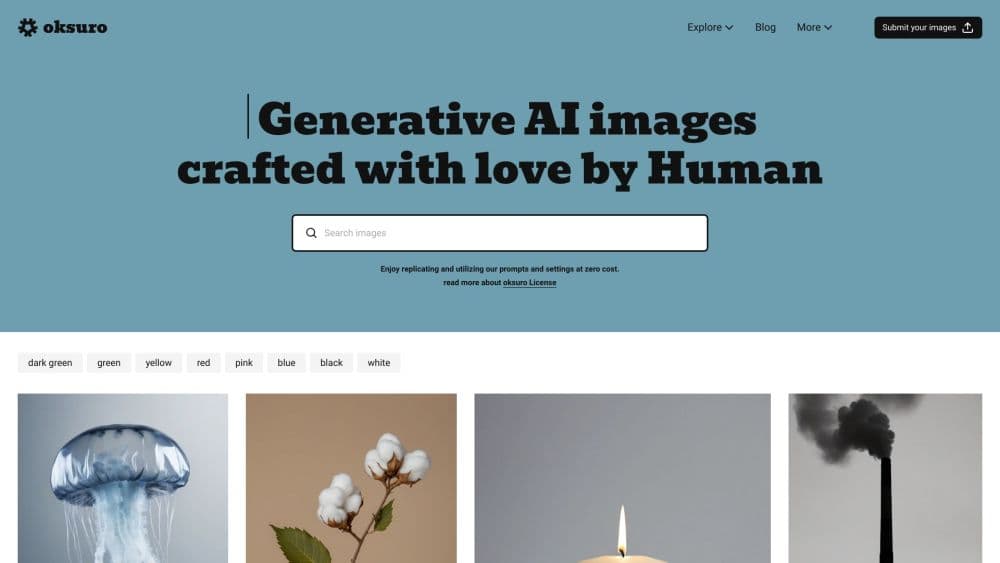
Oksuro is an AI stock image library where every photo comes with the prompt and settings behind it, so you can download the file or rebuild the look in Midjourney and Stable Diffusion.
About Oksuro
What Is Oksuro
Oksuro is a curated library of AI stock images built by STUDIO JT, a design studio in Busan, South Korea. Every entry gives you two things: a finished image you can download, and the prompt plus settings that produced it. Most stock libraries hide the recipe. This one hands it over.
That changes how you use the site. If you need a polished visual for a landing page today, grab the file. If you need thirty images that share one look for a campaign, copy the prompt, adjust the subject, and run it in your own tool. The studio retouches each image by hand before publishing, which is why the collection leans toward skincare, beauty, food, and product photography rather than generic AI fantasy art.
The limits matter. Free accounts can browse and run transforms, but they can't download anything, and commercial use starts on the $9 Starter plan. Prompts are written for specific models such as Stable Diffusion with Automatic1111, Midjourney, and DALL·E, so a copied prompt won't look identical everywhere. You'll also need the right checkpoint to get close.
Getting Started
- Create a free account on oksuro.com. You get 30 credits at sign-up with no card required.
- Browse the series or search by subject, then open an image page to read its prompt and settings.
- Copy the prompt into your own model, or upload a reference photo to the AI image transform tool and let the site restyle it.
- Pick a plan when you need downloads or commercial rights, then export at the resolution your plan allows.
Product Information
A quick look at Oksuro's pricing, supported platforms, and performance.
Best for
The users, tasks, and scenarios where this tool fits best.
Users
- Brand and social designers
- Indie founders and small marketing teams
- AI hobbyists learning prompt craft
Tasks
- Finding a hero image for a product page
- Building a consistent campaign set
- Restyling an existing photo
- Turning a still into a short clip
Scenarios
- A launch week with no budget for photography
- Testing a visual direction before committing
- Keeping a content calendar full
Key features
Prompt and Settings on Every Image
Each image page lists reusable AI image prompts along with the sampler, steps, and model family used to make it. You can copy the whole block and rerun it in Stable Diffusion or Midjourney. This is the feature that separates Oksuro from a plain stock site, because it lets you extend a look instead of buying one picture at a time.
Curated Series With One Visual Language
Images are grouped into series, and each series follows a single aesthetic set by the studio. That matters when a campaign needs twelve photos that feel like they came from the same shoot. Picking from a series beats hunting through search results and hoping the lighting matches.
AI Image Transform
Upload a photo or start from a library image, then let the transform tool rebuild it in a different style. Free accounts can render at up to 1K, Starter reaches 2K, and Pro goes to 4K. It's the fastest route when you have the composition you want but not the mood.
AI Video From a Still
The same credit system produces short video clips from an image. Resolution and length depend on your plan and remaining credits. For social teasers, it saves a trip to a separate video tool. It won't replace a proper editing suite.
Search Across Beauty, Fashion, Food, and Abstract
The catalog is organized by subject and mood rather than by model name. You can search for a skincare bottle on moss or a ceramic bowl in warm light and land on a page with the exact prompt. Categories stay narrow on purpose: this is a studio collection, not a general-purpose generator.
Licensing Built for Client Work
Every download comes with a license that allows commercial use, editing, and remixing, including client projects and social ads. The one restriction is resale: you can't redistribute the images as a competing stock service. Credits bought as add-on packs never expire, so unused balance doesn't disappear at renewal.
Pros and cons
Pros
- Every image includes its prompt and settings, which is rare among AI stock libraries.
- Images are retouched by a design studio, so skin, glass, and fabric hold up at full size.
- Commercial use starts at $9 per month, well below a single licensed stock photo.
- The AI image transform and video tools run on the same credits as downloads, with no second subscription.
- Purchased credit packs stay in your account indefinitely.
Cons
- The free plan blocks downloads completely, so you can't test a file in a real layout before paying.
- Starter caps you at three downloads a month, which runs out fast during a busy launch.
- Copied prompts only reproduce a look when you match the model and checkpoint, so beginners will get mixed results.
- There's no public API or team seat management, which rules out automated pipelines and shared billing for agencies.
Frequently asked questions
Oksuro is a place to download AI images and read the prompts behind them. Designers download the images for client work or copy the prompts to generate their own variations in tools like Midjourney and Stable Diffusion.
Related content
Explore related tools, skills, and articles for Oksuro.
Oksuro Alternatives

Tractionwave
TractionWave · Image · MarketingTractionWave is an AI attention heatmap tool for static ads. Upload a PNG or JPG and it returns predicted attention, ranked hotspots, and fixes before you spend budget.

Imejis.io
Imejis.io · Image · MarketingImejis.io is an AI design studio for agents and marketing teams. Describe an image in plain words, and it writes the copy, builds the layout, reflows it to every size, then exports a finished file.

Layoutr
Van Dijk Ontwikkeling · Image · China AILayoutr is a browser floor plan tool that scales your own plan, places furniture at true size, shows the room in 3D and renders it with AI.