

Omma
Spline · Image · Coding
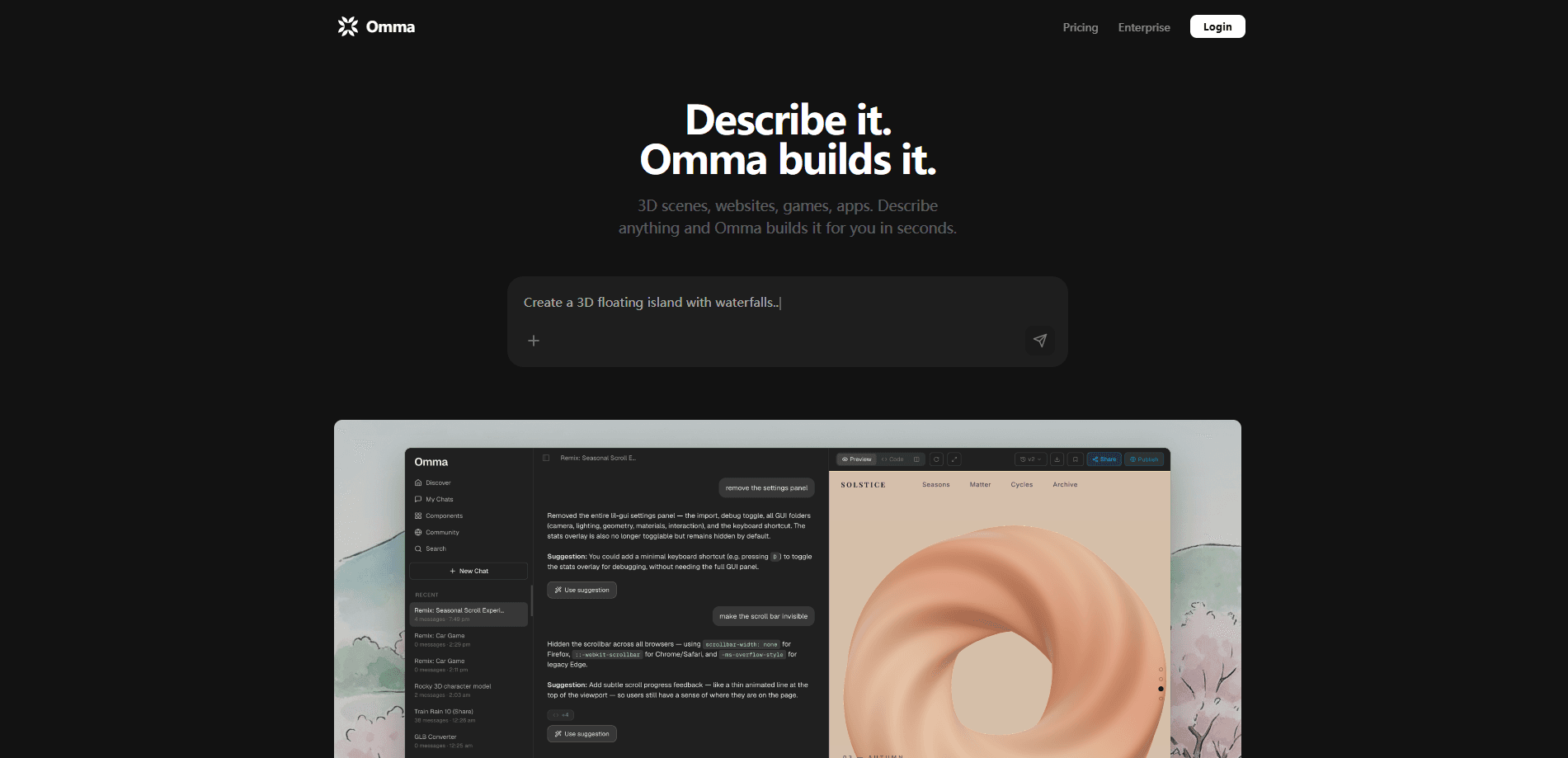
Omma is an AI 3D website builder from Spline that turns plain-language prompts into interactive 3D sites, games, and web apps. You describe what you want, and a set of parallel AI agents handle the 3D modeling, code, and layout in one workflow. It's the kind of no-code 3D tool built for people who want real, publishable 3D experiences without learning WebGL or Three.js.
About Omma
What Is Omma
Omma is Spline's take on prompt-to-3D building, and it works as an AI 3D website builder first. Instead of generating a single model or a static mockup, it produces a working, interactive 3D page you can click, drag, and publish. The pitch is simple: skip the Three.js hand-coding and the three-person team, describe the idea, and get something live.
The platform runs multiple AI agents in parallel. One agent handles 3D assets, another builds the site structure, another writes the interaction logic. That's why a spinning coffee cup on a landing page, or a low-poly island jumping game, can come out of a single prompt in seconds rather than weeks. Fast work. No hand-coding.
The big limitation is control. Prompt-driven tools trade precision for speed, and fine details still need back-and-forth conversation to nail. If you need pixel-exact brand work, you'll spend more time correcting the AI than you'd like. Omma is at its best when "close and fast" beats "exact and slow." Know which you need.
Getting Started
- Go to omma.build and create an account. No coding background is needed.
- Type a description of what you want in the prompt box, or upload a Blender, GLB, OBJ, CSV, JSON, image, video, or audio file as source material.
- Pick a starting type when relevant, such as a landing page, a dashboard, or a small game.
- Let the agents generate an interactive preview, then refine details by chatting, like adjusting colors or adding animation.
- Export the source code, or share, download, and publish the result directly.
Product Information
A quick look at Omma's pricing, supported platforms, and performance.
Best for
The users, tasks, and scenarios where this tool fits best.
Users
- Designers who want 3D and motion work without writing WebGL or Three.js, using prompts to reach a first draft fast.
- Marketers and small teams building immersive product or brand pages, since a single prompt can produce a landing page with a rotating 3D hero.
- Indie developers and hobbyists prototyping interactive 3D games, thanks to physics and collision handling built into the generated output.
Tasks
- Building a 3D landing page
- Turning flat content into 3D
- Making a data dashboard
- Prototyping a mini-game
Scenarios
- A product launch where the brand page needs an interactive hero and you've got days, not weeks.
- Early concept validation, when you want to test a 3D idea visually before committing a full team.
- Classroom or explainer material, where an interactive 3D model of a molecule or historical scene beats a flat slide.
Key features
Parallel AI Agents
Omma splits the work across several AI agents running at once. One generates 3D assets, another assembles the site framework, and another writes the interaction logic. That division of labor is the reason a prompt which would take a single-threaded generator minutes comes back in seconds, and why a scene with models, layout, and motion can arrive as one coherent piece instead of a pile of separate exports.
Prompt-to-3D Scenes and Games
Describe a scene or a game and Omma builds the whole interactive experience, not just a model. It doubles as an AI 3D scene generator and a 3D web app builder in the same pass. Racing and train games, rotating product heroes, and scroll-driven parallax pages all come from text. The output is genuinely interactive, so visitors can click, drag, and play rather than stare at a render. Big difference from a still mockup.
Flat-to-3D Conversion
The /3d command turns a flat image or a text description into a 3D model and drops it straight into the scene. This matters when you already have brand assets sitting in a folder and want them standing up in three dimensions without redrawing a single line by hand, which is normally the slowest part of any 3D project.
Multimodal File Import
Omma reads 3D files like Blender, GLB, and OBJ, plus CSV, JSON, images, video, audio, and URLs. That range means you can pull both real data and existing models into a build instead of starting from an empty scene, and because CSV imports feed directly into interactive charts, a spreadsheet you already maintain can become a live dashboard without any manual re-plotting.
Interactive Web and Dashboard Output
Beyond 3D scenes, Omma generates flat interactive pages such as dashboards and data visualizations with live preview. A CSV goes in, and an interactive chart comes out, which is handy for reports that need to update as numbers change.
Code Export and One-Click Publishing
You can view and copy the generated source, share a link, download the project, or publish in one step. No lock-in there. Exporting the code keeps you from being trapped, since you can take the output into your own stack if the prompt-driven workflow hits a wall.
Pros and cons
Pros
- Generates complete, publishable interactive 3D pages, not just models or screenshots.
- Parallel agents cut build time from weeks of manual WebGL work to seconds.
- Broad file import covers Blender, GLB, OBJ, CSV, JSON, and media.
- Code export means you can leave with real source rather than a locked project.
Cons
- Prompt-driven control is loose, so pixel-exact brand details take repeated back-and-forth.
- Heavy 3D scenes can strain load times and performance on weaker devices, which matters for mobile visitors.
- Pricing and plan details aren't clearly published, so budgeting takes a signup and a look inside.
Frequently asked questions
It's used to build interactive 3D websites, games, web apps, and data dashboards from natural language prompts. You describe a scene or experience. The platform then produces a working, publishable result.
Related content
Explore related tools, skills, and articles for Omma.
Omma Alternatives

X Ray Interpreter
X-ray Interpreter · ImageX Ray Interpreter is a web-based AI radiology tool that turns X-rays, CT scans, MRI, ultrasound, and PET images into plain-language reports. You upload a scan, get a preliminary X-ray interpretation in moments, then ask follow-up questions if something needs explaining. It works as a second opinion and a learning aid, not as a medical diagnosis.

Aieasypic
AIEasyPic · ImageAIEasyPic is an AI image generator that turns plain text prompts into finished artwork in seconds. You can also train custom models on your own photos, swap faces in existing images, and create short video clips from text, all from a browser. It suits casual creators who want quick visuals and hobbyists who want to build a personal model without touching any code.

Chargen
Chargen · ImageChargen is an AI character generator and worldbuilding toolkit built for Dungeons & Dragons and other tabletop RPGs. It turns a one-line idea into a painted character portrait, spins up NPCs, monsters, maps and encounters from the same session, and keeps every creature's details close at hand. The tabletop RPG art side runs on a credit system called Gold, while the text generators stay free for everyone.