
Open Vibe
Wasp · Coding
Open Vibe is a free, open-source curriculum that turns your coding agent into an interactive SaaS tutor and an AI coding tutor rolled into one. Instead of watching videos or reading a Claude Code tutorial, you install a small prompt into Claude Code (or another capable agent) and build a real app while the agent explains what's happening behind the scenes. It's aimed at beginners who want to learn web development and aspiring founders who want to ship a product they actually grasp. No accounts. No credit meters.
About Open Vibe
What Is Open Vibe
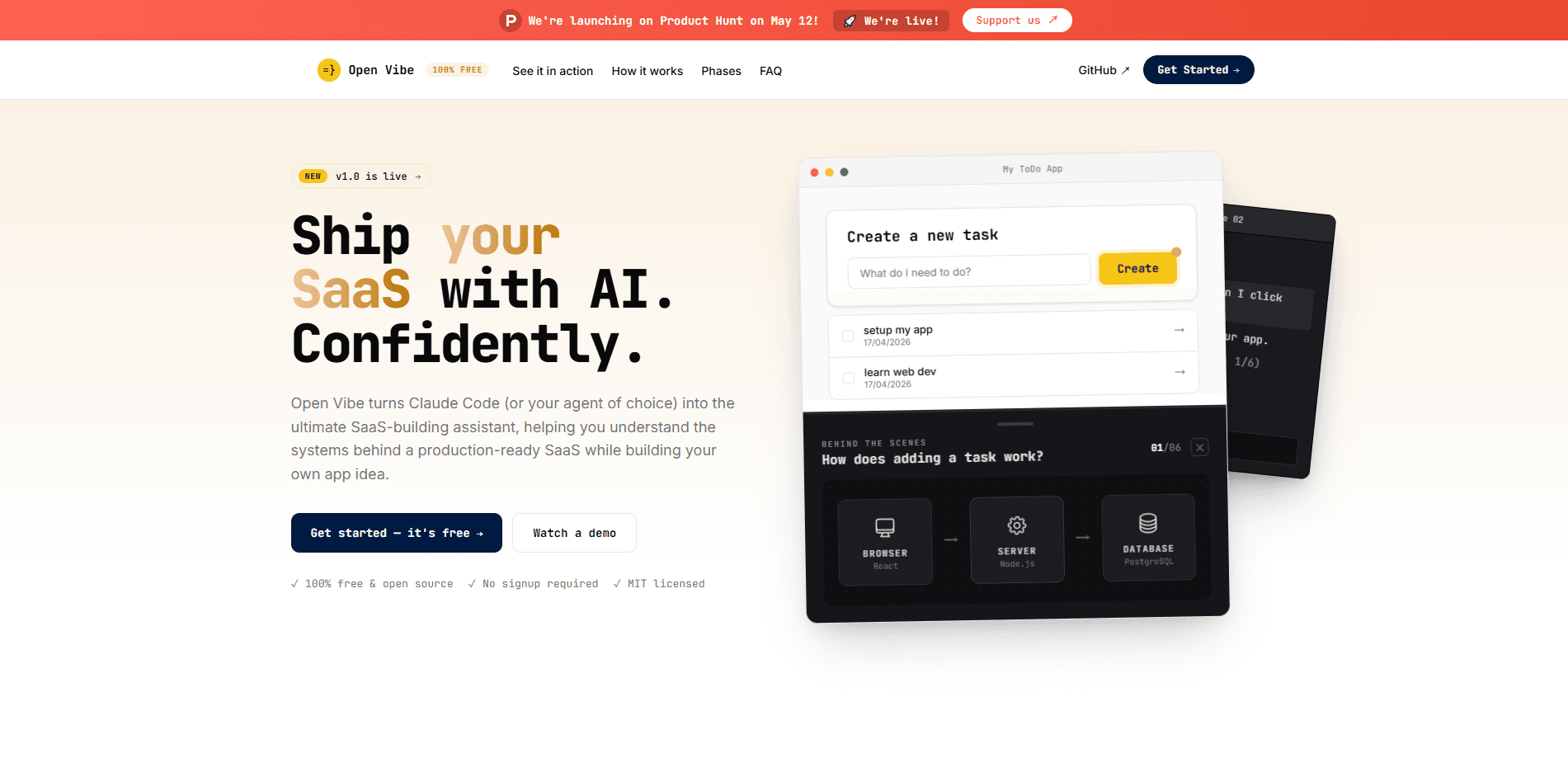
Open Vibe is an MIT-licensed set of skills, instructions, and interactive components that live inside your coding agent. Once installed, it teaches core web development concepts as you build, alternating between tutor mode and pair-programmer mode. The agent draws live "behind the scenes" diagrams showing how a click turns into a server request and a database write. That's the whole trick.
It solves a gap that sits between two common options. Static tutorials teach with throwaway apps that you never really care about, while vibe coding platforms produce apps you don't understand. Open Vibe does both at once: you build something real and learn the systems underneath it. You learn web development by shipping, not by copying.
The biggest limitation is that it assumes a capable agent already set up on your machine. Everything runs locally in your terminal, so there's no hosted dashboard, no browser playground, and no support for agents that can't follow multi-file instructions. Not ideal if you wanted a plug-and-play course.
Getting Started
- Open your terminal and paste the install prompt from the Open Vibe site, which runs
curl -fsSL https://openvibe.sh/llms.txtand drops the course instructions into your agent. No signup is needed. - Tell the agent which phase you want. Phase 1 builds a task management app from a Wasp template; Phase 2 starts from the Open SaaS template with auth, payments, and email built in.
- Let the agent fetch the matching module files and walk you through setup, one module at a time. Go slow.
- Build alongside the agent. Ask "what happens behind the scenes?" whenever you want a diagram of the current step.
- When the app works, ask the agent to help you deploy it to the web.
Product Information
A quick look at Open Vibe's pricing, supported platforms, and performance.
Best for
The users, tasks, and scenarios where this tool fits best.
Users
- Aspiring founders
- Beginners learning web development
- Self-taught developers tired of re-prompting
Tasks
- Learning how a web request moves through browser, server, and database
- Building a first task management app
- Customizing a SaaS template into your own product
- Deploying a local app to the web
Scenarios
- Weekend learning sessions where you want to end with a working app, not just notes.
- Evaluating whether a SaaS idea is worth building, using a real template instead of a mockup.
- Teaching yourself the stack behind modern web apps without paying for a course that goes stale.
Key features
Lessons That Live in Your Agent
Rather than a video library or a PDF, Open Vibe ships as a set of skills and instructions that load into Claude Code or another capable agent. The agent becomes your tutor, so lessons adapt to what you're building instead of following a fixed script. You ask, it answers, and the explanation relates to your actual code.
Behind-the-Scenes Diagrams
When you ask how something works, the agent renders an overlay diagram on your app showing the path from browser to server to database. A click on "add task" becomes a visible chain: React sends a request, Node.js handles it, PostgreSQL stores it. This is the feature that separates Open Vibe from plain chatbot tutoring. It's simple. It's useful.
Two Entry Points for Different Levels
Phase 1 builds a task management app from a Wasp template and explains what a web app is. Phase 2 starts from Open SaaS and teaches what a SaaS is as an orchestration of external services. You pick based on your comfort level, so beginners aren't thrown into payments code on day one. Start where you're at.
Everything Runs Locally
Your code sits on your machine, with no token-limit surprises and no platform lock-in. There's no hosted account to manage and no credit meter ticking while you think. So what changes? You stop paying per prompt and start learning at your own pace. When the project is done, the agent helps you deploy it, and you keep the code under the MIT license.
Open SaaS Starter Template
Phase 2 builds on Open SaaS, a production-ready template that includes auth, payments, admin, email, blog, and AI-ready scaffolding. You customize it into your own product instead of assembling each piece by hand. That means you can start accepting payments soon after the app works. Revenue, not just a demo.
Free and Open Source Forever
Static courses can run $200 to $400 for content that's outdated the moment it ships. Open Vibe is MIT-licensed and free, maintained by the Wasp team. You can read the source, fork it, or extend the modules if your workflow needs something different. No paywall, ever.
Pros and cons
Pros
- Free and MIT-licensed, with no signup and no credit system to watch.
- The agent teaches as you build, so you understand the code instead of shipping a black box.
- Live behind-the-scenes diagrams turn abstract request flows into something you can see.
- Local-first workflow keeps your code on your machine and avoids platform lock-in.
- Two starting points let beginners and intermediate builders pick a fitting pace.
Cons
- Requires a capable coding agent already installed and configured, so it isn't a standalone web app you can open in a browser.
- There's no hosted dashboard or progress tracker outside the JSON files written to your project, which feels sparse if you expect a polished course UI.
- Content is developer-oriented and assumes you're comfortable in a terminal, so total non-technical users will struggle.
- No public API for integrating the lessons into other tools.
Frequently asked questions
Yes. Open Vibe is free and open source under the MIT license, with no signup required and no paid tier for the curriculum itself.
Related content
Explore related tools, skills, and articles for Open Vibe.
Open Vibe Alternatives
Forefront
Forefront · CodingForefront is a web platform for building with open-source AI. It lets you fine-tune leading open-source language models on your own data, evaluate how they perform, and run them through an API or export them to host yourself. Developers who want the convenience of a closed-source platform but insist on owning their models and data are the target audience here.

Startkit
StartKit.AI · CodingStartkit is a boilerplate for building AI SaaS and AI wrapper products. Think of it as an AI startup boilerplate with the boring parts already wired up: authentication, Stripe and Lemon Squeezy payments, usage limits, transactional email, and an AI API starter that talks to OpenAI, Anthropic, Groq, or Llama. You clone the repo, set your price, and start on the part of your product that people actually pay for. It's Next.js under React and Tailwind, so most of the boilerplate code already feels familiar.
Testim
Tricentis · CodingTestim is an AI-powered test automation platform for building and running end-to-end tests across web, mobile, and Salesforce applications. It leans on machine learning to keep tests stable when an interface changes, so teams spend less time fixing broken selectors. Not bad for an automated testing tool you can start using today. You create tests by recording actions in a browser, then optionally add JavaScript when you need more control. It's a solid pick for busy QA teams.