

OpenAI WebSocket Mode for Responses API
OpenAI · Coding
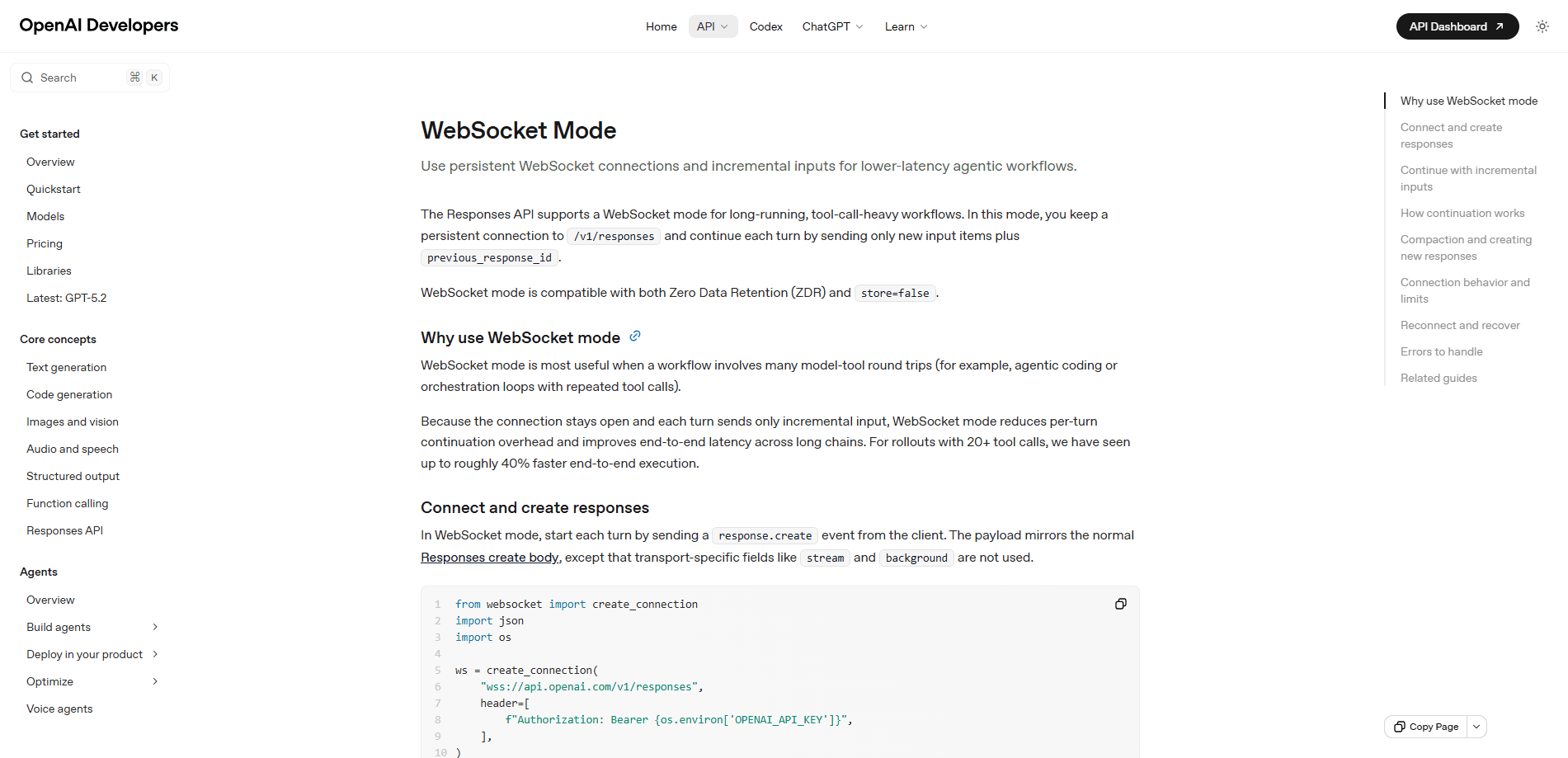
OpenAI WebSocket Mode for Responses API is a persistent connection mode that lets you run long, tool-heavy agent workflows over a single WebSocket instead of repeated HTTP requests. You open one connection to the Responses endpoint and keep each turn light by sending only new input items plus a previous_response_id. It's built for agentic coding and orchestration loops where the same task fires dozens of tool calls, and it works with store=false for privacy-sensitive setups.
About OpenAI WebSocket Mode for Responses API
What Is OpenAI WebSocket Mode for Responses API
OpenAI WebSocket Mode is a transport option for the Responses API, not a separate product. The Responses API is OpenAI's stateful primitive for building agent-style apps, and it's the endpoint most new projects start on. What changes is the pipe underneath it. That's it. Everything else about your prompts and tools stays the same.
The problem it fixes is continuation overhead. In standard HTTP mode, every turn reopens a connection, and you resend the growing context each time. That works fine for a single question. For an agent that calls tools twenty or thirty times in a row, all those round trips add up. WebSocket mode keeps the connection open to the Responses endpoint and lets each follow-up send only the delta, chained through a previous_response_id. Not rocket science. Just a better pipe.
The biggest limitation is scope. This mode is meant for long, tool-heavy workflows, not for everything. OpenAI's own guidance says single-shot requests and short chats should stay on the standard HTTP Responses API, where the optimization buys you little. The connection also has a time limit, so you'll need to handle reconnects in a long run. Mildly annoying, but manageable.
Getting Started
- Get an OpenAI API key and install a WebSocket client such as the websocket-client package for Python.
- Open a socket to the Responses WebSocket endpoint and pass your key in the Authorization header.
- Send your first turn with a response.create event, including the model, tools, and initial input.
- Continue the conversation by sending a new response.create that references the prior turn's previous_response_id and includes only new input items, such as function_call_output.
- Read server events as they stream back, then close the socket or reconnect if you hit the connection time limit.
Product Information
A quick look at OpenAI WebSocket Mode for Responses API's pricing, supported platforms, and performance.
Best for
The users, tasks, and scenarios where this tool fits best.
Users
- Backend and AI engineers building agents that need low-latency tool loops, since the mode targets server-to-server traffic.
- Platform teams running orchestration workloads where the same job calls tools dozens of times per rollout.
- Developers with privacy constraints who need a transport that supports store=false and zero data retention.
Tasks
- Agentic coding
- Tool-call handling
- Multi-turn orchestration
Scenarios
- A coding agent that loops through file analysis, patch generation, and test runs on a live socket.
- A backend service coordinating several tool calls per user request where per-turn latency matters.
- A team that wants to cut overhead on high-volume agent traffic without changing their model or prompts.
Key features
Persistent Connection to the Responses Endpoint
WebSocket mode keeps one connection open to the Responses API across many turns. You drive it with response.create events, and the first one starts a new turn just like a normal request. Because the socket stays open, you skip the connection setup that the standard streaming API pays on every single turn. That overhead is small once. Over a long agent run it isn't.
Incremental Input with previous_response_id
Each follow-up turn sends only the new input items, plus a previous_response_id that links back to the prior turn. You don't resend the whole context, which is where most of the savings come from in long chains. The payload for the first turn mirrors the standard create body, minus transport-only fields like stream and background that don't apply here. So the request stays lean even as the conversation grows.
Faster Continuation for Tool-Heavy Workflows
The headline benefit shows up once a workflow involves a lot of model-tool round trips. That's the world of low-latency agent workflows, and this transport was built for them. OpenAI's guidance points to a meaningful speedup on rollouts with many tool calls, with the gain coming from the continuation path rather than the first token alone, which is exactly the part that wastes the most time when an agent loops through the same tools over and over. Not every workflow sees it. If your agent barely calls tools, you won't notice much. If it calls them constantly, that's the whole point.
Works with store=false and Zero Data Retention
WebSocket mode works with store=false and zero data retention setups, which matters if you can't have OpenAI hold onto response state. The server keeps the recent response state in memory for the connection's lifetime, so you still get fast continuations without persisting turns across requests that would otherwise leave data behind on the server. For teams in regulated or privacy-sensitive environments, that combination is the reason to pick this transport.
Streaming Events and Ordering Match the HTTP Model
Server events and their ordering match the existing Responses streaming model. If you already handle streaming events over HTTP, the event shapes look familiar, so you don't have to rewrite your client logic from scratch. The difference is the delivery channel, not the message format. So why move at all? Speed, in the cases where it counts. That keeps the migration cost low.
Pros and cons
Pros
- Lower continuation latency in workflows with many tool calls, which is exactly where HTTP mode hurts most.
- Sending only incremental input reduces repeated transmission and connection setup overhead.
- Supports store=false and zero data retention, so privacy-sensitive teams can use it.
- Server events and ordering match the HTTP streaming model, so existing client code adapts easily.
- A single open socket fits agentic coding and orchestration loops better than stacked HTTP requests.
Cons
- It's only worth it for long, tool-heavy workflows; short chats and one-shot calls see little gain.
- The connection has a time limit, so you have to build reconnect logic for long-running agents.
- The transport is more code to manage than a simple HTTP call, which raises client complexity.
- You still pay standard API usage rates; the mode cuts latency, not the per-token cost.
Frequently asked questions
It's a transport mode that keeps a persistent WebSocket connection to the Responses API instead of making a fresh HTTP request every turn. You send only new input items and a previous_response_id, which cuts per-turn overhead on long agent runs. Think of it as staying on the line instead of hanging up and redialing.
Related content
Explore related tools, skills, and articles for OpenAI WebSocket Mode for Responses API.
OpenAI WebSocket Mode for Responses API Alternatives
Forefront
Forefront · CodingForefront is a web platform for building with open-source AI. It lets you fine-tune leading open-source language models on your own data, evaluate how they perform, and run them through an API or export them to host yourself. Developers who want the convenience of a closed-source platform but insist on owning their models and data are the target audience here.

Startkit
StartKit.AI · CodingStartkit is a boilerplate for building AI SaaS and AI wrapper products. Think of it as an AI startup boilerplate with the boring parts already wired up: authentication, Stripe and Lemon Squeezy payments, usage limits, transactional email, and an AI API starter that talks to OpenAI, Anthropic, Groq, or Llama. You clone the repo, set your price, and start on the part of your product that people actually pay for. It's Next.js under React and Tailwind, so most of the boilerplate code already feels familiar.
Testim
Tricentis · CodingTestim is an AI-powered test automation platform for building and running end-to-end tests across web, mobile, and Salesforce applications. It leans on machine learning to keep tests stable when an interface changes, so teams spend less time fixing broken selectors. Not bad for an automated testing tool you can start using today. You create tests by recording actions in a browser, then optionally add JavaScript when you need more control. It's a solid pick for busy QA teams.