

Paid
Paid · Productivity · Business
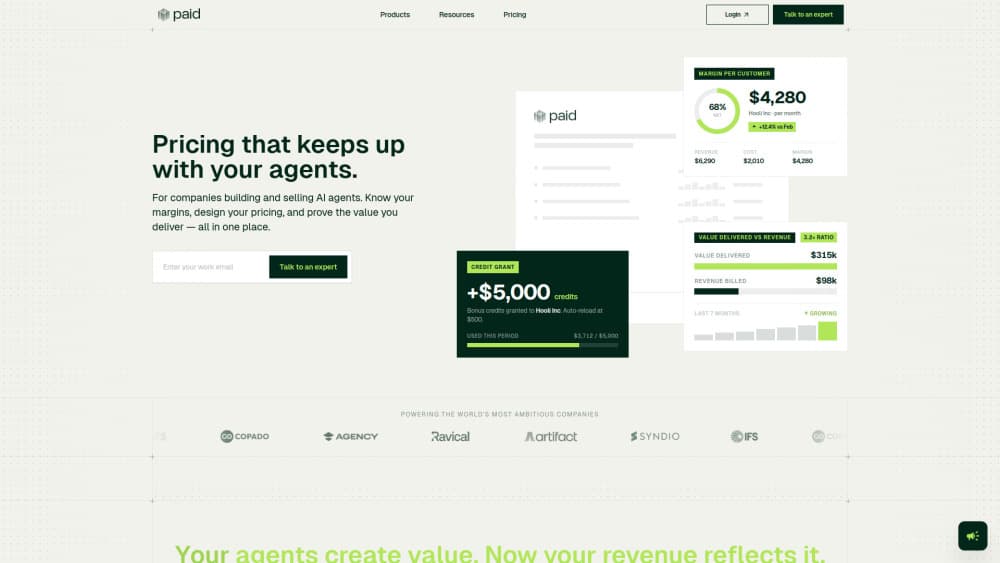
Paid is a monetization and billing platform built for companies that sell AI agents. It handles credit-based billing, usage pricing, and outcome pricing in one place. Teams use it to design pricing models, track what each agent action costs, and show customers a receipt of the value they got. All of it runs from a no-code dashboard. Instead of stitching together a billing engine, a metering service, and a spreadsheet, you get one place to see revenue, costs, and margins per customer.
About Paid
What Is Paid
Paid is the monetization layer for AI agent companies. If you've built an agent that does real work, the hard part isn't shipping it. It's charging for it in a way that matches how much value it creates. Paid handles that. You describe what your agent does as signals, attach a price to each one, and the platform meters it, bills it, and reports on it.
The product targets teams that find traditional billing tools a poor fit. Subscription software charges a flat fee and usage tools charge by API call. AI agents sit in a messier spot: one task might cost you a fraction of a cent or several dollars depending on the model and tool calls behind it. Paid tracks those underlying costs, so you can see your actual margin instead of guessing. So what does a typical setup look like?
The main limitation is scope. Paid is designed for AI agent businesses, and its value comes from ingesting your agent's activity. If you just want a generic invoicing tool for a normal SaaS product, you'll be paying for metering and margin machinery you don't need. That's a real cost. It also assumes you're willing to route billing through it rather than keep a separate standalone billing module.
Getting Started
- Sign up at paid.ai and create a free account, which covers up to $100k in annual billings.
- In the dashboard, configure your credit currencies and products under Configure, then define pricing models like credits, usage, platform fee, or outcome.
- Wire your agent to Paid by installing the SDK (Node.js, Python, or Go) and generating an API key.
- Send signals from your agent as it runs, so each action, task, and tool call is metered against a price.
- Review margins and value receipts in the operator dashboard, then adjust pricing without waiting on an engineering sprint.
Product Information
A quick look at Paid's pricing, supported platforms, and performance.
Best for
The users, tasks, and scenarios where this tool fits best.
Users
- AI agent startups
- Finance and ops leads
- Platform engineers
Tasks
- Designing pricing models
- Tracking cost per action
- Sending customer value receipts
Scenarios
- Running a paid pilot
- Scaling past a flat subscription
- Auditing runaway agent costs
Key features
Pricing and Credits Without Code
Paid supports credits, usage-based, outcome-based, and hybrid pricing, all configurable from a single dashboard without writing a line of billing logic. You set up credit currencies and plans under Configure, and the platform handles the rest. When the data suggests a change, you adjust it instantly instead of opening an engineering sprint.
Customer Value Receipts
Alongside the invoice, Paid generates a receipt showing what the agent delivered: time saved, cost savings, risk avoided, or incremental revenue generated for the customer. It's a concrete way to justify a renewal, since the customer sees the value, not just the amount owed.
Operator Dashboard
Revenue, costs, and margins sit in one view, broken down per customer, per product, or per agent. You can see where your pricing falls between what it costs to deliver and the value you're creating. No more reconciling dashboards from three different tools. That alone saves real time.
Margin Tracking
Paid tracks what each account costs you to serve, split by agent, model, and action, so you can finally see which customers actually make money. That level of detail turns "are we making money?" from a guess into a number. It's the feature that separates Paid from a plain billing tool.
Event Monitoring
Paid records every action, task, and tool call your agents make and translates them into human-readable signals. You can observe what agents are doing in real time, set pricing against it, and see where the spend is going. It won't surprise you on the invoice. That visibility is the point.
Billing and Invoicing Engine
A billing engine handles invoicing, credit card payments, and complex metering out of the box. You can charge by credits, usage, subscription, or a mix. Most teams underestimate the metering side. Here it's built in rather than bolted on.
Pros and cons
Pros
- Purpose-built for AI agents, so it meters model and tool costs a general billing tool ignores.
- No-code pricing setup lets non-engineers change credits, usage, and outcome models on the fly.
- Value receipts give a concrete renewal argument that ties the invoice to outcomes.
- SDKs for Node.js, Python, and Go make sending usage signals a short integration.
- A free tier covering up to $100k in annual billings lets small teams start without paying.
Cons
- Narrow fit: if you sell ordinary SaaS rather than agents, the metering and margin features go unused.
- You can't run it as a standalone billing module, so it has to be your billing system of choice.
- Learning the credits and signals model takes some setup before the dashboard becomes useful.
Frequently asked questions
It's a monetization and billing platform for AI agent companies. You define what your agent does as signals, attach prices, and Paid meters, bills, and reports on the result, including margin per customer and value receipts.
Related content
Explore related tools, skills, and articles for Paid.
Paid Alternatives

Swms
Swms AI · Writing · Productivity · BusinessSwms is an AI safety compliance tool that turns a plain description of a job into ready-to-use safety documents. Describe your project, trade, and known hazards, and it writes a safe work method statement, job hazard analysis, safe work procedure, RAMS, or safety data sheet in seconds. It also ships with Oscar, a chat assistant that answers workplace safety questions in any language. Teams in construction, mining, transport, and warehousing use it to cut the paperwork that usually eats into a workday.

Wordly AI Translation
Wordly · Voice & Language · ProductivityWordly AI Translation is a real-time AI translation and captioning platform built for meetings, conferences, and events. It delivers live translation, captions, transcripts, and summaries in more than 60 languages, and attendees join by scanning a QR code or opening a link instead of using dedicated headsets. The platform works with Zoom, Microsoft Teams, Google Meet, and Webex, and it's designed for organizations that want multilingual access without hiring human interpreters for every session. Simple as that.

Rows
Rows (Superhuman) · Productivity · BusinessRows is an AI spreadsheet and data analysis tool that imports live data from more than 50 sources, then lets you work with it using plain language instead of SQL queries or nested formulas. You can pull numbers out of PDFs, connect ad platforms, databases, and bank accounts, and ask the AI to build reports, merge datasets, or set up models that recalculate themselves. It runs in the browser, works like a spreadsheet, and now sits under the Superhuman umbrella.