

ParallaxPro
ParallaxPro · Coding
ParallaxPro is an AI video game creator that builds playable games from a written description. You type what you want, the AI assembles it into a working game, and you can reshape it in a browser editor or publish it to a public link. Nothing to install. No game engine to learn. The whole loop from idea to something your friends can play takes minutes, not weeks.
About ParallaxPro
What Is ParallaxPro
ParallaxPro is a web platform for making video games with AI instead of code, which is why people treat it as an AI game maker that writes the first draft for you. The pitch is blunt. Describe the game you want in a prompt, and the AI reads the whole thing and builds it. One sentence works. A full paragraph works better.
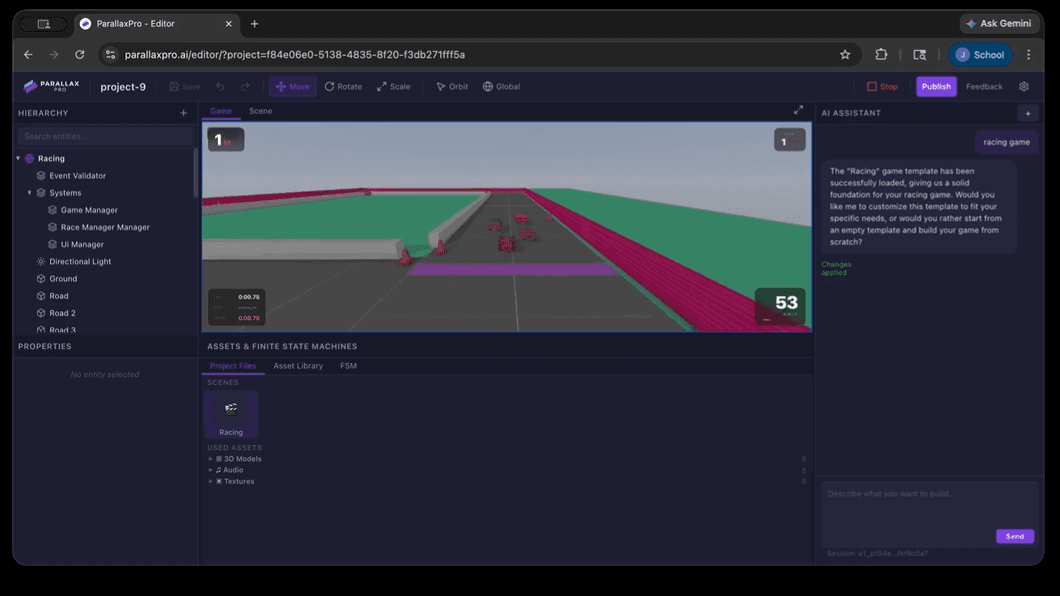
The tool targets people who have a game idea but no game development background, so you can make games without coding at all. You don't need to learn a scripting language, set up an engine, or export builds by hand. The editor runs in a browser tab, and it comes with a 3D viewport, an asset library, and an AI assistant that can edit scenes, wire logic, or fix bugs on request.
The main limits come from the model, not the interface. AI-generated games tend to be simple and short, and complex mechanics still need human tweaking. The free tier is thin on AI credits, so most serious building happens on a paid plan.
Getting Started
- Sign up at parallaxpro.ai and open a new project from the editor.
- Type your game idea into the prompt box, from one sentence to a full brief, and let the AI build the first version.
- Chat with the AI Assistant to fix problems and adjust the game to your liking.
- Test it with the browser viewport and tune assets or logic by hand where needed.
- Publish with one click to a public URL, as single-player, multiplayer, or an embed.
Product Information
A quick look at ParallaxPro's pricing, supported platforms, and performance.
Best for
The users, tasks, and scenarios where this tool fits best.
Users
- Beginners with a game idea
- Indie developers prototyping fast
- Content creators making quick games
Tasks
- Turning a prompt into a playable game
- Fixing game bugs with AI
- Publishing across stores
Scenarios
- Weekend game jams
- Testing a game concept before investing more
- Making a quick game with friends
Key features
Text-to-Game Generation
The core feature is a prompt box that turns plain language into a working game, acting as both an AI game generator and a text to game tool in one. You describe the game, the AI reads the full description, and it builds it. The detail you put into the prompt shapes the result. A paragraph beats a one-liner.
Browser Editor With 3D Viewport
ParallaxPro ships a full browser game editor that runs in a tab. It includes a 3D viewport, an asset library, and autosave. Your work is kept without manual saving. There's nothing to install and nothing to update.
Always-On AI Assistant
The editor includes an AI assistant that can edit the scene, wire up logic, or fix bugs when you ask. It turns changes into chat requests, which means you can modify a game without touching code.
One-Click Publishing
When the game is ready, one click publishes it to a public URL. You can ship it as single-player, multiplayer, or an embeddable build. Friends play from any browser.
Publishing to App Stores and Steam
On the Pro plan and above, you can publish beyond the browser to the App Store, Google Play, Steam, and other platforms. That covers the jump from a web build to a distributable release.
Credits-Based Scaling
Each plan comes with monthly credits, from 50 on Free up to 12,500 on Max. More credits mean bigger, more complex games. The plan you pick tracks with how much you plan to build.
Pros and cons
Pros
- No coding or engine knowledge required, which opens game creation to people who'd normally be blocked at setup.
- Fast loop from idea to playable build, since the AI generates the first version and you refine it by chat.
- Full editor with a 3D viewport and asset library rather than just a prompt box.
- Publishing covers browser links, embeds, multiplayer, and store releases from one project.
- Cancel anytime and keep every game you've made, even on the free plan.
Cons
- The free plan gives only 50 credits a month and limited AI creation, so testing real ideas means paying.
- AI-generated games stay simple, and complex mechanics still need manual work.
- API availability isn't published, so developers who want to integrate it can't plan around it yet.
Frequently asked questions
ParallaxPro is an AI video game creator that builds playable games from a text description. You describe the game, the AI builds it, and you edit or publish the result from a browser editor.
Related content
Explore related tools, skills, and articles for ParallaxPro.
ParallaxPro Alternatives
Forefront
Forefront · CodingForefront is a web platform for building with open-source AI. It lets you fine-tune leading open-source language models on your own data, evaluate how they perform, and run them through an API or export them to host yourself. Developers who want the convenience of a closed-source platform but insist on owning their models and data are the target audience here.

Startkit
StartKit.AI · CodingStartkit is a boilerplate for building AI SaaS and AI wrapper products. Think of it as an AI startup boilerplate with the boring parts already wired up: authentication, Stripe and Lemon Squeezy payments, usage limits, transactional email, and an AI API starter that talks to OpenAI, Anthropic, Groq, or Llama. You clone the repo, set your price, and start on the part of your product that people actually pay for. It's Next.js under React and Tailwind, so most of the boilerplate code already feels familiar.
Testim
Tricentis · CodingTestim is an AI-powered test automation platform for building and running end-to-end tests across web, mobile, and Salesforce applications. It leans on machine learning to keep tests stable when an interface changes, so teams spend less time fixing broken selectors. Not bad for an automated testing tool you can start using today. You create tests by recording actions in a browser, then optionally add JavaScript when you need more control. It's a solid pick for busy QA teams.