

Pen Island: Clean Drawings
Pen Island · Image · AI Detection
Pen Island: Clean Drawings is an AI art platform built around one unusual promise: the drawings stay clean. The site works as a public art site with a computer vision content filter that screens every upload and blocks obscene images before they reach the gallery. Think of it as a clean drawing community, not a professional editing suite. It's free to use in any browser.
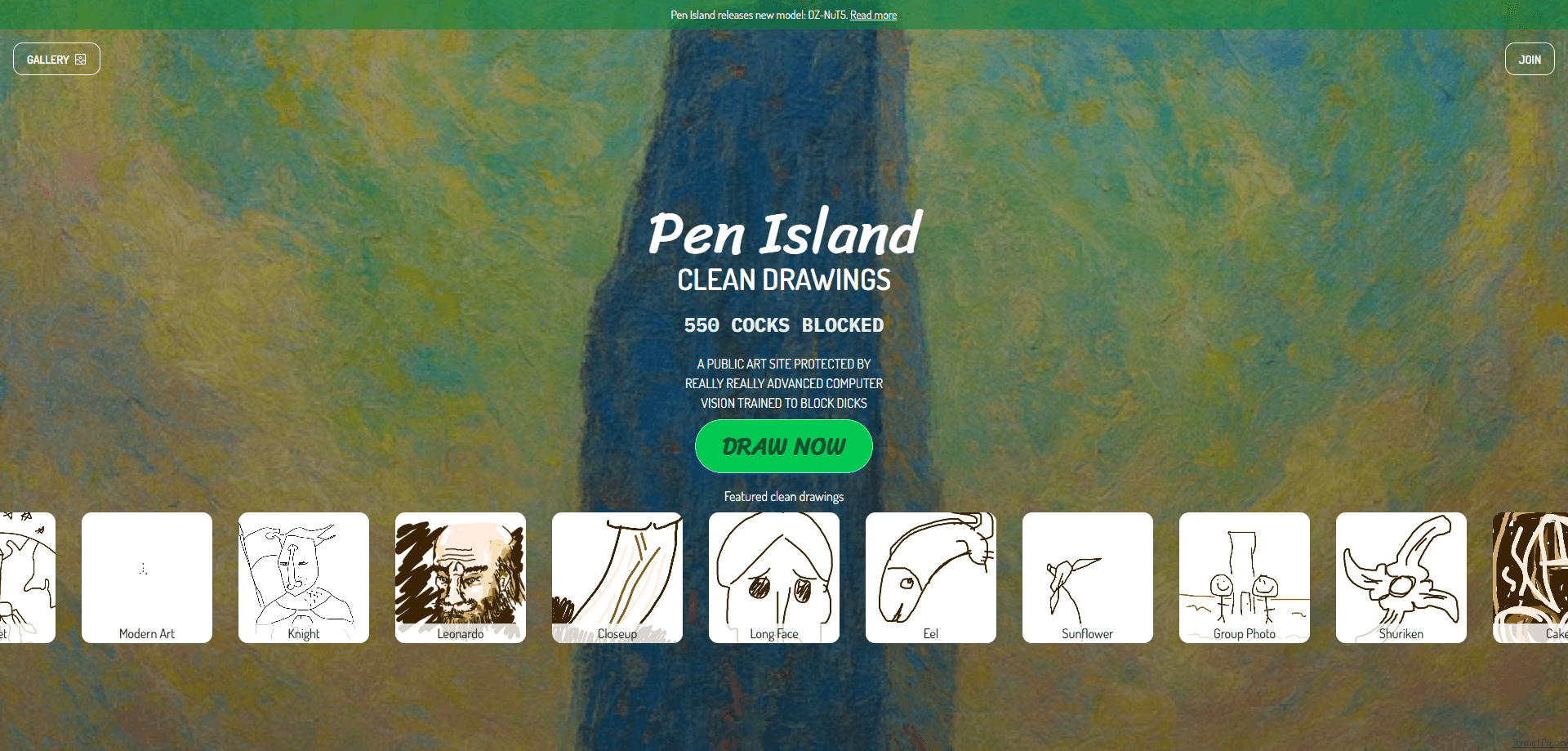
About Pen Island: Clean Drawings
What Is Pen Island: Clean Drawings
Pen Island: Clean Drawings is a web-based drawing platform where people post and browse artwork in a shared, moderated space. Its defining feature isn't a brush engine or a layer system. It's the filtering layer sitting in front of the gallery.
Most open art communities struggle with the same problem. A small number of users upload obscene images, and moderation can't keep pace. Pen Island attacks that at the source with a computer vision content filter that runs on every submission. The result is an AI art platform that stays safe for students, hobbyists, and anyone who doesn't want to filter their own feed.
The biggest limitation is scope. This is a lightweight public art site, not a full drawing app with advanced tools. If you need serious illustration software with brush engines, layers, and export presets, you'll create your artwork elsewhere and only use Pen Island to share the finished piece. The platform is currently free, with no paid tier listed.
Getting Started
- Go to the Pen Island website in a desktop or mobile browser.
- Create an account or sign in, depending on what the site asks for at entry.
- Draw your artwork in your own tool, or post directly if in-browser drawing is available.
- Upload your drawing to the public gallery.
- Wait for the automatic screening to clear it, then share the link with others.
Product Information
A quick look at Pen Island: Clean Drawings's pricing, supported platforms, and performance.
Best for
The users, tasks, and scenarios where this tool fits best.
Users
- Students and young artists who want a safe gallery to post drawings without exposure to crude content, since every single upload is screened by the platform's detection model before it ever goes live in the shared gallery.
- Hobbyist doodlers who sketch casually and want a low-pressure place to share work, as the site is completely free and doesn't demand professional-level output from anyone.
- Teachers and parents looking for a clean drawing community to point kids toward, because the content filter runs on every submission rather than relying on manual reports.
Tasks
- Sharing clean sketches with a public audience
- Browsing an art feed without surprises
- Building a small portfolio of safe-for-work pieces
Scenarios
- A classroom activity where students post drawings and the teacher needs the gallery to stay appropriate, with the automated filter doing the first pass before anything becomes visible to the class.
- Casual weekend sketching when you want feedback from a community but don't want to wade through offensive posts.
- Introducing a beginner to online art sharing where content safety matters more than advanced tools.
Key features
Automatic Content Screening
Every upload passes through a computer vision model before it reaches the gallery. The system is trained to detect and block obscene drawings, so visitors don't have to report or filter content themselves. This is the feature the whole platform is built around, and it's what separates Pen Island from a typical open gallery.
Public Gallery
Pen Island hosts a shared gallery that anyone can browse. Featured work rotates through the homepage, giving new posts a chance to be seen without a follower count. It's a straightforward way to get eyes on your art. No algorithm gatekeeping.
Featured Drawing Rotation
The homepage surfaces a rotating set of clean drawings, from rough sketches to finished pieces. New users get a fair shot. Post something solid and it can land on the front page.
Web-Based Access
There's nothing to install. Pen Island runs in a browser on desktop and mobile, so you can post or browse from almost any device. That keeps the barrier to entry low. Why bother with a download for a gallery?
Free to Use
The platform is free, with no subscription tier listed on the site. Pay nothing. You can post and browse without a paywall, which makes it easy to try before committing to any community.
Evolving Detection Model
Pen Island keeps updating its filtering model, with newer versions tuned for speed and accuracy. The most recent release, announced on the site's blog, focuses on catching harder cases as detection gets increasingly tougher. Filters go stale fast. Regular updates keep the gallery clean over time.
Pros and cons
Pros
- Content filtering runs automatically on every upload, so the gallery stays clean without relying on user reports.
- Free to use with no paid tier, which lowers the barrier for students and casual artists.
- Browser-based on desktop and mobile, so there's nothing to install.
- Featured rotation gives new drawings a shot at the homepage regardless of follower count.
Cons
- It's a sharing site, not a full drawing app, so if you need brushes, layers, or advanced editing tools, you'll have to create your artwork in another program and upload the finished result here.
- The site lists no public API, so you can't plug the filtering technology directly into your own app or workflow.
- No pricing page means paid features, storage limits, or premium tiers could change without much notice.
Frequently asked questions
It's a public art-sharing platform where a computer vision model screens every upload and blocks obscene drawings. You post artwork, it gets checked, and clean pieces land in the shared gallery.
Related content
Explore related tools, skills, and articles for Pen Island: Clean Drawings.
Pen Island: Clean Drawings Alternatives

X Ray Interpreter
X-ray Interpreter · ImageX Ray Interpreter is a web-based AI radiology tool that turns X-rays, CT scans, MRI, ultrasound, and PET images into plain-language reports. You upload a scan, get a preliminary X-ray interpretation in moments, then ask follow-up questions if something needs explaining. It works as a second opinion and a learning aid, not as a medical diagnosis.

Aieasypic
AIEasyPic · ImageAIEasyPic is an AI image generator that turns plain text prompts into finished artwork in seconds. You can also train custom models on your own photos, swap faces in existing images, and create short video clips from text, all from a browser. It suits casual creators who want quick visuals and hobbyists who want to build a personal model without touching any code.

Chargen
Chargen · ImageChargen is an AI character generator and worldbuilding toolkit built for Dungeons & Dragons and other tabletop RPGs. It turns a one-line idea into a painted character portrait, spins up NPCs, monsters, maps and encounters from the same session, and keeps every creature's details close at hand. The tabletop RPG art side runs on a credit system called Gold, while the text generators stay free for everyone.