

Perfect Wiki
Perfect Wiki (IE Ilia Pirozhenko) · Productivity · Leaning
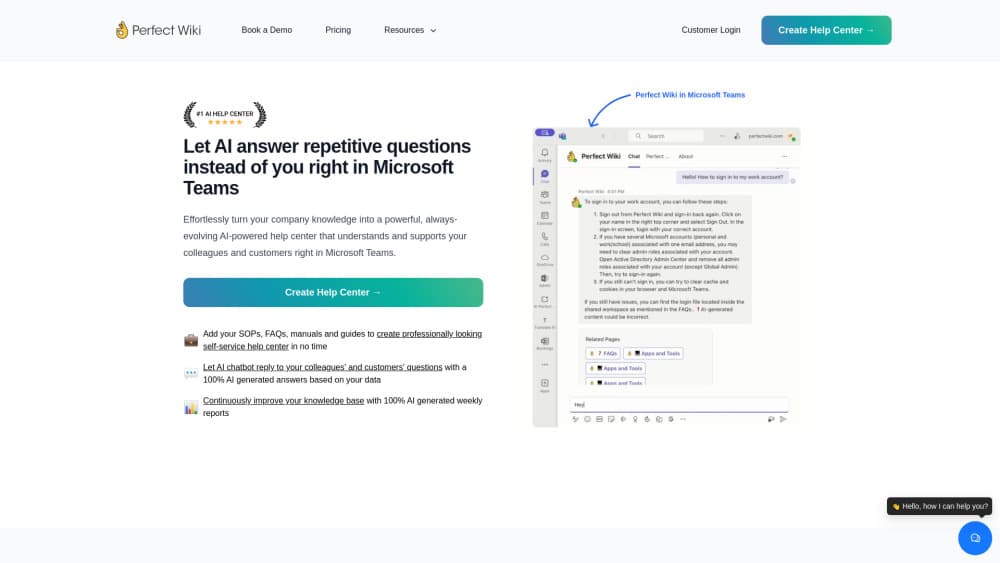
Perfect Wiki is an AI knowledge base for Microsoft Teams. It stores SOPs, manuals and FAQs in one searchable place, then answers team questions with cited sources.
About Perfect Wiki
What Is Perfect Wiki
Perfect Wiki is a Teams wiki app that gives company knowledge a fixed home instead of leaving it in chat threads and personal folders. You put your SOPs, manuals, FAQs and training notes into one internal knowledge base, and the built-in assistant answers questions about them in plain language. Every answer cites the page or file it came from, so people can check the source in one click.
The product solves a familiar office problem. Process knowledge sits with one experienced person, the FAQ is a large spreadsheet, and manuals are spread across SharePoint folders that nobody can search. Perfect Wiki connects to a SharePoint or OneDrive folder you choose, indexes Word, PDF, Excel, PowerPoint, HTML, CSV and ZIP files, and keeps that content in sync each night. You don't have to reorganize anything before you start.
The limits matter too. The AI reads only the documents you connect, so it won't answer general questions or pull in outside information. Answers depend on how current your source files are: an outdated manual produces an outdated answer. The base price covers a modest monthly pool of AI requests, and heavier use pushes you toward the Enterprise plan.
Getting Started
- Install Perfect Wiki from the Microsoft Teams app store and add it as a channel tab or a personal tab.
- Connect a SharePoint or OneDrive folder, or import your documents, and let the first index run.
- Create or edit pages with the provided templates, then check that reader and editor roles match your team.
- Mention @PerfectWiki in a channel or open the chat tab, ask a question, and open the cited source to confirm the answer.
Product Information
A quick look at Perfect Wiki's pricing, supported platforms, and performance.
Best for
The users, tasks, and scenarios where this tool fits best.
Users
- Operations leads at small and mid-sized companies
- IT and support teams on Microsoft 365
- HR and legal teams with repeat questions
Tasks
- Writing and maintaining SOPs
- Turning chat answers into documentation
- Finding a specific policy detail
- Publishing a public help center
Scenarios
- Onboarding a new hire
- A key employee leaves
- A support desk answers the same five questions daily
Key features
AI Answers With Sources
The assistant reads your connected documents and replies in the language you ask in, including German, Spanish and more than 25 others. Each answer links to the page or file behind it. That citation is the feature that makes the tool usable at work, because a reader can check the exact paragraph before acting on it.
Teams Native Tabs and Mentions
Perfect Wiki runs as a channel tab, a personal tab, or a bot you mention in a conversation. A channel answer is visible to everyone in that channel, which turns a private lookup into shared knowledge. You can also right-click a message and send it to the assistant.
SharePoint and OneDrive Sync
You pick one folder, and the app indexes what is inside it without asking for access to the rest of your drive. Nightly sync keeps the index close to the source. Supported formats include Word, PDF, Excel, PowerPoint, HTML, CSV and ZIP archives.
Chat to Wiki Capture
Any useful answer in a Teams chat can become a page through a "Save to Perfect Wiki" action. The saved text turns into a searchable, citable page, so tribal knowledge is captured while the person who has it is still typing.
Knowledge Gap Reports
Every week the app lists the questions it could not answer, along with top searches and popular pages. That report is a practical editorial queue: it tells you which SOP or FAQ page to write next instead of guessing.
Permissions and Data Controls
Sign-in goes through Microsoft, and the app inherits channel permissions. Roles cover reader, editor and admin, with custom access lists for sensitive pages. Data is hosted on Google Cloud with EU and US residency options, encrypted in transit and at rest, and excluded from model training.
Pros and cons
Pros
- Readers are free, so you pay only for the people who write and edit content.
- Setup stays inside Microsoft Teams and SharePoint, with no separate app for staff to learn.
- Every AI answer carries a source link, which makes verification quick.
- Chat capture turns everyday answers into documentation without a writing project.
- The weekly gap report gives you a concrete list of missing pages.
Cons
- The AI only knows what you connect, so gaps in your source files become gaps in answers.
- The Basic plan pools 100 AI requests per editor each month, and a busy support team can hit that ceiling.
- The product is built around Microsoft 365, so a Google Workspace team gets a much smaller benefit.
- There is no permanent free plan, only a 14-day trial, and annual billing is required for the $12 rate.
Frequently asked questions
It stores company procedures, manuals and FAQs in a searchable Teams wiki and answers questions about them with cited sources. Teams use it for onboarding, support scripts and policy lookups.
Related content
Explore related tools, skills, and articles for Perfect Wiki.
Perfect Wiki Alternatives

Swms
Swms AI · Writing · Productivity · BusinessSwms is an AI safety compliance tool that turns a plain description of a job into ready-to-use safety documents. Describe your project, trade, and known hazards, and it writes a safe work method statement, job hazard analysis, safe work procedure, RAMS, or safety data sheet in seconds. It also ships with Oscar, a chat assistant that answers workplace safety questions in any language. Teams in construction, mining, transport, and warehousing use it to cut the paperwork that usually eats into a workday.

Wordly AI Translation
Wordly · Voice & Language · ProductivityWordly AI Translation is a real-time AI translation and captioning platform built for meetings, conferences, and events. It delivers live translation, captions, transcripts, and summaries in more than 60 languages, and attendees join by scanning a QR code or opening a link instead of using dedicated headsets. The platform works with Zoom, Microsoft Teams, Google Meet, and Webex, and it's designed for organizations that want multilingual access without hiring human interpreters for every session. Simple as that.

Rows
Rows (Superhuman) · Productivity · BusinessRows is an AI spreadsheet and data analysis tool that imports live data from more than 50 sources, then lets you work with it using plain language instead of SQL queries or nested formulas. You can pull numbers out of PDFs, connect ad platforms, databases, and bank accounts, and ask the AI to build reports, merge datasets, or set up models that recalculate themselves. It runs in the browser, works like a spreadsheet, and now sits under the Superhuman umbrella.