

Phant AI: AI Video&image Maker
Phant AI · Image · Video
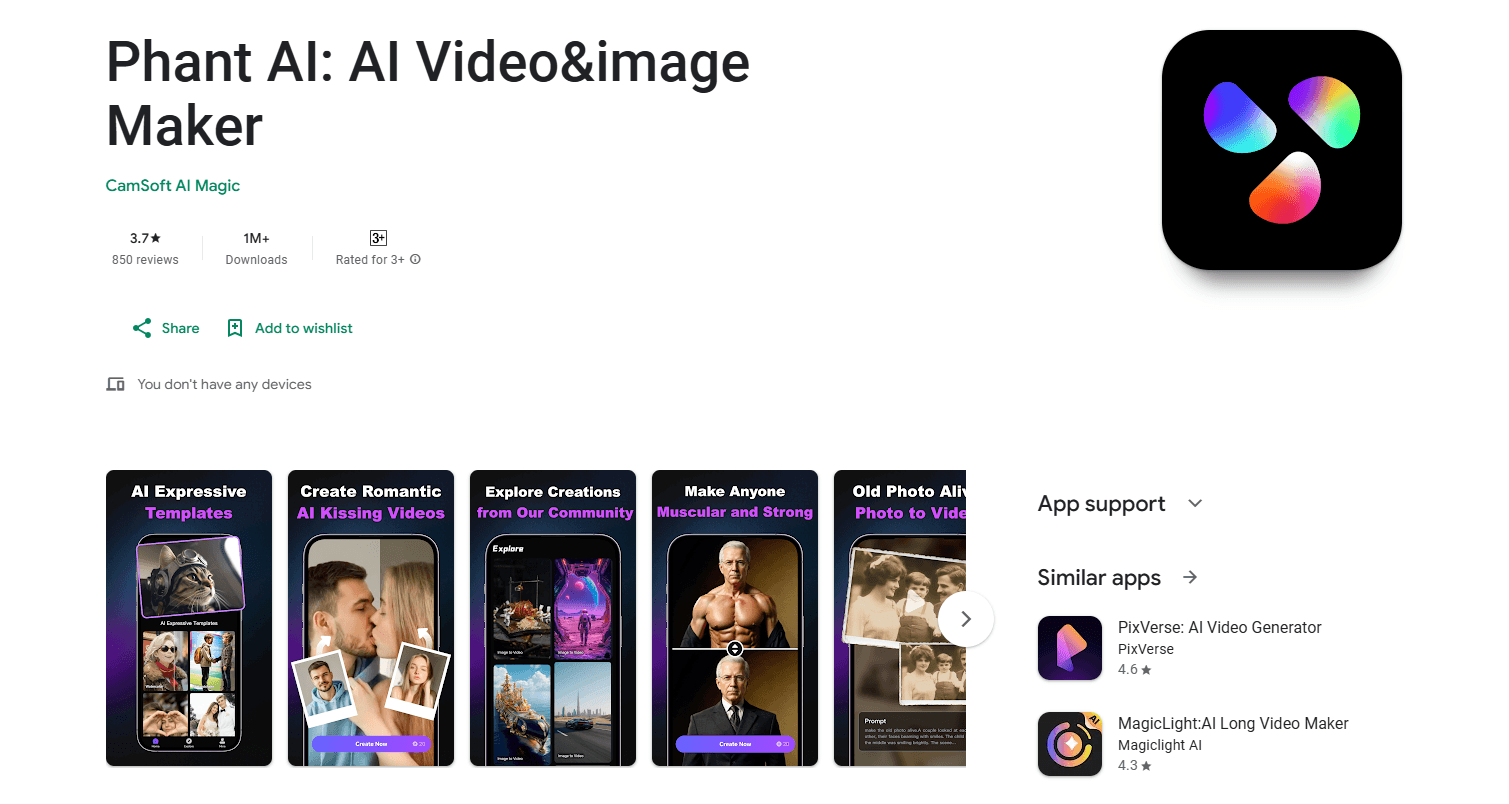
Phant AI: AI Video&image Maker is an Android app for turning photos and short text prompts into animated videos and AI images. It leans on trend-driven templates, so a still picture of two people can become a hugging, kissing or fighting clip without any editing work. If you want quick, shareable motion for social feeds and don't have the patience for a full video editor, this is built for exactly that.
About Phant AI: AI Video&image Maker
What Is Phant AI: AI Video&image Maker
Phant AI is a mobile AI video generator built around a simple idea: pick a photo, choose an effect, and let the app animate it. Instead of teaching you keyframes or timelines, it ships with ready-made motion templates and a text-to-video mode, so the output looks like a short scene rather than a slideshow.
The draw here is speed and novelty. Hugging, kissing and fighting animations are the kind of clips that do well on TikTok, Instagram Reels and WhatsApp status. Phant AI makes them in a few taps. The trade-off is control. You're choosing from what the app offers, not directing a scene shot by shot. Results depend on your source photo. Clean and well-lit beats clever every time.
It's also an AI image maker, not just a video tool. You can generate still images from descriptions and build a post around both. Expect the usual mobile-AI constraints. Generation runs in the cloud. No connection, no clip. The best effects usually sit behind a subscription.
Getting Started
- Install Phant AI: AI Video&image Maker on your Android phone and open it.
- Sign in or continue as a guest if the app allows it, then grant photo and storage permissions.
- Pick a template, like an AI hugging or kissing animation, or switch to text-to-video and type a prompt.
- Upload a clear photo of the subject, ideally one face per person and good lighting.
- Tap generate, wait for processing, then save the clip and share it to your social apps.
Product Information
A quick look at Phant AI: AI Video&image Maker's pricing, supported platforms, and performance.
Best for
The users, tasks, and scenarios where this tool fits best.
Users
- Social media creators
- Casual users who don't edit video
- Couples and friend groups
Tasks
- Turning a still photo into a short animated clip
- Generating images from text
- Making trend-style reaction videos
Scenarios
- Posting to TikTok, Reels or WhatsApp status
- Making a playful gift for a partner or friend
- Testing an idea before a real shoot
Key features
AI Hugging and Kissing Animations
Pick two photos and the app animates them into a hug or a kiss, with the AI filling in the motion between the poses. It's the headline feature. It's also the reason most people download the app. Results look best when both photos are front-facing and evenly lit, since the model has to blend two different shots into one believable clip.
Fighting and Action Templates
Beyond the soft stuff, Phant AI includes fight and action-style effects that turn still photos into short combat scenes. These suit meme-style posts and reaction videos more than anything sentimental. As with any AI animation, fast motion is harder for the model to keep clean. So expect some variation in quality between attempts.
Photo to Video Conversion
The photo to video mode is the general-purpose path. Upload an image, and the app brings it to life with movement instead of leaving it static. It's the fallback when you don't want a themed template and just need motion. Output length is short. That matches how these clips are actually used on social platforms.
Text to Video and Text to Image
Describe what you want in words and Phant AI generates either a short video or a still image from that description. This is the most flexible part of the app. It's also the most unpredictable. The result depends on how clearly you write the prompt. Simple, concrete descriptions tend to beat long, elaborate ones.
Ready-Made Social Templates
The template library is what separates Phant AI from a bare AI model. Each effect is tuned for a specific look. You get a finished clip instead of a raw generation you still have to cut and caption. Templates rotate as trends change. That's why the app needs regular updates.
Pros and cons
Pros
- Turns two photos into a hugging or kissing clip in a few taps, no editing skills needed.
- Combines AI video and AI image generation in a single Android app.
- Templates are built for vertical social formats, so exports fit TikTok, Reels and status updates.
- A free tier lets you test the core effects before paying.
Cons
- Output quality depends heavily on the source photo, so blurry or side-on images produce weaker results.
- Generation happens in the cloud, meaning no connection means no clip, and longer jobs take time to process.
- The best templates and higher-resolution exports sit behind a subscription, so the free experience is limited, and the gap between the free and paid tiers is wide enough that serious users will hit the paywall fast.
Frequently asked questions
It turns photos and text prompts into short AI videos and images, and the most popular use is animating two separate photos into a single hugging, kissing or fighting clip that you can post straight to social media.
Related content
Explore related tools, skills, and articles for Phant AI: AI Video&image Maker.
Phant AI: AI Video&image Maker Alternatives

X Ray Interpreter
X-ray Interpreter · ImageX Ray Interpreter is a web-based AI radiology tool that turns X-rays, CT scans, MRI, ultrasound, and PET images into plain-language reports. You upload a scan, get a preliminary X-ray interpretation in moments, then ask follow-up questions if something needs explaining. It works as a second opinion and a learning aid, not as a medical diagnosis.

Aieasypic
AIEasyPic · ImageAIEasyPic is an AI image generator that turns plain text prompts into finished artwork in seconds. You can also train custom models on your own photos, swap faces in existing images, and create short video clips from text, all from a browser. It suits casual creators who want quick visuals and hobbyists who want to build a personal model without touching any code.

Chargen
Chargen · ImageChargen is an AI character generator and worldbuilding toolkit built for Dungeons & Dragons and other tabletop RPGs. It turns a one-line idea into a painted character portrait, spins up NPCs, monsters, maps and encounters from the same session, and keeps every creature's details close at hand. The tabletop RPG art side runs on a credit system called Gold, while the text generators stay free for everyone.