

PikpikGo
PikpikGo · Image · Video
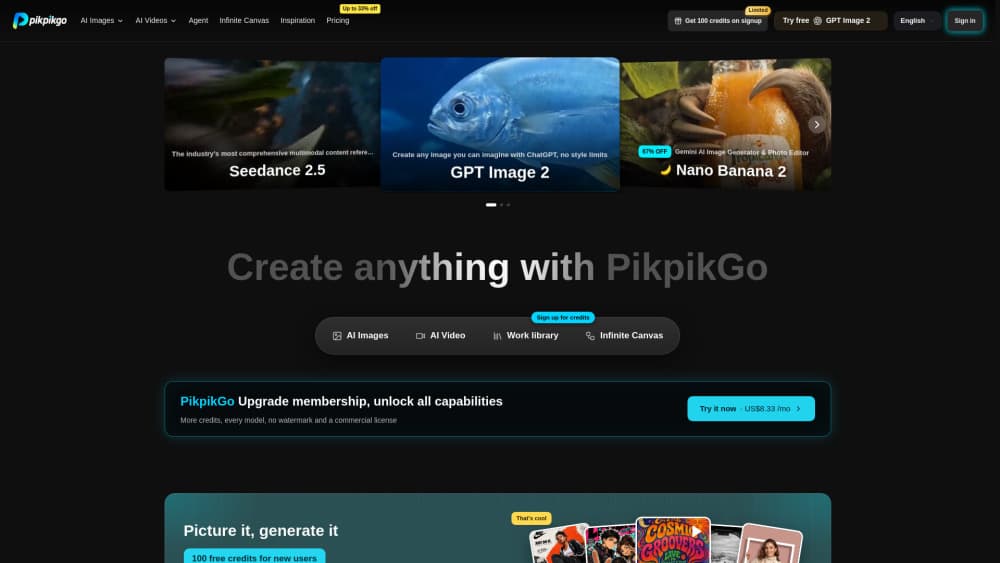
PikpikGo is an online AI creation platform that puts eight image and video models in a single browser studio. It works as both an AI image generator and an AI video generator, so you can handle text to image and text to video work in one place. Pick a model, write a prompt or upload a reference, and generate without switching between subscriptions. One credit balance covers every model, and new accounts start with 20 free credits to try it out.
About PikpikGo
What Is PikpikGo
PikpikGo is a multi-model AI platform for making images, videos and visual projects. Instead of paying for separate subscriptions to OpenAI, Google, ByteDance and Alibaba tools, you reach their image and video models from one studio and spend credits the same way across all of them. The pitch is simple: fewer accounts, one place to work.
Should you care if you already pay for one image tool? Maybe not. The real value shows up when your work needs more than one model.
The main draw is the model mix. For images you get OpenAI's GPT Image 2.5 and GPT Image 2, Google's Nano Banana Pro, and ByteDance's Seedream 5.0 Pro. For video there's Seedance 2.5 and Seedance 2.0 Fast from ByteDance, Wan 3 from Alibaba, and MiniMax H3. Output goes up to 4K for images and 1080p for video, which covers most social and small commercial work.
The catch is credits. They're the only currency here, and every plan grants them monthly. Unused plan credits expire at the end of each month and don't roll over, so heavy one-off projects can waste allowance if you don't pace yourself. Bought credit packs are the exception because they never expire, and you can also refund unconsumed credits within three days of purchase.
Getting Started
- Create a free account on the website and collect the 20 starting credits.
- Open the Creative Studio, then pick an image or video model from the model list.
- Type a prompt or upload a reference image, and set your resolution and aspect ratio.
- Generate the result and download it, or keep iterating on the same canvas.
- Upgrade to a paid plan when you need more credits, 4K video or watermark-free commercial output.
Product Information
A quick look at PikpikGo's pricing, supported platforms, and performance.
Best for
The users, tasks, and scenarios where this tool fits best.
Users
- Content creators
- Small marketing teams
- Developers
- Casual experimenters
Tasks
- Generating ad and social visuals
- Turning a script into a short video
- AI image editing
- Scaling output through an API
Scenarios
- Testing a campaign idea across several models before committing to a look.
- Producing quick storyboard clips from a written scene for early pitch meetings.
- Building a reusable prompt in the studio first, then wiring it into an app through the API.
Key features
Eight Models in One Studio
The studio groups eight image and video models in a single workspace, from OpenAI, Google, ByteDance, Alibaba and MiniMax. That range means you can compare outputs side by side instead of trusting a single vendor's look. Switching models costs nothing extra because the same credit balance applies everywhere. No new tab. No second login. Just pick another model.
One Credit Balance Across Every Model
Credits are the only currency, and they work the same on every model. You top up once and spend across image and video generation, which removes the guesswork of maintaining several separate accounts and tracking which balance covers which tool. Credit packs bought on their own never expire, so unused balance carries forward. Use them whenever.
Creative Studio Canvas
The Creative Studio is an infinite canvas where you drag, combine and iterate on ideas in one shared space. Outputs land in an asset library rather than a loose downloads folder. For teams, that keeps work discoverable instead of scattered across personal drives. Simple, but it adds up. Nothing gets lost.
High-Resolution Image Output
Image models reach 1K, 2K and up to 4K, and GPT Image 2.5 adds a fast Flare mode plus a detail-focused Sunburst mode for text to image work. High resolution matters when a picture needs to survive cropping, downsizing or reuse across a banner, a thumbnail and a print layout. Nano Banana Pro handles long, specific prompts and editing of pictures you already have.
Video Clips Up to 30 Seconds
Seedance 2.5 and Wan 3 handle text to video, producing clips up to 30 seconds at 1080p with sound, guided by prompts, reference images, video and audio. MiniMax H3 stretches aspect ratios to 21:9 for a cinematic frame. First and last frame control gives you some real say over how a shot begins and ends, which helps when a client wants a specific opener.
OpenAI-Compatible API
The API exposes the same models, pricing and render pipeline the studio uses, under a base URL of https://open.pikpikgo.com/v1. Keys start with sk- and travel in a bearer header, and image generation returns the same shape as OpenAI's endpoint, so existing SDK code needs little more than a base URL swap. Video is async only because rendering takes minutes. Not ideal, but that's how long a render runs.
Team Workspace and Commercial License
Paid plans include a team workspace with up to 100 seats and asset storage that grows with the tier. Paid tiers also drop the watermark and add a commercial license, which matters if you plan to sell or publish the work. That combination suits small agencies more than solo hobbyists. Big difference. Some teams won't need it.
Pros and cons
Pros
- Eight top image and video models behind one login and one credit balance.
- Free plan plus 20 starting credits make it easy to test before paying.
- OpenAI-compatible API means most existing integration code carries over.
- Paid tiers remove watermarks and include a commercial license.
- Credit packs never expire, so leftover balance isn't wasted.
Cons
- Plan credits expire monthly and don't roll over, which can waste allowance on uneven schedules.
- The free tier is deliberately limited to three images a day, one model and 720p.
- Video generation is API-only in async mode, so no simple synchronous calls. That slows quick tests.
- There's no mobile app, so everything runs through the browser. That rules out quick edits on the go.
Frequently asked questions
PikpikGo generates images and videos from text prompts or reference uploads in a browser studio. It's built for people who want access to several leading AI models without buying each one separately.
Related content
Explore related tools, skills, and articles for PikpikGo.
PikpikGo Alternatives

X Ray Interpreter
X-ray Interpreter · ImageX Ray Interpreter is a web-based AI radiology tool that turns X-rays, CT scans, MRI, ultrasound, and PET images into plain-language reports. You upload a scan, get a preliminary X-ray interpretation in moments, then ask follow-up questions if something needs explaining. It works as a second opinion and a learning aid, not as a medical diagnosis.

Aieasypic
AIEasyPic · ImageAIEasyPic is an AI image generator that turns plain text prompts into finished artwork in seconds. You can also train custom models on your own photos, swap faces in existing images, and create short video clips from text, all from a browser. It suits casual creators who want quick visuals and hobbyists who want to build a personal model without touching any code.

Chargen
Chargen · ImageChargen is an AI character generator and worldbuilding toolkit built for Dungeons & Dragons and other tabletop RPGs. It turns a one-line idea into a painted character portrait, spins up NPCs, monsters, maps and encounters from the same session, and keeps every creature's details close at hand. The tabletop RPG art side runs on a credit system called Gold, while the text generators stay free for everyone.