

Pixel GPT
Deep Pixels · Image
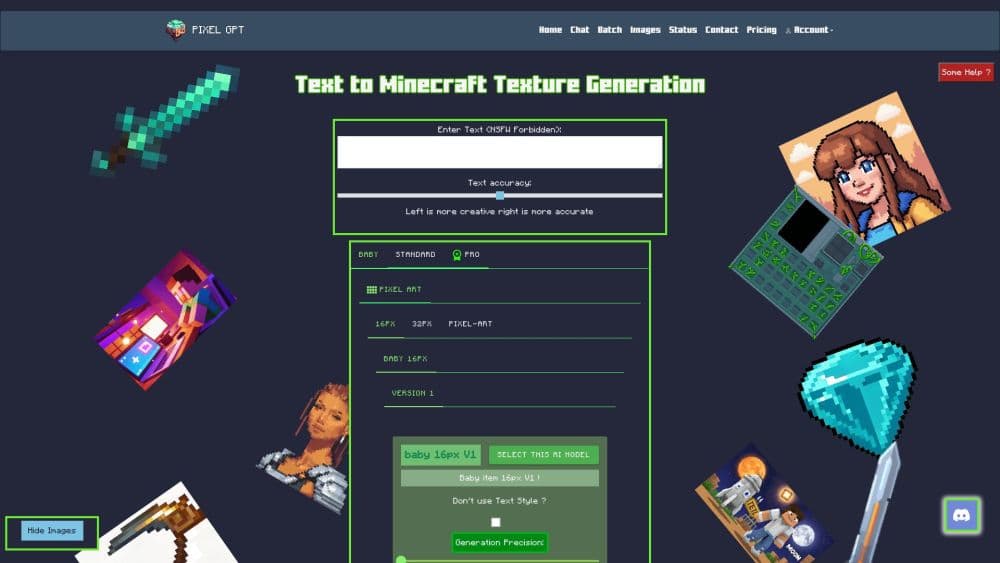
Pixel GPT is a browser-based AI tool from Deep Pixels that turns short text prompts into Minecraft item textures, pixel art, and profile pictures, with batch runs for building whole texture packs.
About Pixel GPT
What Is Pixel GPT
Pixel GPT is a web app for making small pixel images with AI. It works as an AI pixel art generator first and a Minecraft tool second, so the same account covers sprites, icons, and avatars. You type what you want, pick a model, and get a finished PNG in the sizes Minecraft actually uses: 16x16 and 32x32 for items and blocks, up to 128x128 for pixel art and avatars. Deep Pixels runs the service, and the same account also covers a batch generator and a config tool for Minecraft server plugins.
The problem it solves is time. Drawing a single 16x16 item by hand takes an experienced pixel artist maybe ten minutes. A pack with 200 items takes weeks. Pixel GPT won't match a skilled artist on every sprite, but it gets you a usable draft in seconds, and you can rerun a prompt until the shape and palette land. Server owners use it to refresh a season's content without hiring anyone.
The limits matter as much as the output. Everything is small: no 3D models, no high resolution art, no animation. Quality depends heavily on which model you pick, and the free models are deliberately weaker than the paid ones. Free accounts also can't use the output commercially, and the terms forbid scripts or bulk automation outside the built-in batch tool. Treat it as a texture generator for Minecraft-style work, not a general image model.
Getting Started
- Register at deep-pixels.com with an email address and password. The free tier opens right away with a limited set of models.
- Choose a mode on the home screen: 16x16 or 32x32 item textures, 128x128 pixel art, or profile pictures. The Model Explorer lists every model with its sample output if you want to compare first.
- Write a prompt that names the object, the material, and the palette you want. Short, concrete prompts work better than long descriptions.
- Generate and inspect the result at full size. Rerun with a tweaked prompt or switch to a stronger model if edges look muddy.
- Download the PNG, or queue a batch of prompts and pull everything as a ZIP when you're building a full pack.
Product Information
A quick look at Pixel GPT's pricing, supported platforms, and performance.
Best for
The users, tasks, and scenarios where this tool fits best.
Users
- Minecraft server owners
- Map and modpack creators
- Plugin developers
- Hobbyists learning pixel art
Tasks
- Making Minecraft item textures for a custom plugin
- Building a full texture pack
- Drafting pixel art icons and avatars
- Configuring Minecraft server plugins
Scenarios
- Refreshing a server for a new season
- Testing an art direction before commissioning
- Prototyping a mod's item list
Key features
A Large Library of Specialized Models
Pixel GPT doesn't run one model for everything. The library splits into families such as Baby for fast drafts, Standard and Pro for everyday items, Ultimate Extreme for cleaner edges, and the newer Elite, Aurora, and Orion lines for the best output. Ultimate subscribers see more than 345 models, and the Model Explorer shows sample images for each one. Picking the right model changes the result more than rewriting your prompt does.
Item Textures at Minecraft's Real Sizes
The core modes output 16x16 and 32x32 PNGs, which is what vanilla Minecraft expects for items and blocks. That matters because a texture generated at 512 pixels and scaled down turns to mush. Generating at the target size keeps pixel clusters readable, and the file drops straight into a resource pack without resizing.
Batch Generation for Texture Packs
Batch generation is the part that turns this from a sprite tool into a texture pack generator. It takes a list of prompts and returns one image per entry, so you can produce a pack's worth of items in a single job. Limits depend on your plan: Starter allows 32 images per batch, Advanced 96, and Ultimate 256, with a set number of batches every two days. Results download as a ZIP with the prompt text kept alongside each image.
Image Reference and Presets
The Ultimate plan lets you feed a reference image into the generator, which helps when a new item has to match an existing set's outline and shading. Presets cover common jobs such as GUI panels, item variants, and prompt-based edits of an existing texture. Ultimate adds a dedicated GUI editor model that works at 1280x1280 for menu layouts.
Config Generator for Server Plugins
The Config Generator writes YAML configuration files for Minecraft server plugins through a web form instead of a text editor. You describe the behavior you want, and it produces settings you can review and adjust. Deep Pixels is upfront that the output isn't always perfect, so plan on checking values before loading a config on a live server.
Mythic Mob Skill Chat
A separate chat tool builds skill definitions for the MythicMobs plugin. You describe an ability in plain language, and it returns the configuration block. For server teams that spend hours on syntax, it's a faster way to get a working first version, and the same chat handles follow-up tweaks.
Model Explorer and Public Gallery
The Model Explorer lists every model with sample images and current usage, and a public gallery shows what other people have generated. Both are useful before you spend credits or choose a plan, since you can see the actual quality gap between a free model and a premium one rather than guessing from a description.
Pros and cons
Pros
- Textures come out at native Minecraft sizes, so there's no downscaling step before they go into a resource pack.
- The model range covers fast drafts and high quality output in the same account, and switching takes one click.
- Batch generation turns a long item list into a single job with a ZIP download, which is the difference between an afternoon and a week.
- The free tier is genuinely usable for testing, with a set of models you can run without paying.
- The interface ships in English, French, Korean, and Chinese, and the pricing page states each plan's limits and quality ratings in plain terms.
Cons
- Free models produce muddy shapes and often miss prompt details, so the free tier is closer to a demo than a working tool.
- Nothing here makes 3D models or animations, which rules out custom mobs and animated textures.
- Plans are billed per year or per six months with no monthly option, so trying it properly means a larger commitment.
- Output rights depend on your plan, and free accounts can't sell or publish what they generate.
Frequently asked questions
Pixel GPT generates small pixel images from text, mainly Minecraft item textures, blocks, GUI elements, pixel art scenes, and profile pictures. Server owners and pack creators use it to produce a set of themed textures without drawing each sprite by hand.
Related content
Explore related tools, skills, and articles for Pixel GPT.
Pixel GPT Alternatives

Tractionwave
TractionWave · Image · MarketingTractionWave is an AI attention heatmap tool for static ads. Upload a PNG or JPG and it returns predicted attention, ranked hotspots, and fixes before you spend budget.

Imejis.io
Imejis.io · Image · MarketingImejis.io is an AI design studio for agents and marketing teams. Describe an image in plain words, and it writes the copy, builds the layout, reflows it to every size, then exports a finished file.

Layoutr
Van Dijk Ontwikkeling · Image · China AILayoutr is a browser floor plan tool that scales your own plan, places furniture at true size, shows the room in 3D and renders it with AI.