

PixelApps
PixelApps · Image
PixelApps is an AI design generator that turns a written description of your app into polished, professional UI screens you can hand off to AI coding tools. You describe what you're building, the tool returns three distinct design variations, and then you export the one you like as HTML, CSS, or a ready-to-paste prompt for builders like Cursor, Bolt, and Lovable. It works as a UI design tool for apps that don't have a designer yet. Founders, indie developers, and anyone who can describe an app but doesn't want to start from a blank canvas are the target here.
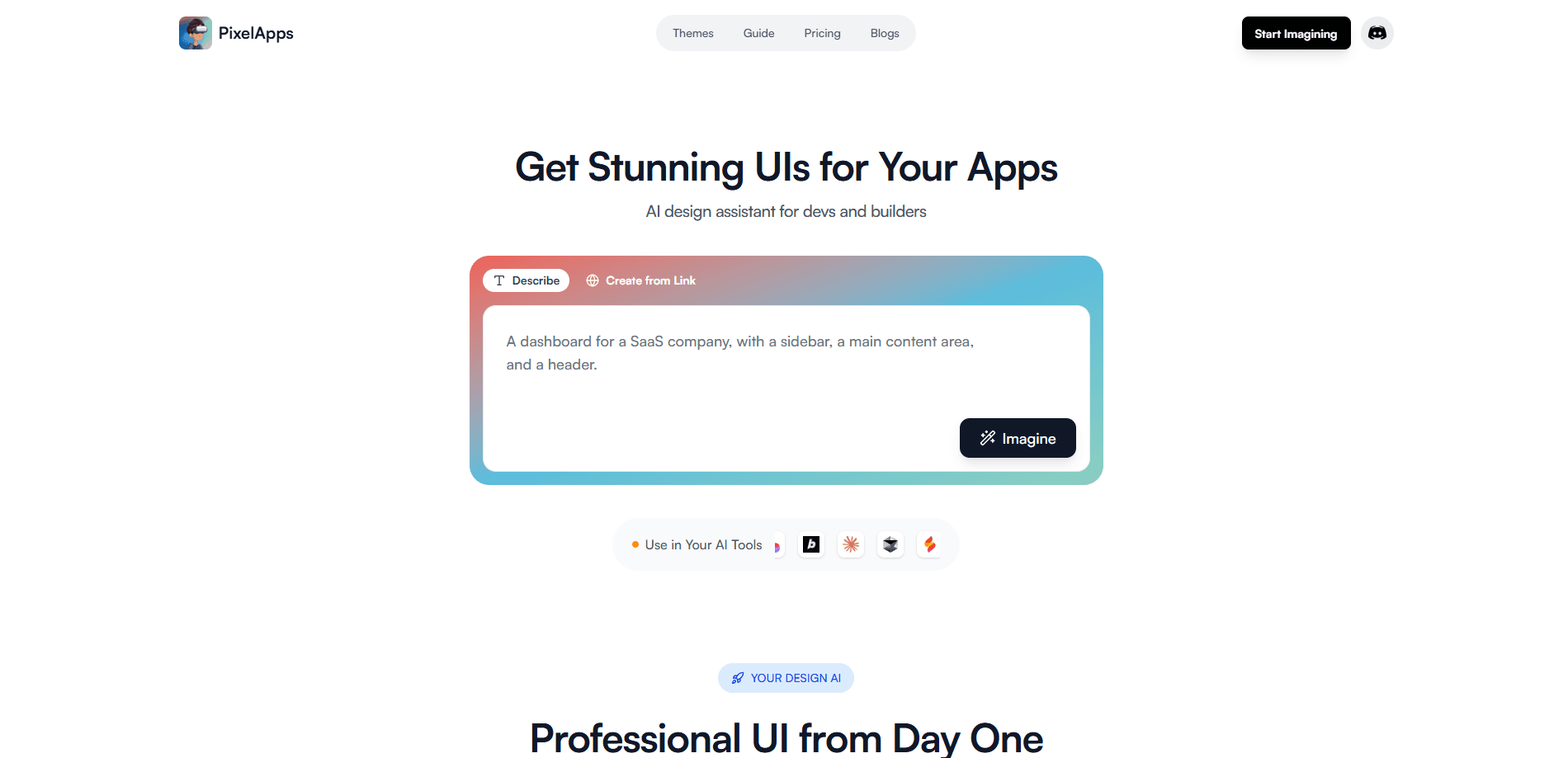
About PixelApps
What Is PixelApps
PixelApps is a web-based AI design generator built for people who are shipping apps with AI coding tools but keep getting stuck on how the thing should look. It does UI design from text. Instead of describing the exact button, card, and header you want inside a build tool and hoping it comes out clean, you describe the whole app in plain language and PixelApps returns finished-looking screens.
The core idea is speed to a professional starting point. Every design follows a shared design system, so buttons, inputs, and cards stay consistent across whatever it generates. That consistency matters when you hand the output to an AI app builder. Those tools otherwise tend to produce a different visual style on every new screen.
The tradeoff is control. You're working with variations the AI proposes rather than placing elements pixel by pixel, so teams with an existing brand system and strict guidelines will still want to adapt the output before it ships. And because it's a browser tool, you'll be exporting code or prompts into your own stack rather than getting a finished, hosted app.
Getting Started
- Create an account on the PixelApps site to start generating designs.
- Describe your app in natural language, covering its functionality, style, and purpose.
- Browse the three design variations it returns and pick the direction closest to your vision.
- Refine the selected design in the editor using real-time previews until it matches what you want.
- Export the result as downloadable HTML with embedded CSS, or copy it as a prompt for your AI development tool.
Product Information
A quick look at PixelApps's pricing, supported platforms, and performance.
Best for
The users, tasks, and scenarios where this tool fits best.
Users
- Indie developers and solo founders
- Non-designers building with AI tools
- Early-stage teams prototyping fast
Tasks
- Generating first-draft UI screens
- Exploring multiple visual directions
- Producing exportable front-end code
Scenarios
- Starting a new app from a blank repo
- Pitching a concept to a client or cofounder
- Preparing a design prompt for Cursor, Bolt, or Lovable
Key features
Three Design Variations Per Prompt
Every description returns three separate design options. Each one takes a different aesthetic approach. That matters more than it sounds. Picking between concrete screens is far easier than trying to imagine one, and the variation usually surfaces a direction you wouldn't have described on your own. It doubles as a quick AI wireframe generator. You can generate a dashboard layout one way, for instance, and end up preferring the version with a sidebar you didn't ask for.
Export Directly to Popular AI Builders
The export step is where PixelApps fits into a real workflow. It's built to pair with the AI app builder designs you're already generating. You can download the complete HTML file with embedded CSS, or copy the design as a prompt phrased for AI tools. The site names Cursor, Bolt, Lovable, Replit, Firebase Studio, Base44, Claude Code, Emergent, and Rocket as targets. Copying as a prompt is the smoother path when your builder prefers instructions over raw code.
A Shared Design System
Components follow one set of design principles, so buttons, cards, and inputs stay visually consistent across the screens it produces. This is the part that separates it from prompting a builder directly, where each new screen can drift into its own style. Cohesion is the whole point when you're assembling a multi-screen app.
Editing With Real-Time Previews
The built-in editor lets you iterate on a design and see changes as you make them, so you're not regenerating from scratch every time something is slightly off. You keep refining one direction until it fits. That's faster than restarting the prompt and hoping for a better roll. How much can you change in a single pass? Enough to fix spacing, colors, and layout without losing the rest of the design.
Human Design Services On Top
Alongside the AI generator, PixelApps offers a paid service where its designers and developers build the UI for you. A single landing page or small app of up to 15 screens runs $249 with a two-day delivery, while a full website or large app of up to 70 screens is $750 with four-day delivery. Both include full code access. It's a useful fallback when the generated output needs a professional pass.
Pros and cons
Pros
- Turns a written app description into polished UI screens quickly.
- Three variations per prompt make it easy to compare directions.
- Exports to HTML or an AI-ready prompt for Cursor, Bolt, and Lovable.
- Shared design system keeps generated screens visually consistent.
- Real-time editor lets you refine without regenerating everything.
Cons
- Credit-based pricing means heavy experimentation adds up; 100 credits cost $29 and expire after three months.
- You're choosing among AI proposals, so precise brand control is limited.
- Output is front-end code you still have to integrate and maintain yourself.
Frequently asked questions
It generates professional-looking UI designs from a text description of your app. You write what you're building, get three design variations back, and export the one you want as HTML or as a prompt for an AI development tool.
Related content
Explore related tools, skills, and articles for PixelApps.
PixelApps Alternatives

X Ray Interpreter
X-ray Interpreter · ImageX Ray Interpreter is a web-based AI radiology tool that turns X-rays, CT scans, MRI, ultrasound, and PET images into plain-language reports. You upload a scan, get a preliminary X-ray interpretation in moments, then ask follow-up questions if something needs explaining. It works as a second opinion and a learning aid, not as a medical diagnosis.

Aieasypic
AIEasyPic · ImageAIEasyPic is an AI image generator that turns plain text prompts into finished artwork in seconds. You can also train custom models on your own photos, swap faces in existing images, and create short video clips from text, all from a browser. It suits casual creators who want quick visuals and hobbyists who want to build a personal model without touching any code.

Chargen
Chargen · ImageChargen is an AI character generator and worldbuilding toolkit built for Dungeons & Dragons and other tabletop RPGs. It turns a one-line idea into a painted character portrait, spins up NPCs, monsters, maps and encounters from the same session, and keeps every creature's details close at hand. The tabletop RPG art side runs on a credit system called Gold, while the text generators stay free for everyone.