

PIXEL DOJO
PIXEL DOJO · Image
PIXEL DOJO is a browser-based AI image and video generator: 80+ image models, 60+ video models, LoRA training and six studios under one subscription from $10 a month.
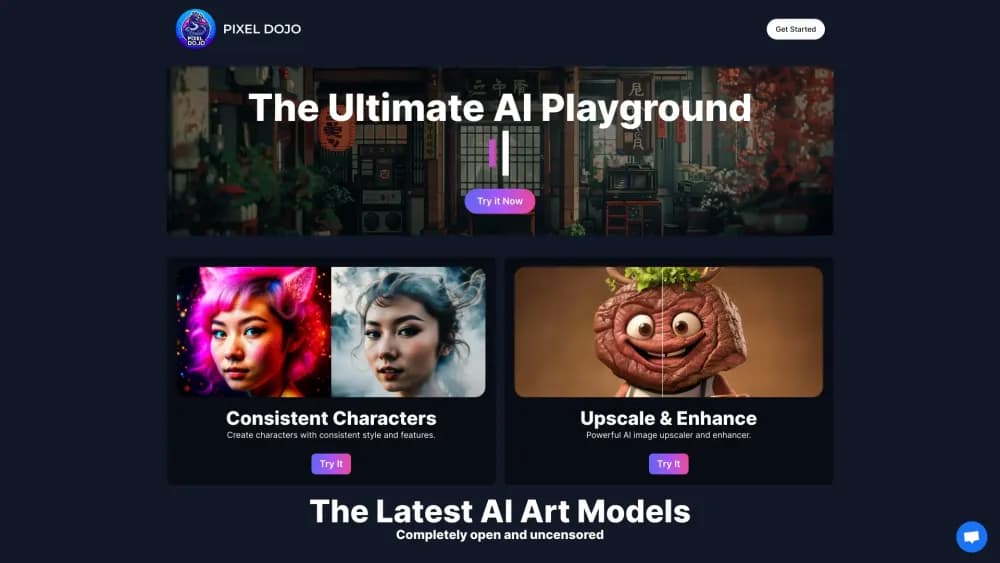
About PIXEL DOJO
What Is PIXEL DOJO
PIXEL DOJO is a web workspace for AI art and video. It works as a general AI image generator and AI art generator, and the Pixel Dojo pricing stays flat across studios. Instead of subscribing to one model (Midjourney), one video tool (Runway) and one upscaler, you get a single dashboard where FLUX 3, Nano Banana, Veo 3.1, Kling, Seedance and WAN sit side by side. The site lists 125 tools in total, and new models get added most weeks.
The pitch is breadth at a low entry price. Every paid plan unlocks every model and every studio, including LoRA training and the upscaler, so the $10 Lite plan doesn't feel like a crippled demo. What changes between plans is how many credits you burn through, not what you can reach.
The catch is that hundreds of models with different strengths means you have to choose. PIXEL DOJO shows the credit cost before each run, which helps, but you still need some sense of which image or video engine suits a proposal deck versus a product ad. Credits are the other limit: a still image runs 1.5 to 4.5 credits, a short clip 10 to 36, so video work eats a plan fast.
Getting Started
- Sign up at pixeldojo.ai with an email address. No card is needed for the free effects, which let you make 3 watermarked videos or photos a day.
- Pick a starting point: the AI image generator, the AI video generator, or a studio such as Character Studio or Video Studio.
- Type a prompt, or attach a reference image, and check the credit cost quoted under the run button before you commit.
- Review the result, then edit, upscale, extend the clip or push the image into a video model.
- Download the file for commercial use, or keep iterating in Canvas, the node board that chains several tools into one flow.
Product Information
A quick look at PIXEL DOJO's pricing, supported platforms, and performance.
Best for
The users, tasks, and scenarios where this tool fits best.
Users
- Solo content creators who need both stills and motion
- Small marketing teams producing ads
- Illustrators and comic artists building a re-usable cast
Tasks
- Turning a text prompt into a usable image
- Making a short video ad
- Upscaling and cleaning old assets
Scenarios
- Producing a batch of ad variants for a launch
- Keeping a brand character on-model across a series
- Automating image generation from code
Key features
Model Library Across Image and Video
One account reaches 80+ image models and 60+ video models, spanning FLUX 3 Image, Ideogram 4.5, GPT Image 2.5, Seedream 5, Qwen Image 2.1 on the image side and Veo 3.1, Kling 3.0, Seedance 2.5, WAN 3.0, MiniMax H3 on the video side. That matters when a brief calls for sharp typography in one shot and photorealism in the next. Switching models is a dropdown, not a new subscription, but each engine carries its own credit rate.
Six Studios for End-to-End Jobs
The studios package the models into a workflow. Film Studio takes a one-line idea to a cut short film, Character Studio locks a face across scenes, Marketing Studio turns a URL into a video ad, Video Studio makes and edits clips, Faceless Studio builds narrated episodes, and Prompt Studio refines an idea before you spend. Each one is included from the $10 plan.
Sensei, the Built-In Director
Sensei is an agent layer powered by Grok 4.7 that takes a single instruction such as "a 15 second ad for a luxury fragrance" and plans the shot list, prices each step, and waits for approval before running a bigger job. It picks models per shot and re-runs takes that miss. Images and video still cost their normal credits, plus a small Sensei fee shown as a running total.
Consistent Characters and LoRA Training
Character Studio saves a face from photos or a text description and returns the same person across scenes and a six-view turnaround sheet. When that isn't enough, six LoRA trainers (Fast Flux, Flux 2, Flux Dev, Z-Image, Qwen Image 2.1, SDXL) turn your photos into a custom model, with the fastest ready in about two minutes.
AI Video Editing and Clip Extension
Video Studio goes past generation: you can relight a clip, swap a product, restyle a scene, move your saved character into someone else's motion, or extend a clip forward and backward. The edit models included are Seedance 2.5 Video Edit, Kling Video Edit and WAN 2.7 Video Edit, all in the same composer.
Upscaling, Cleanup and One-Click Effects
The upscale range runs from P-Image Upscale to Magnific and Clarity Pro, the last reaching 16x and 64 megapixels. Cleanup tools remove watermarks, objects, text in photos and subtitles in video. On top sit 300+ one-click video effects and a set of photo effects, which are what the free tier unlocks.
Canvas and the REST API
Canvas is a node board where prompts, references and outputs connect into a repeatable pipeline. Developers get an async REST API with model listing, job polling, webhooks and a hosted MCP server, so Claude or Cursor can request images directly. API calls spend the same credits as the web app.
Pros and cons
Pros
- Every model and studio comes with every plan, so the $10 Lite tier isn't a gated demo of the paid product
- Credit costs appear before each run, which makes comparing a cheap FLUX image against an expensive Veo clip concrete rather than guesswork
- Credits roll over while you stay subscribed, so a quiet month doesn't wipe the balance
- Commercial use is included from Lite upward, which matters for client work and product pages
- The API, MCP server and web app share one credit pool, so coding and clicking don't need separate budgets
Cons
- Credit burns are uneven: a 5-second Kling clip costs 20 credits while a FLUX image costs 1.5, so video-heavy users outgrow Lite quickly
- The model list is long enough that picking an engine for a task takes trial and error, and there's no single recommendation per use case
- Sensei adds a fee on top of normal generation costs, which makes budgeting an agent job harder to predict
- Refunds only apply to a first purchase within 7 days, and renewals or credit top-ups aren't refundable
Frequently asked questions
It generates and edits AI images and video in a browser. People use it for social posts, ad creative, product photography, short films and upscaled assets, drawing on 80+ image models and 60+ video models in one workspace.
Related content
Explore related tools, skills, and articles for PIXEL DOJO.
PIXEL DOJO Alternatives

Tractionwave
TractionWave · Image · MarketingTractionWave is an AI attention heatmap tool for static ads. Upload a PNG or JPG and it returns predicted attention, ranked hotspots, and fixes before you spend budget.

Imejis.io
Imejis.io · Image · MarketingImejis.io is an AI design studio for agents and marketing teams. Describe an image in plain words, and it writes the copy, builds the layout, reflows it to every size, then exports a finished file.

Layoutr
Van Dijk Ontwikkeling · Image · China AILayoutr is a browser floor plan tool that scales your own plan, places furniture at true size, shows the room in 3D and renders it with AI.