

Plane Agents
Plane · Productivity · Business
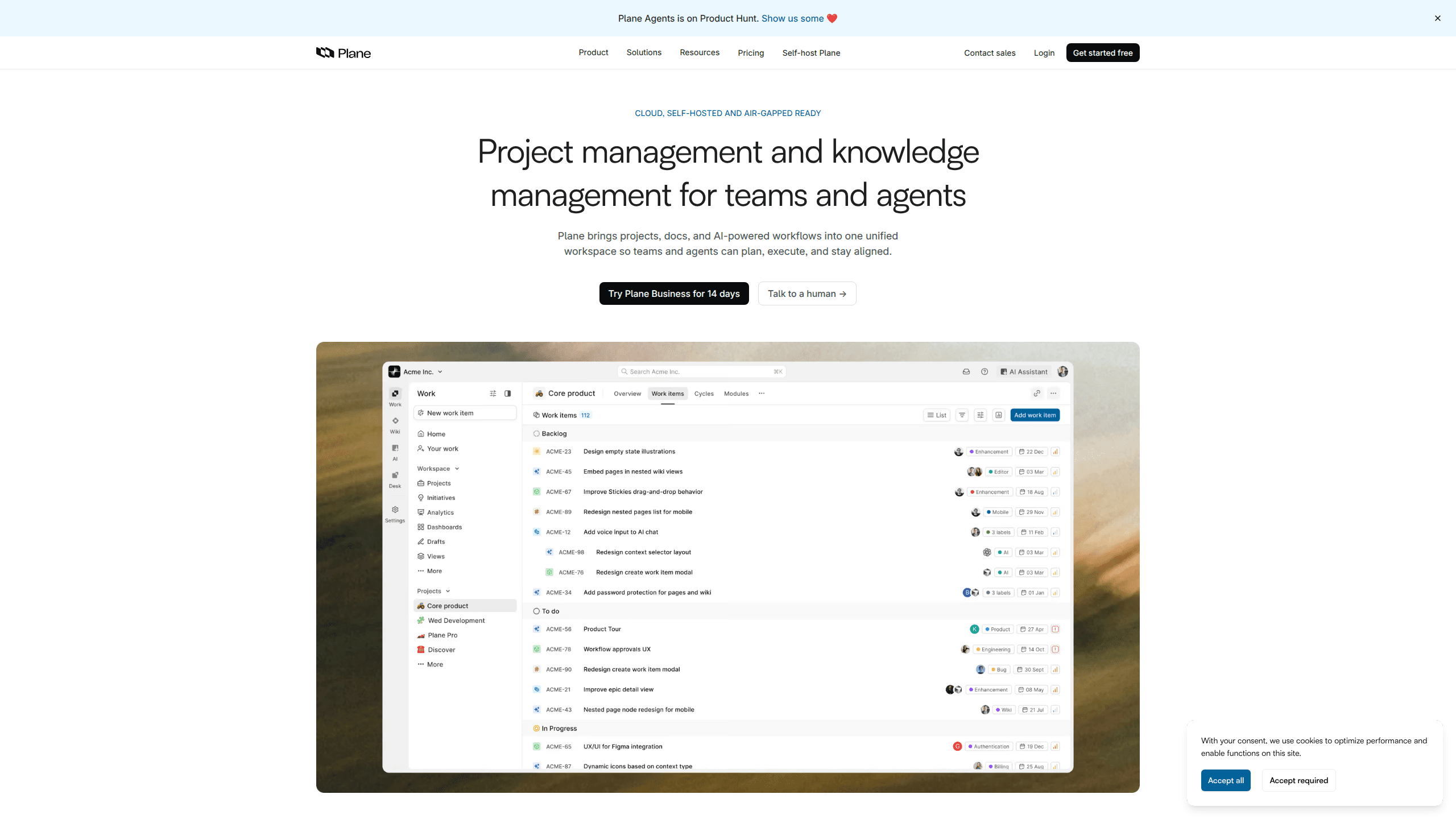
Plane Agents is part of Plane, a project and knowledge management platform where you can assign work items to AI agents just like you would to a teammate. The agents read across your projects, cycles, docs, and threads, then triage requests, draft updates, and keep tasks moving without you switching tools. It runs on the cloud or fully self-hosted, and paid plans bundle monthly AI credits per seat.
About Plane Agents
What Is Plane Agents
Plane Agents is the AI layer built into Plane, an open-source-friendly project management platform used for planning, tracking, and documenting work. Instead of treating AI as a separate chatbot, Plane puts agents inside the same workspace where your projects and docs already live. You assign a work item to an agent the way you'd assign it to a person.
The appeal is context. Most AI assistants only know what you paste into a prompt, so they miss the history behind a task. Plane Agents read across your entire workspace, which means an agent can see the cycle, the linked doc, and the thread where a decision was made. That context is what makes the output useful instead of generic.
The main limitation is that agents are a Plane feature, not a standalone product. You can't bolt them onto Jira or another tool. They only work inside Plane, and the number of AI credits you get depends on your plan tier.
Getting Started
- Sign up for a Plane workspace at app.plane.so and pick a plan. The Free tier works for small teams. Pro and Business add AI credits.
- Create a project, then add work items, cycles, and docs so the agents have context to work with.
- Assign a work item to a built-in agent from the work item's assignee field, the same way you'd assign it to a teammate.
- Let the agent triage incoming requests, draft responses, or post status updates, then review its output before it ships.
- Connect Plane AI to Slack or Teams if you want to turn conversations into work items without leaving your chat app.
Product Information
A quick look at Plane Agents's pricing, supported platforms, and performance.
Best for
The users, tasks, and scenarios where this tool fits best.
Users
- Small product teams
- Engineering managers
- Support and ops teams
Tasks
- Triaging incoming requests
- Drafting status updates
- Tracking blockers
Scenarios
- Running a sprint review
- Replacing a legacy tool
- Keeping docs current
Key features
Work Items You Can Assign to Agents
Plane treats agents as assignees, so handing off a task works the same as delegating to a person. You pick an agent from the assignee field and it takes ownership of the item. That consistency matters for teams that don't want a separate AI workflow to learn.
Workspace-Wide Context
Plane Agents read across every project, cycle, doc, and thread in your workspace. Ask about blockers on a project or what changed in a doc last week, and the answer comes from your real data rather than a generic model response. This is the core difference from standalone AI chatbots. It matters. A prompt-only assistant can't see the history behind a task.
Built-In Agents for Busywork
The platform ships with agents that handle recurring jobs: triaging incoming requests, assigning owners, tracking blockers, and posting updates. They run in the background so your team can stay focused on actual delivery instead of admin. No meetings required.
Slack and Teams Integration
You can bring Plane AI into Slack or Microsoft Teams, where your team already talks. Conversations turn into trackable work items, and updates flow back into chat so people don't have to open another tab to stay informed. That's it. No new app to adopt.
Cloud, Self-Hosted, and Air-Gapped Options
Plane runs on the cloud or on your own infrastructure, including air-gapped setups for teams with strict data rules. That range is unusual for AI-enabled project tools, many of which are cloud-only and route your data through third-party servers.
AI Credits Per Seat
Paid plans issue monthly AI credits per seat, and agents draw from a separate workspace pool. Pro includes 500 credits per seat, Business includes 1,000, and Enterprise offers flexible allocations with usage controls. This gives admins a way to cap spend as AI usage grows.
Migration Support From Other Tools
Plane offers migration help for teams leaving Jira, Linear, ClickUp, Asana, or Monday, aiming to move your data without leaving it behind. The pitch is straightforward: switch tools without losing your project history.
Pros and cons
Pros
- Agents work inside your existing workspace, so they already know the context behind a task.
- A free plan covering up to 12 users makes it easy to test AI agents before committing.
- Self-hosted and air-gapped deployment options suit teams with strict data requirements.
- Native Slack and Teams support keeps workflows in the tools people already use.
- A public REST API and webhooks let developers build custom integrations.
Cons
- Agents only work inside Plane. You can't use them with Jira or another project tool.
- AI credits are metered per seat. Heavy AI use can push you to a higher tier.
- Enterprise Grid is listed as coming soon, so larger orgs may need to wait.
- The most advanced AI features depend on cloud plans. Self-hosted setups see a narrower feature set.
Frequently asked questions
Plane Agents are AI assistants built into Plane that you assign work items to, just like a teammate. They read across your workspace and handle tasks such as triage, drafting, and status updates. Simple as that.
Related content
Explore related tools, skills, and articles for Plane Agents.
Plane Agents Alternatives

Swms
Swms AI · Writing · Productivity · BusinessSwms is an AI safety compliance tool that turns a plain description of a job into ready-to-use safety documents. Describe your project, trade, and known hazards, and it writes a safe work method statement, job hazard analysis, safe work procedure, RAMS, or safety data sheet in seconds. It also ships with Oscar, a chat assistant that answers workplace safety questions in any language. Teams in construction, mining, transport, and warehousing use it to cut the paperwork that usually eats into a workday.

Wordly AI Translation
Wordly · Voice & Language · ProductivityWordly AI Translation is a real-time AI translation and captioning platform built for meetings, conferences, and events. It delivers live translation, captions, transcripts, and summaries in more than 60 languages, and attendees join by scanning a QR code or opening a link instead of using dedicated headsets. The platform works with Zoom, Microsoft Teams, Google Meet, and Webex, and it's designed for organizations that want multilingual access without hiring human interpreters for every session. Simple as that.

Rows
Rows (Superhuman) · Productivity · BusinessRows is an AI spreadsheet and data analysis tool that imports live data from more than 50 sources, then lets you work with it using plain language instead of SQL queries or nested formulas. You can pull numbers out of PDFs, connect ad platforms, databases, and bank accounts, and ask the AI to build reports, merge datasets, or set up models that recalculate themselves. It runs in the browser, works like a spreadsheet, and now sits under the Superhuman umbrella.