

Productlane
Productlane · Productivity · Marketing
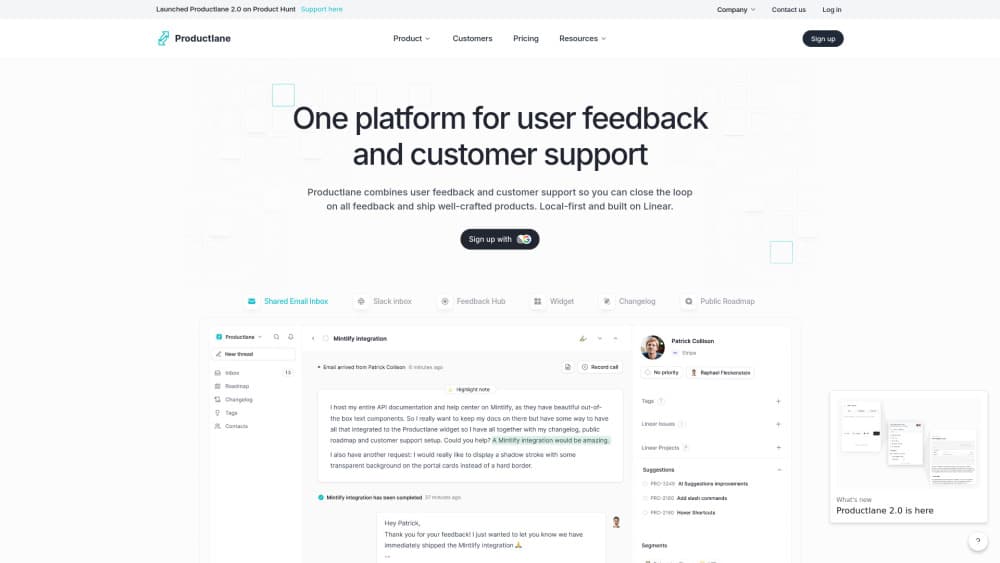
Productlane is an AI customer support platform for software companies. Its agent handles AI ticket resolution, unites email, live chat, and Slack in one inbox, and runs a self-updating help center.
About Productlane
What Is Productlane
Productlane is a customer support tool built for software companies, designed in Munich. It puts email, live chat, and Slack into a single inbox, then lets an AI agent answer the tickets it can settle from what you have already written. The team behind it pitches one idea: the agent resolves most questions on its own, and the rest reach a human or land in Linear as an issue.
What sets it apart is that the agent reads your product, not just your help center. Once you connect a GitHub repo and Linear, it grounds answers in your codebase and tracks the issues your customers hit. When something looks broken, it opens the customer's live account, files the issue, and tells the person once the fix ships.
Two things limit the fit. It leans hard on Linear, so a team on Jira or Asana gets less out of it. And the AI resolution credits are metered: 25 on the Starter plan, then $0.79 per resolution, which you need to track on high volume.
Getting Started
- Start a trial on the Productlane website and connect Linear, since the workspace is built around it.
- Add your support channels: a shared email address, the live chat widget, or a Slack Connect channel.
- Import or write your help center, then connect GitHub so the agent can read how your product works.
- Turn on the Productlane Agent per channel, and set which email addresses it should answer.
- Watch the inbox, let the agent close the easy threads, and let the rest escalate to your team.
Product Information
A quick look at Productlane's pricing, supported platforms, and performance.
Best for
The users, tasks, and scenarios where this tool fits best.
Users
- Support teams at software companies
- Small startups
- Product managers
- Engineering-led teams
Tasks
- Answering repeat support questions
- Turning messages into issues
- Keeping docs current
- Triaging across channels
- Reporting on support load
Scenarios
- Running support with a small team
- Onboarding trial users
- Closing the loop on bugs
- Handling a global inbox
Key features
The Productlane Agent
The agent is the center of the product. It reads your help center, changelog, and connected systems, then writes a reply only when it has a real answer. When all it could send is an acknowledgement, it stays silent and leaves the thread to your team. It also ignores machine mail, so a bounce, an out-of-office, or a newsletter never gets a reply, and each email address carries its own switch.
Answers grounded in your codebase
Connect GitHub and the agent grounds its answers in your repo, not just your docs. It maps your product screen by screen, generating one article per screen that lists each button, field, and setting. Those articles are agent-only and never touch your published docs, and they leave out screens behind an admin login or other customers' data. The map updates on its own from merged code and completed Linear issues.
Shared inbox across email, chat, and Slack
Email, live chat, and Slack Connect channels run through one inbox, so a customer's question does not depend on where they asked. The agent can be deployed on more than one email address, and each one answers in its own context, so jobs@ never replies like support@. Views keep the queue sorted, and anything the agent cannot settle escalates to a person.
Self-updating help center
The help center holds your documentation, and it updates itself from the work your team already does. Resolved conversations, closed issues, and shipped commits come back as draft articles you review and publish. You connect it to your own domain, and it feeds both customers and the agent the same source.
Changelog and feedback portal
A public changelog shows customers what shipped, and a feedback portal collects what they want next. Both connect to Linear, so a customer request becomes a tracked issue rather than a note nobody reads. The changelog also feeds the agent, which means a question about a recent release can be answered from the entry itself.
API, MCP, and integrations
Productlane exposes a v2 REST API to read and write your whole workspace, along with outgoing webhooks signed with HMAC-SHA256. It also connects over MCP, which lets tools like Cursor talk to your workspace. Linear is the deep integration, and other connections cover Slack, Zapier, Raycast, HubSpot, Attio, GitHub, and importers from Zendesk, Intercom, Productboard, and CSV.
Pros and cons
Pros
- One inbox pulls email, live chat, and Slack together, so a support team does not switch between tabs to follow a thread.
- The agent answers from your help center and your GitHub repo, which lifts resolution rates beyond what docs alone allow.
- The help center writes drafts from resolved conversations and shipped fixes, cutting the manual upkeep that usually lags.
- Linear sits at the center, so customer requests and bug reports become tracked issues with the customer's context attached.
- Transparent pricing starts at $29 per user a month, and a v2 REST API with MCP support makes it easy to extend.
Cons
- The workspace assumes Linear, so a team on Jira or Asana loses much of the value and would need a workaround.
- There is no free plan, and AI resolutions are metered past the included credits at $0.79 each, so heavy volume adds up.
- The agent only works as well as the content you feed it, so a thin help center means weak answers.
- Deploying on every channel, mapping GitHub screens, and tuning the agent takes setup time before it pays off.
Frequently asked questions
Productlane is a customer support platform for software companies. It combines a shared inbox for email, live chat, and Slack with an AI agent that answers tickets from your help center and your codebase. Support teams use it to resolve common questions automatically and send the rest to a person or to Linear.
Related content
Explore related tools, skills, and articles for Productlane.
Productlane Alternatives

Swms
Swms AI · Writing · Productivity · BusinessSwms is an AI safety compliance tool that turns a plain description of a job into ready-to-use safety documents. Describe your project, trade, and known hazards, and it writes a safe work method statement, job hazard analysis, safe work procedure, RAMS, or safety data sheet in seconds. It also ships with Oscar, a chat assistant that answers workplace safety questions in any language. Teams in construction, mining, transport, and warehousing use it to cut the paperwork that usually eats into a workday.

Wordly AI Translation
Wordly · Voice & Language · ProductivityWordly AI Translation is a real-time AI translation and captioning platform built for meetings, conferences, and events. It delivers live translation, captions, transcripts, and summaries in more than 60 languages, and attendees join by scanning a QR code or opening a link instead of using dedicated headsets. The platform works with Zoom, Microsoft Teams, Google Meet, and Webex, and it's designed for organizations that want multilingual access without hiring human interpreters for every session. Simple as that.

Rows
Rows (Superhuman) · Productivity · BusinessRows is an AI spreadsheet and data analysis tool that imports live data from more than 50 sources, then lets you work with it using plain language instead of SQL queries or nested formulas. You can pull numbers out of PDFs, connect ad platforms, databases, and bank accounts, and ask the AI to build reports, merge datasets, or set up models that recalculate themselves. It runs in the browser, works like a spreadsheet, and now sits under the Superhuman umbrella.