
Pulldog
Natic · Coding
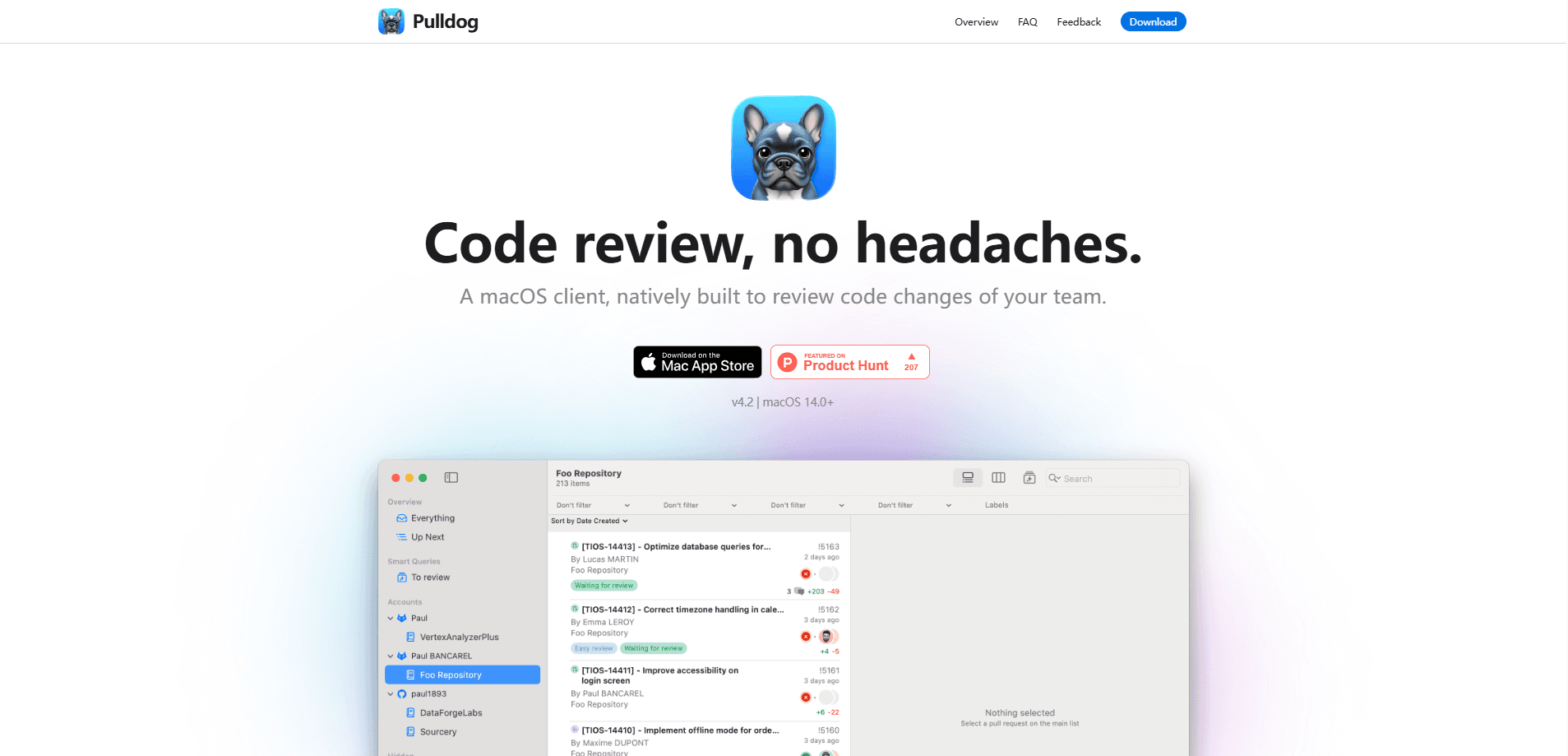
Pulldog is a native macOS code review client that pulls your team's pull requests into one focused window. It connects to GitHub, GitLab, Bitbucket, Gitea and Forgejo, then lets you filter, search and review changes without living inside a browser tab. Think of it as a dedicated code review tool for people who live in Git all day. If your day starts and ends with review queues, it gives the code the space it deserves.
About Pulldog
What Is Pulldog
Pulldog is a desktop app for reviewing code changes, written from scratch in Swift for macOS. It doesn't wrap a website. It talks to your Git provider's API and renders diffs, comments and pipeline status natively, so scrolling through a large diff feels like using Mail or Finder rather than waiting on a web page, which matters most when a single pull request touches a hundred files and you need to move through it without the interface fighting back. The app is developed by Natic, and it's distributed through the Mac App Store.
The pitch is narrow on purpose: code review is the one thing developers do constantly and it's usually the worst-served part of their toolchain. Reviewers bounce between browser tabs, lose track of which PRs they've already approved, and scroll blindly through files that don't matter. Pulldog treats each of those as a problem worth fixing. So why build a macOS code review app at all? Because the diff is the point, and no website has ever treated it that way.
The catch is platform. It's macOS 14.0 and up only, and there's no Windows or Linux build. If your team is split across operating systems, this won't be the shared tool.
Getting Started
- Download Pulldog from the Mac App Store and open it on a Mac running macOS 14.0 or later.
- Add one or more Git accounts (GitHub, GitLab, Bitbucket, Gitea or Forgejo) so the app can read your pull requests.
- Set up smart queries to decide which PRs show up first, such as ones waiting on your approval or ones where a pipeline passed.
- Open a pull request, collapse the sidebar to widen the diff, and filter by folder or file to review it in the order you want.
- Leave comments and approve. Notifications land on your desktop instead of your inbox.
Product Information
A quick look at Pulldog's pricing, supported platforms, and performance.
Best for
The users, tasks, and scenarios where this tool fits best.
Users
- Developers who review a steady stream of pull requests
- Tech leads and staff engineers who track many PRs at once
- Solo Mac-based developers
Tasks
- Reviewing a large pull request
- Tracking down where a variable changes
- Keeping an eye on merged and merged-today work
Scenarios
- Morning triage before standup
- Deep review of a colleague's feature branch
- Catching up after time off
Key features
Native macOS build in Swift
Pulldog is written entirely in Swift using Apple's current frameworks, so it behaves like a Mac app instead of a packaged website. Windows, menus, keyboard shortcuts and widgets all follow macOS conventions, and the app is compatible with macOS Tahoe. The payoff is speed: diffs load and scroll with native responsiveness, even on files that stall a browser tab.
Support for five Git providers
The app connects to GitHub, GitLab, Bitbucket, Gitea and Forgejo, and Natic says Azure and Gerrit are in progress, which means most teams can point it at the provider they already use rather than migrating their repositories to fit a new tool. You can add as many accounts as you need, which matters if your company keeps separate orgs on different providers. Multiple accounts sit side by side, so a monorepo split isn't a problem. For teams, that means GitHub pull request review and GitLab code review live in the same tool rather than two browser sessions.
Smart queries for organizing pull requests
Borrowing the idea of Mail's smart folders, Pulldog lets you write rules that decide which PRs land in which view. A query can pull approvals that are ready to merge, PRs older than a set number of weeks, big PRs above a deleted-line threshold, or only the ones you opened. Once set, the list sorts itself. It's pull request management that adjusts to how you already think about your queue.
Search and scoped filtering
You can search across all changed files or restrict the search to changed lines only, filter files by name, and match patterns with regex, all of which speeds up the work of finding a specific function or string inside a pull request that spans dozens of files and hundreds of edits. When a pull request touches hundreds of files, filtering by folder lets you review the UI layer first and the core logic later. It's the difference between reading a diff and being buried by one.
Wide diff view
Pulldog starts from a blunt observation: most review tools give the code barely half the window. Collapsing the sidebar expands the diff to roughly 93% of the surface, so you're looking at code, not chrome. That sounds like a small thing. It isn't. For close reading, that extra width cuts the horizontal scrolling that plagues long lines.
Matching selection and notifications
Select a variable and the app highlights where else it's changed or duplicated, which makes understanding impact faster. Not a gimmick. Notifications are subscription-based, so you can hear about replies to your comments and updates to PRs you approved while muting the noise of every new PR, which is the difference between a tool you leave running and one you eventually disable because the constant pinging wears you down. Alerts arrive as desktop notifications rather than email.
Pros and cons
Pros
- Feels like a real Mac app because it's one, which shows in scrolling, search and keyboard handling.
- Five Git providers out of the box, with multiple accounts supported at the same time.
- Smart queries turn a messy PR list into views that match how you actually work.
- Wide diff view and folder filtering make large reviews manageable.
- Localization across 185 languages and 90 themes let you tune the look and language.
Cons
- macOS 14.0+ only, so Windows and Linux users on your team are left out.
- No public API, which limits automation and integration with other tools.
- Pricing isn't published on the product page, so you'll need the Mac App Store listing to see what it costs.
Frequently asked questions
Pulldog is a macOS app for reviewing code changes, mainly pull requests. It pulls your PRs from GitHub, GitLab, Bitbucket, Gitea and Forgejo into one desktop window so you can filter, search and approve them without a browser.
Related content
Explore related tools, skills, and articles for Pulldog.
Pulldog Alternatives
Forefront
Forefront · CodingForefront is a web platform for building with open-source AI. It lets you fine-tune leading open-source language models on your own data, evaluate how they perform, and run them through an API or export them to host yourself. Developers who want the convenience of a closed-source platform but insist on owning their models and data are the target audience here.

Startkit
StartKit.AI · CodingStartkit is a boilerplate for building AI SaaS and AI wrapper products. Think of it as an AI startup boilerplate with the boring parts already wired up: authentication, Stripe and Lemon Squeezy payments, usage limits, transactional email, and an AI API starter that talks to OpenAI, Anthropic, Groq, or Llama. You clone the repo, set your price, and start on the part of your product that people actually pay for. It's Next.js under React and Tailwind, so most of the boilerplate code already feels familiar.
Testim
Tricentis · CodingTestim is an AI-powered test automation platform for building and running end-to-end tests across web, mobile, and Salesforce applications. It leans on machine learning to keep tests stable when an interface changes, so teams spend less time fixing broken selectors. Not bad for an automated testing tool you can start using today. You create tests by recording actions in a browser, then optionally add JavaScript when you need more control. It's a solid pick for busy QA teams.