

Quills.ai
Kloudhunt · Coding · Chatbot
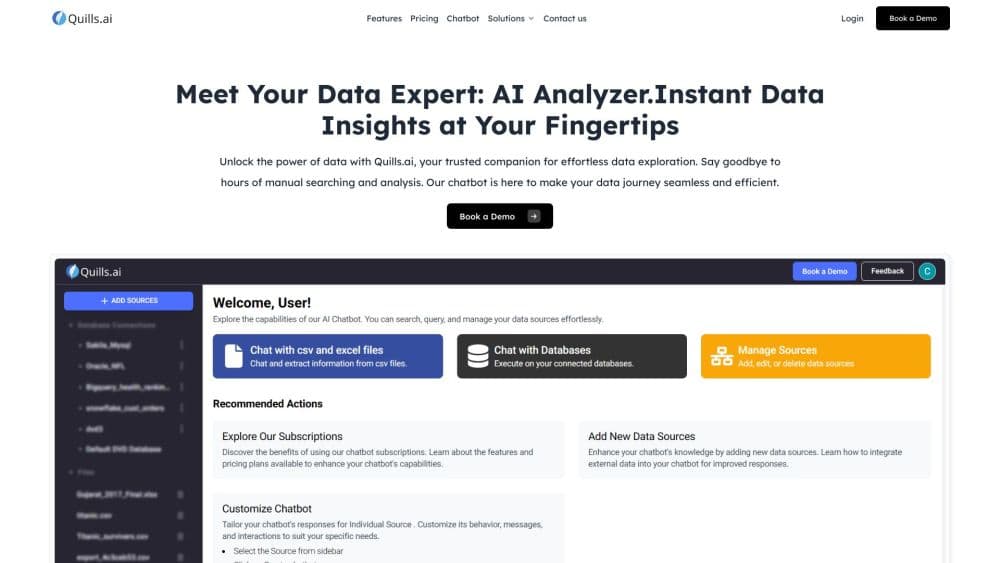
Quills.ai is an AI data chatbot that turns plain-English questions into SQL, charts, and CSV exports across databases, spreadsheets, and PDFs.
About Quills.ai
What Is Quills.ai
Quills.ai is a generative BI tool from Kloudhunt, a Houston company that launched it in 2023. You connect a database or upload a file, then ask questions in a chat window. The bot replies with a table, a chart, or a single number, and it shows the SQL it ran underneath the answer.
The product targets the queue that builds up around every data team. A sales manager wants the top accounts by contract count, an operator wants yesterday's orders, and both wait for an analyst to write a query. Quills.ai lets those people ask directly, in the same language they'd use with a colleague. Analysts keep a way in too: the chat accepts typed SQL when you'd rather write the query yourself.
The limits are worth knowing before a demo. Pricing isn't published, there's no public API, and Slack is the only chat app it plugs into so far. The app carries its own warning that the answers can be wrong, so someone still has to check figures that go into a report. Setup quality also depends on your schema: tidy table names and clear column labels give the model much more to work with than a database full of cryptic abbreviations.
Getting Started
- Book a demo through the calendar link on quills.ai, or use the sign-up button to reach the dashboard. The sales team handles workspace setup and pricing.
- Connect a database or upload CSV, Excel, PDF, DOCX, or DOC files. Group related sources into collections so the bot knows what belongs together.
- Ask your first question in plain English, or switch to the Generate SQL option and edit the query it returns. SQL users can paste a statement straight into the chat.
- Choose table, chart, or single value for the answer, then download the chart as an image or export the rows as CSV or Excel.
Product Information
A quick look at Quills.ai's pricing, supported platforms, and performance.
Best for
The users, tasks, and scenarios where this tool fits best.
Users
- Operations and sales managers
- Data analysts
- Client-facing teams in healthcare, insurance, and retail
Tasks
- Getting one figure before a meeting
- Turning a spreadsheet into a slide
- Answering the same question every week
Scenarios
- A Monday pipeline review
- A new hire learning the data
- A client portal with a data tab
Key features
Plain-English Chat
Type a question the way you'd say it out loud and Quills.ai builds the query for you, returning a table, chart, or single value. The SQL sits under each answer, so you can check the logic or reuse the statement elsewhere. This is the core of the product: natural language to SQL, with a SQL query generator you can question instead of a separate builder.
Direct SQL Mode
Analysts aren't locked out of their own craft. The chat accepts a typed SQL statement and runs it against the connected source, which makes the tool useful for both the person who wants an answer and the person who wants control. You can also ask for the generated query first and edit it before it runs.
Databases and File Uploads
Quills.ai connects to databases and takes uploads in CSV, Excel, PDF, DOCX, and DOC formats, so a finance export and a production table can sit in the same workspace. Collections keep those sources organized by project or department. PDF and DOC support matters more than it sounds: policy documents and contracts often hold the numbers people ask about.
Charts, Tables, and Exports
Answers render as a table, a chart, or a single value, and you can change the format without rephrasing the question. Charts are customizable and download as images, while data previews export to CSV or Excel. For a quick text to SQL workflow that ends in a slide, that covers the whole loop.
Branded Chatbot
The chatbot isn't limited to the Quills dashboard. You can set the logo, title, subtitle, colors, default message, input placeholder, and send button icon, then publish it as a widget on your own site. Logo placement and heading position are configurable too, which matters if the bot has to match an existing product.
Slack and Website Deployment
Add the bot to a Slack channel and teammates can ask questions where they already work, without another tab. Website embedding covers clients and internal portals. The integration list is short and the company says more are coming, so check the current state before you plan around Teams or another chat app.
Pros and cons
Pros
- No SQL required for the basics: a manager can get a number in one message, and the generated query stays visible for anyone who wants to audit it.
- Two modes in one place: plain English for speed, direct SQL for precision, so analysts and business users share the same tool.
- Wide file support: CSV, Excel, PDF, DOCX, and DOC uploads sit next to database connections, which covers most ad-hoc analysis.
- Export path is short: chart to image, data to CSV or Excel, no separate reporting tool needed for a one-off request.
- Branded deployment: the widget and Slack app put the same data visualization chatbot in front of clients and colleagues under your own logo.
Cons
- Pricing is quote-only: you can't estimate cost from the site, and a small team has to sit through a sales call before it knows the number.
- Answers need a check: the interface warns that Quills AI can make mistakes, so anything headed for a board deck needs a human pass.
- No public API: there's no way to pipe answers into an internal app, a data warehouse job, or a custom dashboard.
- Thin integration list: Slack and a website widget are the options, and teams standardized on Teams or Notion won't find a connector.
Frequently asked questions
Quills.ai is an AI business intelligence tool that lets you chat with your database or uploaded files in plain English. It writes the SQL, returns a table or chart, and exports the result.
Related content
Explore related tools, skills, and articles for Quills.ai.
Quills.ai Alternatives
Forefront
Forefront · CodingForefront is a web platform for building with open-source AI. It lets you fine-tune leading open-source language models on your own data, evaluate how they perform, and run them through an API or export them to host yourself. Developers who want the convenience of a closed-source platform but insist on owning their models and data are the target audience here.

Startkit
StartKit.AI · CodingStartkit is a boilerplate for building AI SaaS and AI wrapper products. Think of it as an AI startup boilerplate with the boring parts already wired up: authentication, Stripe and Lemon Squeezy payments, usage limits, transactional email, and an AI API starter that talks to OpenAI, Anthropic, Groq, or Llama. You clone the repo, set your price, and start on the part of your product that people actually pay for. It's Next.js under React and Tailwind, so most of the boilerplate code already feels familiar.
Testim
Tricentis · CodingTestim is an AI-powered test automation platform for building and running end-to-end tests across web, mobile, and Salesforce applications. It leans on machine learning to keep tests stable when an interface changes, so teams spend less time fixing broken selectors. Not bad for an automated testing tool you can start using today. You create tests by recording actions in a browser, then optionally add JavaScript when you need more control. It's a solid pick for busy QA teams.