

Reeler AI
Reeler AI · Video
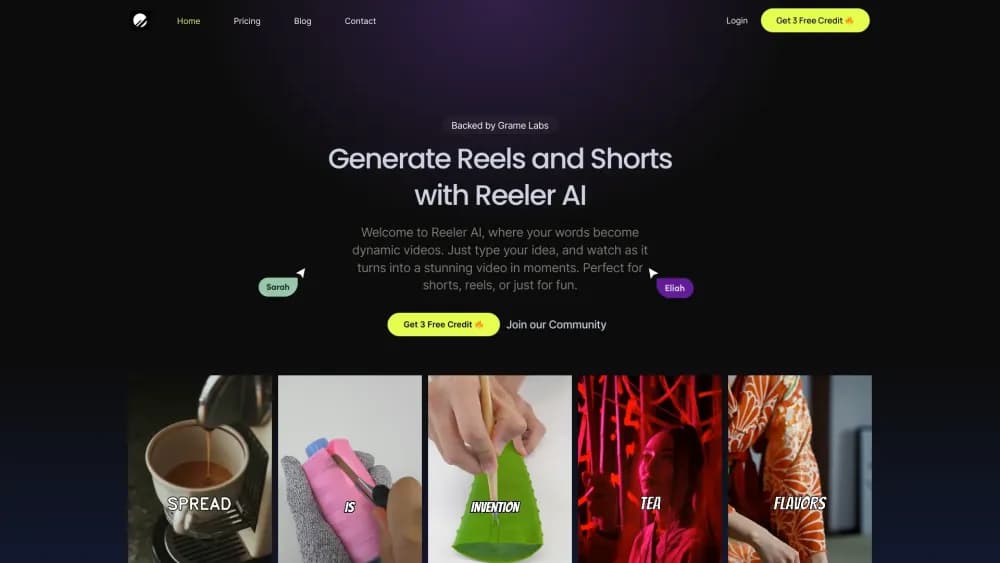
Reeler AI turns text prompts into vertical videos for Reels, TikTok, and Shorts, adding AI voiceovers, animated subtitles, and 1080p exports. The free plan includes 3 videos to test the workflow.
About Reeler AI
What Is Reeler AI
Reeler AI is a browser-based AI video generator built for short-form social video. You describe the clip you want, and the platform assembles scenes, narration, captions, and music into a finished vertical video you can post.
Most people making reels hit the same wall: editing eats more time than the idea. Reeler AI skips the timeline work. Type a script or a rough concept, pick a voice, and the tool returns a draft you can adjust scene by scene.
The tradeoff is control. You get a small set of editable pieces (script, footage, caption styling), not a full editing suite. If you need frame-level cuts, keyframes, or multicam work, you'll still finish in another editor. Renders top out at 1080p, and free accounts are limited to 720p.
Getting Started
- Sign up at reelerai.com. The free plan opens with 3 video generation credits, enough to judge whether the output style fits your channel.
- Write a prompt or paste a short script. Prompts that name the topic, tone, and audience return more usable drafts than a one-line idea.
- Pick a voice and a caption style, then generate. Paid plans unlock the handpicked ElevenLabs voice set.
- Review each scene, swap footage or rewrite lines, then export at up to 1080p and share to your connected social accounts.
Product Information
A quick look at Reeler AI's pricing, supported platforms, and performance.
Best for
The users, tasks, and scenarios where this tool fits best.
Users
- Solo content creators
- Social media managers
- Small business owners
Tasks
- Turning a blog post into a short video
- Making faceless narration videos
- Producing ad variants for testing
- Drafting announcement clips
Scenarios
- Keeping a daily posting schedule
- Launch week with no video team
- Testing hooks before paying for ads
Key features
Text to Video Generation
You give Reeler AI a prompt or script, and it returns a complete vertical video with visuals, narration, and captions already in place. The point is speed: a usable draft in minutes instead of an afternoon in an editor. Longer scripts get split across scenes automatically, which is convenient but needs a check for awkward cuts.
AI Voiceover from ElevenLabs
Paid plans include a handpicked set of ElevenLabs voices, the same voice library many creators already use for narration. Voices read your script with natural pacing, and you can switch the voice before rendering. Free renders don't include the premium voice set, so the free plan is better for checking visuals than final audio.
Animated Subtitles
Captions are generated from your script and animated word by word, the style that holds attention on muted feeds. You can change caption colors and formatting to match your channel. It saves the manual captioning step that usually adds twenty minutes to a short edit.
Scene and Footage Swaps
Each scene can be reviewed on its own. Swap the background footage, rewrite a line, or reorder scenes without regenerating the whole video. That control matters when one clip looks off but the rest works. It's still scene-level editing, not frame-level.
1080p Vertical Exports
Videos are built in a vertical format for Reels, TikTok, and Shorts, with exports up to 1080p on paid plans. The free tier caps renders at 720p, which is fine for a test but soft on larger phone screens. There's no horizontal or square option listed, so this isn't the tool for YouTube long-form or feed posts.
Direct Social Sharing
Reeler AI connects to social accounts so you can publish from the same dashboard where you generated the video. Enterprise users get direct upload to all supported platforms. Everyone else can export the file and post manually, which is one extra step but no real obstacle.
Pros and cons
Pros
- Fast first drafts: a script becomes a captioned vertical video without timeline editing.
- Voice quality holds up: ElevenLabs narration sounds closer to a human read than most built-in text to speech.
- Scene-level fixes are cheap: you can swap one clip or line without rerendering everything.
- Low entry price: $9.99/mo for 30 videos works out to about 33 cents per render.
- Free plan is a real test: 3 videos at 720p show you the output style before you pay.
Cons
- Limited editing depth: no keyframes, frame-level cuts, or multicam, so complex projects end up in another editor.
- Vertical only: no horizontal or square exports, which rules out YouTube long-form and some feed placements.
- Stock visuals can look generic: you'll want your own product footage for brand-critical videos.
- Credit math adds up: every variant and rerender consumes credits, so experimentation has a cost.
Frequently asked questions
Reeler AI makes short vertical videos from text, aimed at Reels, TikTok, and Shorts. It handles scene assembly, AI narration, and animated captions in one pass, so you can post without editing footage yourself.
Related content
Explore related tools, skills, and articles for Reeler AI.
Reeler AI Alternatives
Griffin by Tavus
Tavus · Voice & Language · Video · ChatbotGriffin by Tavus is the first Human Interaction Model: a full-duplex, video-to-video system that watches, listens, and answers during a live video call in real time.

Syllaby AI Avatar 2.0
Syllaby · Video · MarketingSyllaby AI Avatar 2.0 turns a script into a presenter-led video with a reusable AI avatar, natural voice, B-roll and automatic subtitles, all in one browser workflow.

Vitra.ai
Vitra.ai · Voice & Language · Video · MarketingVitra.ai is an agentic content platform that creates, translates, reviews, and publishes video, images, documents, and app content in 120 languages from one shared brief.