

Reference To Video
Reference To Video · Image · Video
Reference To Video is an AI video generator that builds new shots from the references you feed it. It's an image to video AI tool at heart, but it goes further than that label suggests. Instead of typing one long prompt and hoping the model remembers a face, a product, or a camera move, you upload an image, a short video, or an audio clip and let each source define one part of the result. A character image locks appearance, a video reference carries motion and camera language, and an audio track sets sound and timing. That's what consistent character AI video really requires. It targets episodic creators, AI influencers, product teams, and anime or fashion workflows where continuity across shots is the whole point.
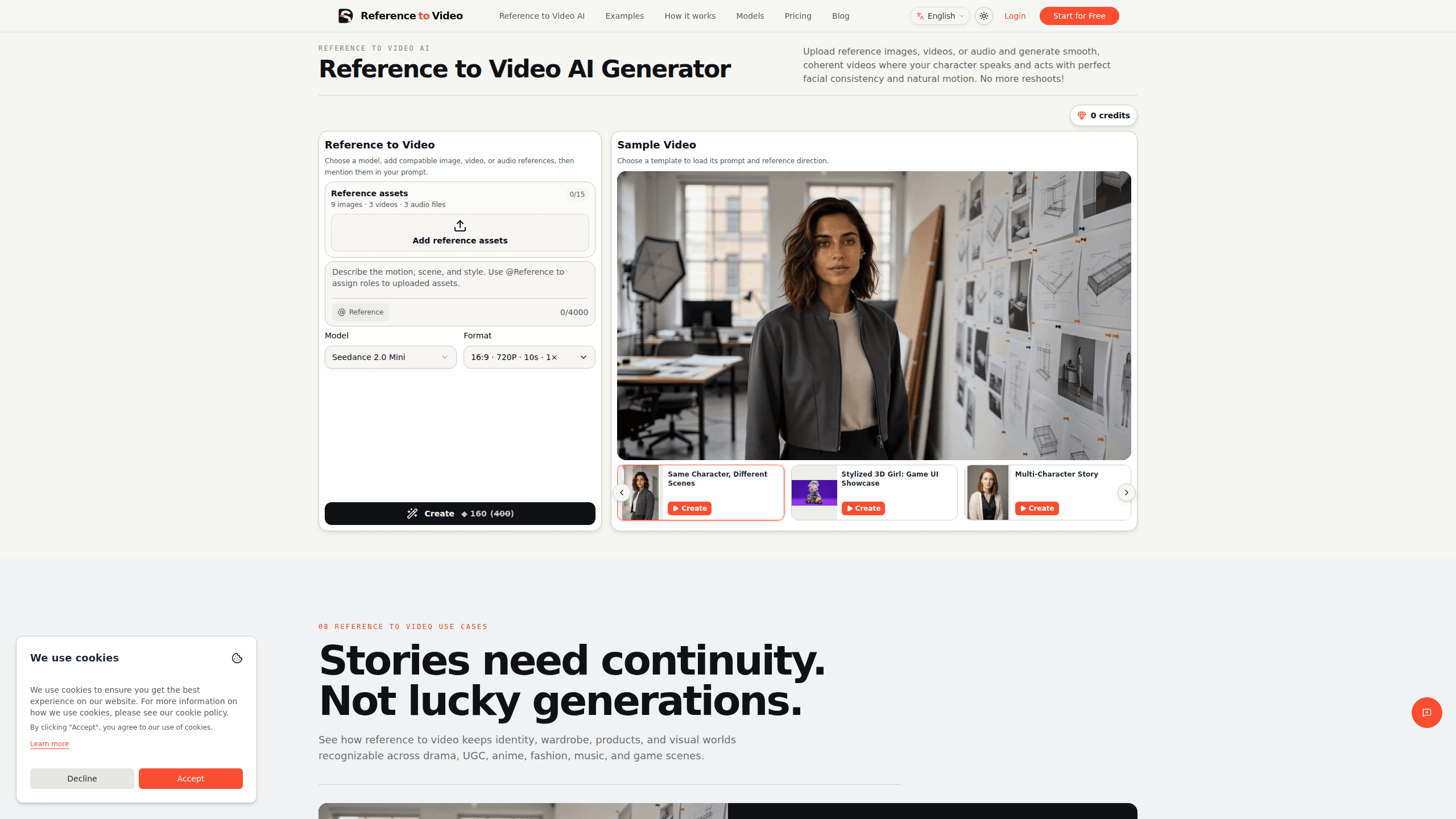
About Reference To Video
What Is Reference To Video
Reference To Video is a web-based AI video generation workflow built on the idea that a source asset should act as creative evidence, not just inspiration. Generic image-to-video tools treat every generation as a fresh start, so a face drifts, a jacket changes, or a product label jumps to the wrong side of the frame. This tool keeps those details fixed while letting the setting, action, and framing change.
The product groups its references by job. Character identity covers faces, hair, and body proportions. Product appearance covers shape, color, materials, and packaging. A short video handles motion, performance timing, and camera direction. Scene and style references carry a location, lighting language, or palette into a new shot. Audio references guide dialogue, voice, music, and beat timing on models that accept them.
The most important limit is model dependency. Reference To Video sits in front of third-party models such as Seedance 2.0 and MiniMax H3, and each model accepts a different set of references. The interface only shows controls the selected model can actually use, so what you can do in one session may not transfer to another. It's also not a promise of frame-perfect continuity, and the site says as much.
Getting Started
- Open referencetovideo.net and pick the model you want to work with, since the available reference slots change with the model.
- Upload your reference assets. Start with the smallest useful set: an image for appearance, a short video for motion, and audio only if sound matters for the shot.
- Give each reference one clear job in the brief so the model knows what must stay recognizable and what may change.
- Write the prompt for the new shot: subject action, camera movement, scene, timing, and how the references should combine.
- Generate, review the output, and refine the prompt or swap a reference until the shot holds together.
Product Information
A quick look at Reference To Video's pricing, supported platforms, and performance.
Best for
The users, tasks, and scenarios where this tool fits best.
Users
- Episodic and short-drama creators
- UGC and ecommerce teams
- Anime, VTuber, and original-character creators
- Fashion and AI-influencer teams
Tasks
- Turning a still character sheet into a moving shot
- Reproducing a hard-to-describe camera move
- Matching a performer to a track
- Building a connected product campaign
Scenarios
- Producing the next episode of a recurring series
- Shipping seasonal ad variations for one product
- Drafting a music-video sequence
- Testing a mascot or stylized brand character in a new scene before committing to a full production.
Key features
Reference-first generation
Every source is treated as a production decision rather than a style hint. An image defines appearance, a video defines motion, and audio defines sound, so each upload has one clear job. This is the part that separates it from plain text-to-video tools, where one prompt has to carry a face, an outfit, a camera move, and a beat all at once.
Character identity control
Faces, hair, body proportions, and distinctive features stay recognizable when you move a character into a new scene. You hand the tool a character image, describe the new setting and action, and expect the person to look like the same person. It won't hold up if the reference image is blurry, small, or shot from an odd angle.
Product appearance control
Product shape, color, materials, packaging, and label placement carry into the new shot. For campaign work this matters more than face consistency, because a wrong-color bottle breaks the ad. The tool preserves the item while the environment changes around it. Try it on a launch shot first.
Motion and camera direction from video
A short video clip can drive gestures, timing, body movement, and performance energy. It can also carry a camera behavior that's genuinely hard to describe. Referencing a pan, an orbit, or a handheld move usually works better than writing those instructions out. Words are weak here. A two-second clip wins.
Scene, style, and audio references
You can carry a location, lighting language, palette, or visual world into a newly composed shot, and on models that accept audio, guide dialogue, voice, music, beats, and action timing. Combining a scene reference with an audio reference lets a clip inherit both its look and its rhythm.
Two multimodal workflows
The site separates work into an image-plus-video workflow and an image-plus-video-plus-audio workflow, a neat example of multimodal video generation in practice. The image anchors appearance, the video guides motion and camera, and audio handles sound and sync when the brief needs it. Seedance 2.0 covers demanding multi-reference jobs at 720P, while MiniMax H3 handles the audio-backed 768P path. Pick with the brief in mind.
Model-aware controls
Because model capabilities shift, the generator shows only the settings the chosen model supports. That keeps you from configuring an audio slot a model can't use. The trade-off is real: the same reference set can behave differently when you switch models, so pick the model before you build the brief.
Pros and cons
Pros
- References stay active through the shot instead of fading after the first frames.
- Each input has a defined role, which makes a result easier to review and fix.
- Separating appearance, motion, and audio gives more control than a single text prompt.
- Camera moves can be borrowed from a video reference rather than described in words.
- The interface hides unsupported controls, so you don't fight settings that do nothing.
Cons
- Output quality and available reference slots depend on the model, so results aren't uniform across a session.
- It won't reproduce a source frame for frame, which can disappoint anyone expecting exact continuity.
- Pricing and plan details aren't shown on a public page, so you have to check inside the app.
- The site says API access isn't documented, which blocks teams that want to script generations.
Frequently asked questions
It generates new AI video shots from reference assets you upload. An image, a video, or an audio clip each define a specific part of the result, and you describe the new scene around them. The point is continuity across shots without heavy editing.
Related content
Explore related tools, skills, and articles for Reference To Video.
Reference To Video Alternatives

X Ray Interpreter
X-ray Interpreter · ImageX Ray Interpreter is a web-based AI radiology tool that turns X-rays, CT scans, MRI, ultrasound, and PET images into plain-language reports. You upload a scan, get a preliminary X-ray interpretation in moments, then ask follow-up questions if something needs explaining. It works as a second opinion and a learning aid, not as a medical diagnosis.

Aieasypic
AIEasyPic · ImageAIEasyPic is an AI image generator that turns plain text prompts into finished artwork in seconds. You can also train custom models on your own photos, swap faces in existing images, and create short video clips from text, all from a browser. It suits casual creators who want quick visuals and hobbyists who want to build a personal model without touching any code.

Chargen
Chargen · ImageChargen is an AI character generator and worldbuilding toolkit built for Dungeons & Dragons and other tabletop RPGs. It turns a one-line idea into a painted character portrait, spins up NPCs, monsters, maps and encounters from the same session, and keeps every creature's details close at hand. The tabletop RPG art side runs on a credit system called Gold, while the text generators stay free for everyone.