

RenderNet
Affogato (formerly RenderNet) · Video
RenderNet, now rebranded as Affogato, is an AI image and video studio that keeps a face, a product, or a brand look consistent across every shot you generate.
About RenderNet
What Is RenderNet
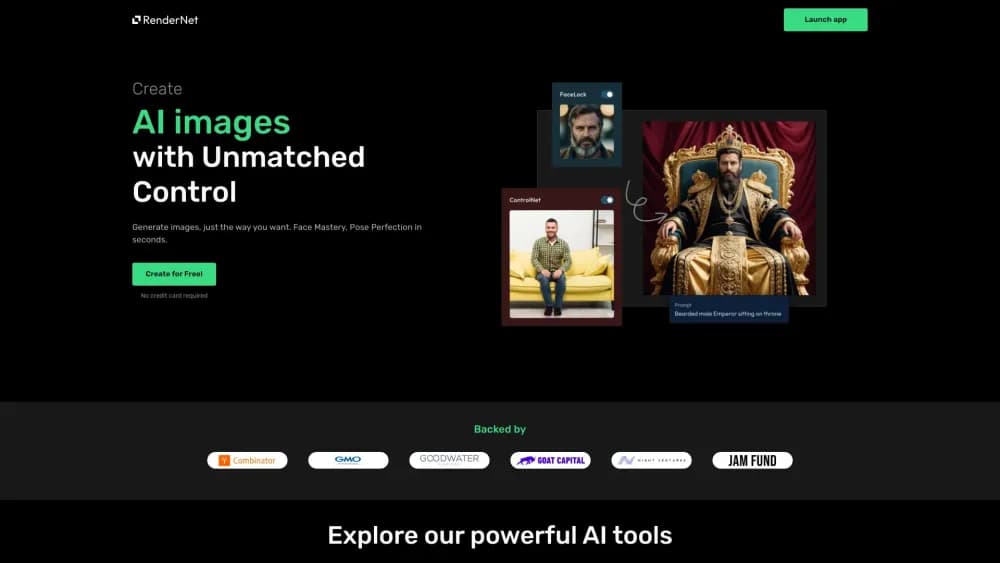
RenderNet is a generative AI studio for images and video, and the product now runs under the name Affogato. It works as an AI character generator first: you cast a character, add a product, describe the shot, and the platform renders both a still and a video from the same setup. Its selling point isn't raw image quality, which you can get from plenty of AI image generators. It's that the same face, outfit, or product stays recognizable across dozens of outputs, so a set of images looks like one shoot instead of ten unrelated generations.
That consistency is the hard part in AI imaging. Most generators treat every prompt as a fresh start, so a character's face drifts between frames. RenderNet solves this by letting you lock an identity once and reuse it, then direct each new scene around that locked reference. The result lands well for anything serial: an AI influencer posting daily, a lookbook, or a product shown from every angle.
The tradeoffs are worth knowing up front. It's a paid studio with no free tier beyond starter credits, so casual one-off image generation isn't its job. And like any diffusion-based platform, output quality depends on which model and prompt you use, so expect some trial and error before results match your intent.
Getting Started
- Sign up at rendernet.ai (now redirecting to the Affogato studio) and claim your starter credits.
- Create a character in the Influencer Studio by generating a face from attributes or uploading a reference image you're allowed to use.
- Save that identity, then add a product or brand asset if you need one kept consistent.
- Describe a shot in plain language and pick a pose or composition control to direct the scene.
- Pick an image or video model, generate, and download the render, which comes without a watermark on paid plans.
Product Information
A quick look at RenderNet's pricing, supported platforms, and performance.
Best for
The users, tasks, and scenarios where this tool fits best.
Users
- AI influencer creators
- Ecommerce sellers
- Marketers and small brands
Tasks
- Building a consistent character
- Shooting product images
- Turning a still into video
- Upscaling and editing renders
Scenarios
- Posting daily as a virtual creator
- Producing ad variants for a launch
- Drafting storyboard frames before a real shoot
Key features
Character Consistency
RenderNet's core feature is locking a face, a look, or a product once and carrying it across every output. You generate or upload a reference in the Influencer Studio, save it as a reusable identity, then direct new scenes around that locked reference. This is what separates it from a general image generator, where a character's face changes from prompt to prompt.
Image and Video in One Workspace
The platform covers both stills and motion, so you can generate an image, animate it into short video, or go straight from text to video without switching apps. That matters when a campaign needs both formats from the same cast and look, since you reuse the identity instead of rebuilding it in a second tool.
Large Model Library
You pick from a large and expanding library of image and video models rather than being tied to one. New models are typically added close to when they reach public availability, so you can match the model to the shot, whether that's photoreal detail, strong typography, or cinematic motion. Every plan unlocks the full library.
Pose and Composition Control
Beyond prompting, RenderNet offers pose and composition controls that let you direct how a character stands, frames a shot, or fills the scene. This gives you a way to specify layout instead of hoping a text prompt produces the arrangement you wanted.
Built-in Editing and Upscaling Tools
A set of editing tools lives inside the same canvas: upscaling to higher resolution, inpainting to erase or replace parts of an image, background removal for clean cutouts, and style transfer to match a reference look. Keeping these in one workspace removes the round trip to a separate editor.
Purpose-Built Studios
Instead of one blank canvas, the platform offers studios tuned to a job, such as fashion, product, AI influencer, and headshots. Each comes preset with the models and workflow that job usually needs, which shortens setup for people who'd rather not configure a pipeline from scratch.
Pros and cons
Pros
- Character and product consistency is the headline feature, so serial content keeps one recognizable identity.
- Image and video generation share one workspace, cutting app-switching for campaigns that need both.
- A broad model library with frequent additions lets you match the model to the task.
- Editing and upscaling tools are built in, so basic cleanups don't need a separate editor.
Cons
- There's no free tier beyond starter credits, so you can't use it indefinitely without paying.
- Results depend on the model and prompt you choose, so there's a learning curve before output matches intent.
- There's no published public API, which rules it out for teams that want to automate generation from their own code.
Frequently asked questions
RenderNet rebranded to Affogato, and rendernet.ai now leads to the Affogato studio. The platform is the same character-focused image and video generator, just under a new name.
Related content
Explore related tools, skills, and articles for RenderNet.
RenderNet Alternatives

ngram 2.0
ngram · Video · Marketingngram 2.0 is an AI video generator for teams. It turns a prompt, a screen recording, or a product URL into a narrated explainer, product demo, or AI avatar video, and every scene stays editable.

OpenScreen 2
OpenScreen (open-source project) · Video · ProductivityOpenScreen 2 is a free, open-source screen recorder and demo video editor for Windows, macOS, and Linux, with automatic zooms, styled frames, local captions, and agent edits.

Skreno
Skreno · Video · ProductivitySkreno is a browser screen recorder that captures a tab, a window or your whole display, then attaches AI transcripts, summaries and console logs to one share link.