

rep+
Bour Abdelhadi · Coding
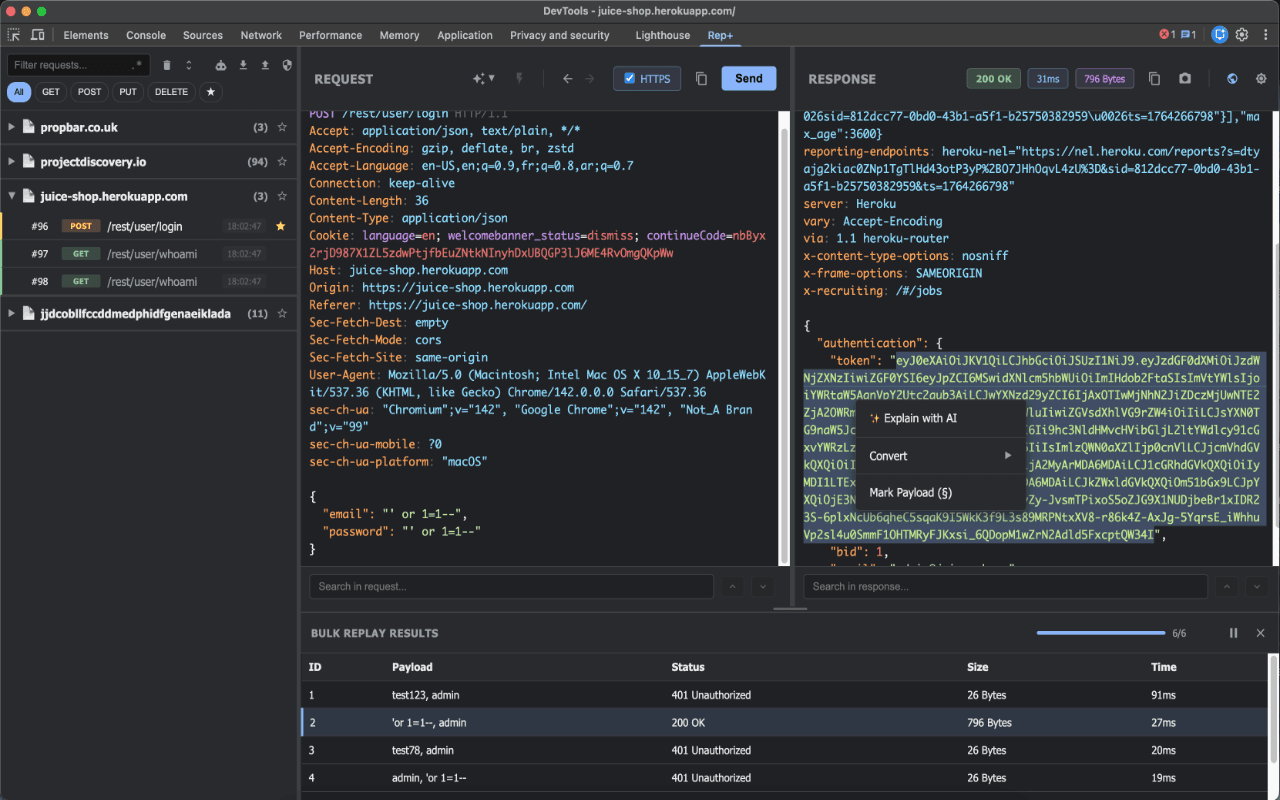
rep+ is a Chrome DevTools extension that brings Repeater-style HTTP request testing into your browser, no proxy setup needed. It captures and replays traffic from any tab, helps you discover hidden endpoints and parameters in JavaScript, flags leaked secrets, and runs built-in attack modes like Sniper and Cluster Bomb. An AI layer adds request explanations and attack suggestions through your own API key or a local model, making it a practical API security testing tool for bug bounty hunters, red teamers, and developers who want to understand what an app is really sending.
About rep+
What Is rep+
rep+ is a browser extension that lives inside Chrome DevTools and works as a lightweight Burp Suite Repeater alternative, then wraps an AI assistant around it. You open DevTools, start capturing, and every request from the current tab shows up in a list you can group, filter, block, or search with plain text or regex. The extension acts as a web request interceptor you never had to configure. No proxy. No certificate. That setup step is the part most people hate about classic tools.
The extension leans on passive analysis as much as manual replay. It reads JavaScript on the page and pulls out endpoints the site never advertises, classifies request parameters by risk, and scans for secrets using high-coverage Kingfisher rules. Results export to CSV or Postman, so a quick browsing session can turn into a test collection you keep.
The catch is scope. rep+ only sees traffic in a Chrome tab. It won't touch a mobile app, a desktop client, or non-HTTP protocols. It's an extension, not a full interception platform, and heavy production testing still belongs in dedicated tooling. Pricing sits somewhere between free for the basics and paid tiers depending on AI usage. AI features need your own provider key or a local model like Ollama to work at all.
Getting Started
- Install rep+ from the Chrome Web Store and pin it to your toolbar.
- Open the target site, then open DevTools (F12) and switch to the rep+ panel.
- Start a capture session to log requests from the current tab, or import a request manually.
- Send a request to the editor, tweak the headers, body, or parameters, and replay it to compare responses.
- Run an automated attack or ask the AI panel to explain the response and suggest next steps, then export the findings you want to keep.
Product Information
A quick look at rep+'s pricing, supported platforms, and performance.
Best for
The users, tasks, and scenarios where this tool fits best.
Users
- Bug bounty hunters
- Security researchers and AppSec teams
- Web developers debugging APIs
Tasks
- Replaying and modifying HTTP requests
- Finding hidden endpoints
- Detecting leaked secrets
- Running automated attacks
Scenarios
- Triaging a suspicious API response during an assessment
- Auditing a web app you already have open
- Prepping a Postman collection from a live site
- Learning how request manipulation works
Key features
Capture and replay without a proxy
rep+ hooks into Chrome DevTools and logs requests from the active tab, so setup takes seconds. You send any captured request to the editor, change what you need, and replay it. Duplicate requests get stripped during capture. That keeps the list readable when a page fires the same call dozens of times.
Passive endpoint and parameter discovery
The extension parses JavaScript on the page to surface endpoints that never show up in the UI. It also finds query, body, header, and path parameters, then classifies each by risk with a confidence score. That risk ranking is the useful part. Raw parameter lists get long fast.
Secret detection with Kingfisher rules
Pages get scanned for exposed credentials using high-coverage Kingfisher rules, covering JavaScript as well as inline scripts. It catches keys, tokens, and similar strings that developers accidentally ship to the client. Findings export alongside endpoints so you can hand them to whoever owns the code.
Built-in automated attacks
Sniper, Battering Ram, Pitchfork, and Cluster Bomb modes cover the standard fuzzing patterns without a separate tool. You mark the injection points, load a payload set, and let it run. Same mental model as Burp Intruder. It just lives inside the browser.
AI request analysis and attack suggestions
Connect your own LLM API key or point rep+ at a local model through Ollama, and it explains requests, proposes edits, and suggests attacks. Each request gets its own chat thread that can reference other requests, so context stays with the finding. The token handling is tuned to keep costs down, which matters when you're running this all day.
Inline data conversion and response inspection
Base64, URL encoding, JWT decoding, and Hex or UTF-8 conversion happen inline, so you don't paste payloads into a separate decoder. Responses render in multiple formats with syntax highlighting and line numbers, and you can search deep inside response bodies and JavaScript.
Export to CSV or Postman
Endpoints, parameters, and secrets export to CSV for reporting or straight into a Postman collection for follow-up testing. It closes the loop between poking at a site in the browser and handing off a structured set of tests. That handoff matters. Most findings die in a notes app.
Pros and cons
Pros
- No proxy or CA certificate setup, which removes the biggest friction point in request testing.
- Passive endpoint, parameter, and secret discovery turns ordinary browsing into recon.
- AI explanations and attack suggestions work with your own key or a local model.
- Automated attack modes cover the common fuzzing patterns out of the box.
- Exports to CSV and Postman keep findings portable.
Cons
- Only captures traffic inside a Chrome tab. Mobile apps, desktop clients, and non-HTTP traffic are out of reach.
- AI features need an external API key or a local model, so the smartest parts aren't self-contained.
- Being a browser extension, it's not a replacement for a full platform when you need scanner automation or deep protocol coverage.
Frequently asked questions
It captures HTTP requests inside Chrome DevTools, lets you modify and replay them, and adds passive analysis plus AI help on top. Think of it as a browser-native HTTP request testing tool rather than a full proxy suite.
Related content
Explore related tools, skills, and articles for rep+.
rep+ Alternatives
Forefront
Forefront · CodingForefront is a web platform for building with open-source AI. It lets you fine-tune leading open-source language models on your own data, evaluate how they perform, and run them through an API or export them to host yourself. Developers who want the convenience of a closed-source platform but insist on owning their models and data are the target audience here.

Startkit
StartKit.AI · CodingStartkit is a boilerplate for building AI SaaS and AI wrapper products. Think of it as an AI startup boilerplate with the boring parts already wired up: authentication, Stripe and Lemon Squeezy payments, usage limits, transactional email, and an AI API starter that talks to OpenAI, Anthropic, Groq, or Llama. You clone the repo, set your price, and start on the part of your product that people actually pay for. It's Next.js under React and Tailwind, so most of the boilerplate code already feels familiar.
Testim
Tricentis · CodingTestim is an AI-powered test automation platform for building and running end-to-end tests across web, mobile, and Salesforce applications. It leans on machine learning to keep tests stable when an interface changes, so teams spend less time fixing broken selectors. Not bad for an automated testing tool you can start using today. You create tests by recording actions in a browser, then optionally add JavaScript when you need more control. It's a solid pick for busy QA teams.