

Running Form Analysis App
fruitfoxlu · Video
Running Form Analysis App is a free, browser-based running form checker that turns a short side-view video of you running into concrete feedback on your stride. It's also a running gait analysis tool that runs entirely on your device, using pose detection to track 33 body landmarks. You get form flags, key running metrics, and economy-focused recommendations. Nothing to install. No account to create.
About Running Form Analysis App
What Is Running Form Analysis App
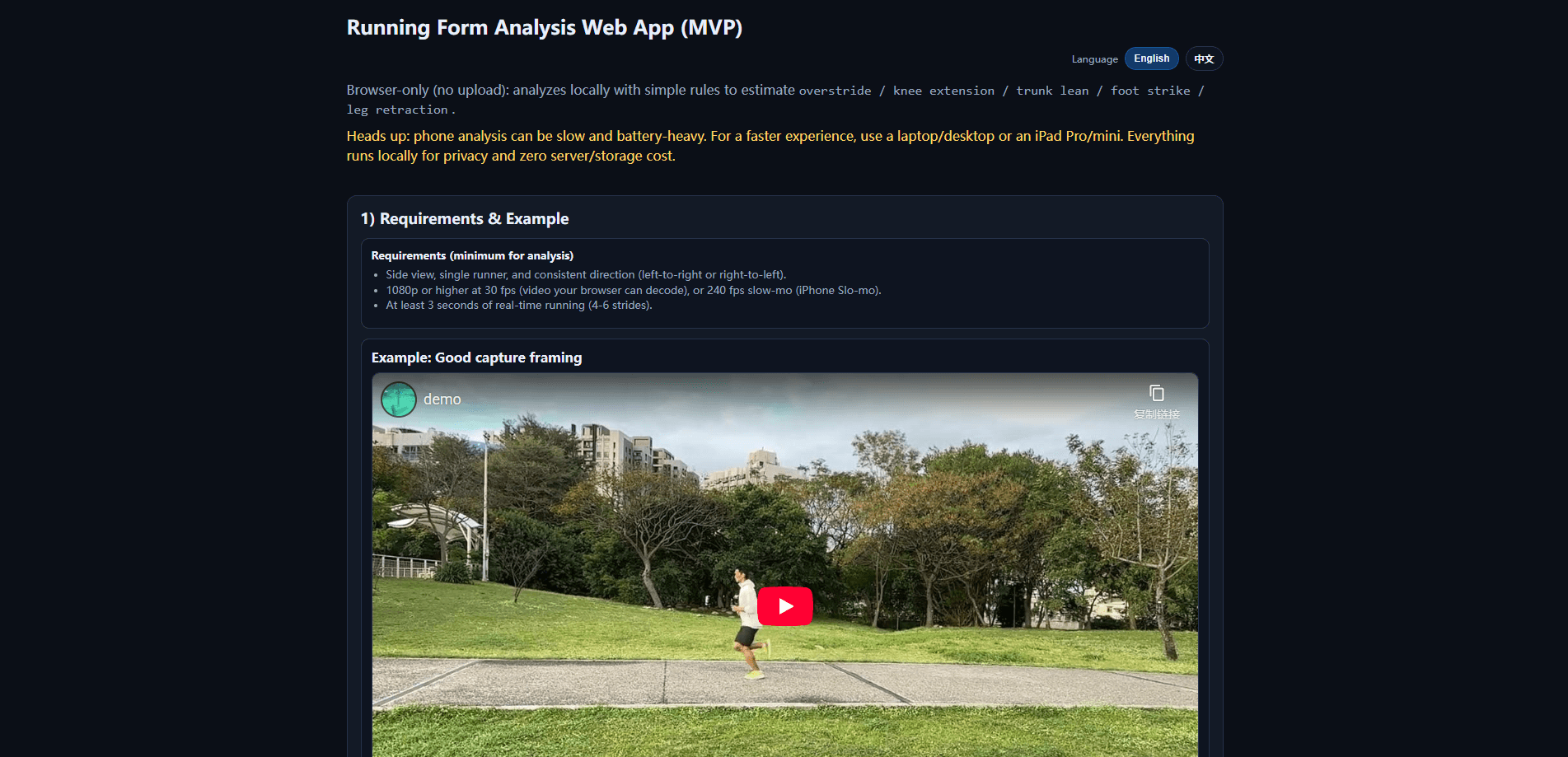
Running Form Analysis App is an AI running form analysis web app that watches a running video and estimates how your body moves through each stride. Instead of guessing from memory what your legs do mid-run, you upload a clip and get a readout on common form issues like overstriding, knee angle, trunk lean, heel-strike rate, and pre-contact retraction speed.
The product is built as a browser-only MVP. The pose model, a TensorFlow.js version of BlazePose, loads in the page and detects 33 landmark points on your body. Everything runs locally, so your video never leaves your device. That matters if you'd rather not ship clips of yourself to a server you don't control.
So what actually comes back? A set of form flags, a metrics table, and recommendations aimed at running economy.
It's honest about being early. The analysis is rule-based rather than a trained coaching model, so treat the output as a starting point for discussion, not a diagnosis. Sloppy lighting, odd camera angles, or a busy background can throw off the numbers.
Getting Started
- Record a side-view clip of a single runner moving in one consistent direction, left-to-right or right-to-left.
- Shoot at 1080p or higher at 30 fps, or use a 240 fps slow-motion mode such as the iPhone Slo-mo camera.
- Capture at least 3 seconds of real-time running, which works out to roughly 4-6 strides.
- Open the web app, pick your video file (mp4 or webm), and click Start Analysis.
- Read the results on screen and download the JSON if you want the raw numbers.
Product Information
A quick look at Running Form Analysis App's pricing, supported platforms, and performance.
Best for
The users, tasks, and scenarios where this tool fits best.
Users
- Runners chasing running injury prevention
- Runners who want a second opinion on their form
- Self-coached athletes
- Coaches and physios doing a quick screen
Tasks
- Checking for overstriding
- Reviewing knee angle at contact
- Spotting heel-strike patterns
- Comparing runs over time
Scenarios
- Treadmill sessions
- Post-run review at home
- Pre-marathon form checks
- Rehab return-to-run
Key features
Browser-Based Pose Detection
The app loads a TensorFlow.js build of BlazePose and tracks 33 landmark points on the body directly in your browser. That's the engine behind every metric you see. Because the model runs client-side, no server processes your footage. The whole thing works on any static host.
Local Video Handling
Your clip stays on your device, start to finish. The tool never uploads it, which makes it a comfortable fit for testing with your own footage. If you're uneasy about personal video leaving your machine, this removes the question entirely.
Rule-Based Form Flags
The analysis checks a handful of known form issues: overstride, knee angle, trunk lean, heel-strike rate, and pre-contact retraction speed. Each gets flagged rather than scored out of ten, so you see what to look at first. The rules are straightforward. That's why it's fast. It's also why it's not a coaching brain.
Key Metrics With Context
Beyond the flags, you get a table of running metrics with median estimates and a plain-language interpretation next to each number. The interpretation column is the useful part. A raw angle means little to most runners. Telling you what it tends to signal does.
Running Economy Recommendations
The tool pairs its findings with suggestions aimed at running economy, the idea that less wasted motion means less energy burned per mile. The advice stays general, which suits an MVP. Use it as prompts for what to work on, not a personal training plan.
Frame Sampling and Stride Logic
Under the hood, the app samples video at a default 24 FPS and enforces a 0.30-second minimum step interval to avoid counting the same step twice, since without that safeguard a single footstrike can get logged as two separate steps. It's a small detail that keeps the stride count closer to reality on uneven clips.
JSON Export
You can download the analysis results as JSON, which is handy for tracking changes over weeks or for anyone who wants to run their own numbers on the output. It also makes the tool easier to slot into a workflow you already keep.
Bilingual Interface
A header toggle switches the interface between English and Traditional Chinese, and you can share a language-specific link with ?lang=en. A small touch, but it widens who can actually use the tool.
Pros and cons
Pros
- Completely free to use, with no account, signup, or subscription
- Video never leaves your device, so there's no privacy trade-off for trying it
- Runs in the browser with nothing to install, on any static host
- Labels specific form issues instead of giving a vague overall score
- JSON export lets you compare metrics across sessions and track changes
Cons
- The analysis is rule-based and the project is an MVP, so treat the numbers as estimates rather than clinical measurements
- It needs a clean side-view clip with good lighting and a steady camera; a shaky phone or a cluttered background can skew the results
- The app has no mobile version and no Google Play download, so you need a browser and a way to get your video onto that machine
- Camera calibration and pixel-to-centimeter conversion aren't in place, so angles carry some bias
Frequently asked questions
Yes. It's free to use, with no account, paid tier, or subscription. You just open it in a browser and load a video.
Related content
Explore related tools, skills, and articles for Running Form Analysis App.
Running Form Analysis App Alternatives

ngram 2.0
ngram · Video · Marketingngram 2.0 is an AI video generator for teams. It turns a prompt, a screen recording, or a product URL into a narrated explainer, product demo, or AI avatar video, and every scene stays editable.

OpenScreen 2
OpenScreen (open-source project) · Video · ProductivityOpenScreen 2 is a free, open-source screen recorder and demo video editor for Windows, macOS, and Linux, with automatic zooms, styled frames, local captions, and agent edits.

Skreno
Skreno · Video · ProductivitySkreno is a browser screen recorder that captures a tab, a window or your whole display, then attaches AI transcripts, summaries and console logs to one share link.