

Sea Imagine AI
Sea Imagine AI · Video
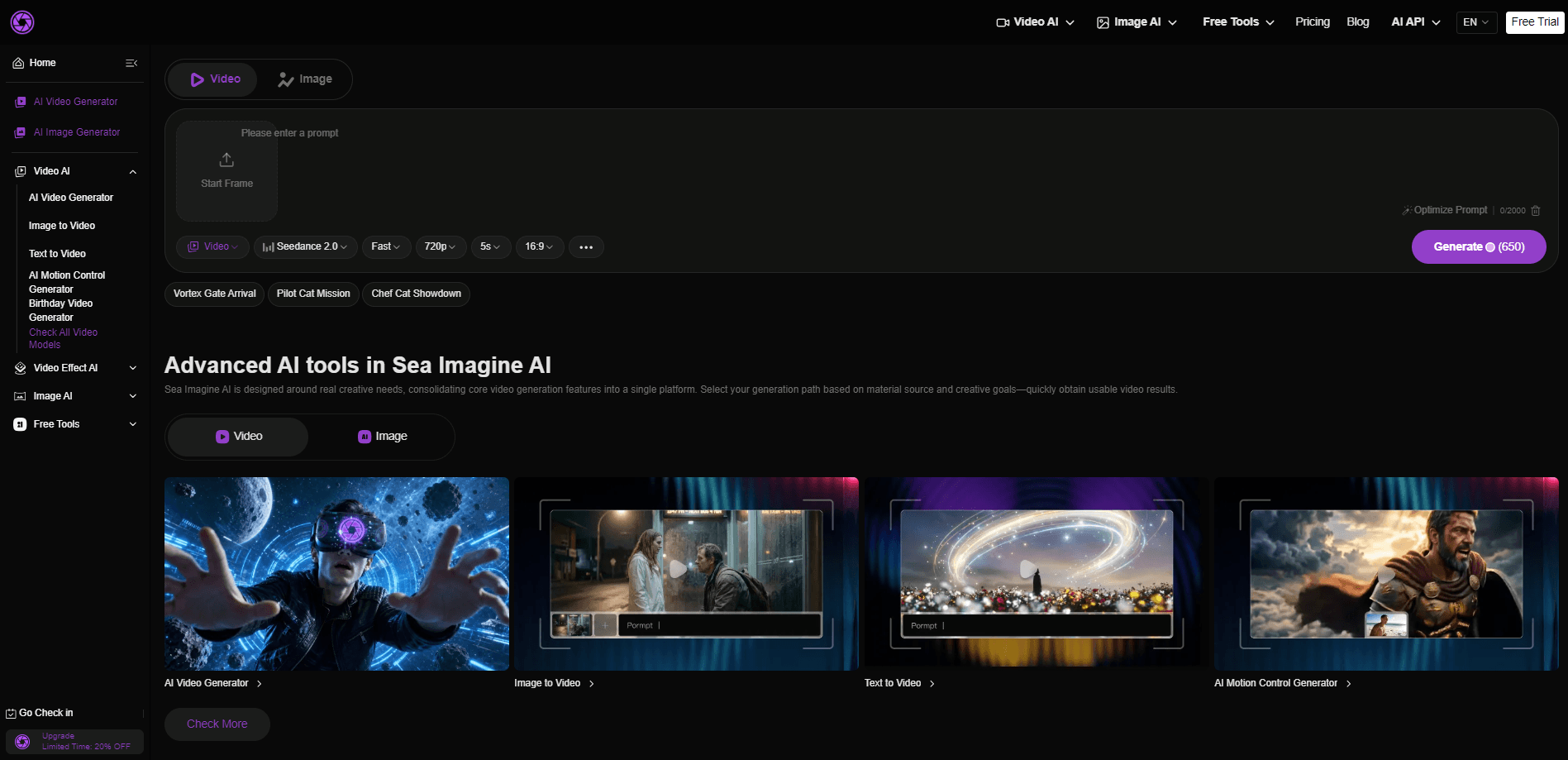
Sea Imagine AI is a browser-based AI creation platform that generates images and videos from text or from images you upload. It pulls several top video models into one interface, so you pick a generation path instead of juggling separate tabs and subscriptions. Outputs run up to 15 seconds with built-in audio, and everything lands in an editable, reusable format. Fast results matter here. It's built for creators who want a working video clip fast, not a research session on which model to trust.
About Sea Imagine AI
What Is Sea Imagine AI
Sea Imagine AI is an online AI video generator and image generator rolled into a single workspace. You feed it a text prompt or a still image, choose a model, and it returns either a short video clip or an image. The "agent" framing on the site is marketing dressing; what you actually get is a unified creation interface where text-to-video, image-to-video, and AI image generation all live side by side.
The appeal is model choice without the overhead. The platform routes work through advanced models, including names like Kling, Wan, and Sora, letting you switch styles or fidelity levels for different projects. Because it runs in a browser, there's nothing to install, and the same account works on a laptop, a tablet, or a phone. No downloads. No setup rituals.
The catch is the credit system. Every generation spends credits, free users wait longer in the queue and deal with watermarks, and premium models sit behind paid tiers. Public information on exactly how many credits each model burns is thin, so budgeting a big project takes some trial and error, and you'll burn a few packs learning the ropes before you find a rhythm that works. If you only need a handful of clips, the free tier is enough to test. If you're producing regularly, plan to buy a credit pack.
Getting Started
- Open seaimagine.com in your browser and sign in with an email or a linked account. New users get a small credit grant to start.
- Pick your generation path: text to video, image to video, or AI image generation.
- Enter a prompt, or upload a reference image if you're animating a still. Choose the model and any style or length settings.
- Generate the asset and wait in the queue. Processing priority depends on your plan.
- Download the result, then refine it, add a voiceover, or drop it into a larger edit.
Product Information
A quick look at Sea Imagine AI's pricing, supported platforms, and performance.
Best for
The users, tasks, and scenarios where this tool fits best.
Users
- Content creators who need short social clips fast
- Small business owners making marketing visuals
- Writers and storytellers visualizing a scene
- Beginners with no editing background
Tasks
- Turning a still photo into a short animated clip
- Drafting concept footage from a written brief
- Producing AI art for posts and thumbnails
- Adding motion to a static asset for a deck or ad
Scenarios
- A marketer assembling a week of social content in one sitting
- A solo founder mocking up a promo video before a launch
- A teacher building a short visual explainer
- Weekend experimentation with new video models
Key features
Text to Video Generation
You describe a scene, story, or concept in plain text and the platform returns a video with realistic motion and integrated audio. Clips run up to 15 seconds, which suits social posts, teasers, and concept pitches. It's the fastest route from a written idea to something you can actually watch and show. Write the prompt. Watch it move.
Image to Video Generation
Upload a single image or a small set and the tool animates it with smooth motion, camera transitions, and sound. A flat product photo or portrait gains depth and movement you couldn't get from a static asset. This is the feature most creators reach for when they already have visuals and need motion.
Multi-Model Support
Rather than locking you into one engine, this multi-model AI platform lets you choose among advanced video and image models in the same project. You can match the model to the look, the action, or the scene you have in mind. Nice upside. The trade-off is real: credit costs and wait times differ by model, so you learn which ones to trust for a given job. Which model should you pick for a given clip? That's the kind of question the platform leaves to trial and error.
Unified Creation Interface
Image and video generation share one workflow, so there's no jumping between two products or relearning a second set of controls. Beginners get a shallow learning curve, and frequent users get a cleaner end-to-end process. Switching between stills and clips takes a couple of clicks instead of a fresh login.
Reusable and Editable Results
Generated videos keep high visual fidelity and arrive structured enough to build on. You can refine a clip, add a voiceover, or fold it into a bigger creative project, which is the part that separates a throwaway demo from a tool that actually fits a real editing workflow where each shot is one piece of a longer piece. That matters when a single shot is one piece of a larger edit rather than the final product.
AI Image Generation
From a text prompt you get detailed, realistic images for graphic design, creative art, product renders, and presentations. You describe the vision and the model renders it. It doubles as a drafting tool when you want to lock a look before spending credits on video. Use it first. Save your video credits for the shots that matter.
Pros and cons
Pros
- Multiple generation paths (text to video, image to video, image generation) live in one browser tab, so you skip managing separate subscriptions.
- Model switching inside a single project makes it easy to compare styles without new accounts.
- Free tier gives new users credits plus a daily check-in bonus, enough to test before buying.
- Exported clips are editable and reusable, which suits creators who assemble multi-part projects.
- No install needed. It runs in the browser on desktop and mobile.
Cons
- Free tier carries watermarks, slower queue priority, and no private generation, so anything client-facing needs a paid plan.
- Credit packs are one-time and expire after a set window, which punishes slow or sporadic creators who don't spend credits quickly.
- Public documentation on exact credit costs per model is limited, making it hard to predict how far a pack will stretch.
- Videos cap at 15 seconds, which rules out longer narrative or long-form video work.
Frequently asked questions
It generates images and videos from text prompts or uploaded images, all inside a web browser. You choose a generation path, pick from several AI models, and download the result. Think of it as an AI video generator and image generator sharing one workspace, which saves you from stitching together a prompt tool, an image tool, and a video tool as three separate subscriptions with three separate logins. One login. One bill.
Related content
Explore related tools, skills, and articles for Sea Imagine AI.
Sea Imagine AI Alternatives

ngram 2.0
ngram · Video · Marketingngram 2.0 is an AI video generator for teams. It turns a prompt, a screen recording, or a product URL into a narrated explainer, product demo, or AI avatar video, and every scene stays editable.

OpenScreen 2
OpenScreen (open-source project) · Video · ProductivityOpenScreen 2 is a free, open-source screen recorder and demo video editor for Windows, macOS, and Linux, with automatic zooms, styled frames, local captions, and agent edits.

Skreno
Skreno · Video · ProductivitySkreno is a browser screen recorder that captures a tab, a window or your whole display, then attaches AI transcripts, summaries and console logs to one share link.