

Seadanse
Seadanse · Image · Video · Marketing
Seadanse is a browser-based AI video platform built around ByteDance's Seedance 2.5 model. As an AI video maker, you type a prompt, upload an image, or drop in a reference clip, and it renders a finished video with the soundtrack already in it. The site also packs an AI Video Agent that turns a short script into a full sequence, plus a shared credit pool that works across every model on the roster.
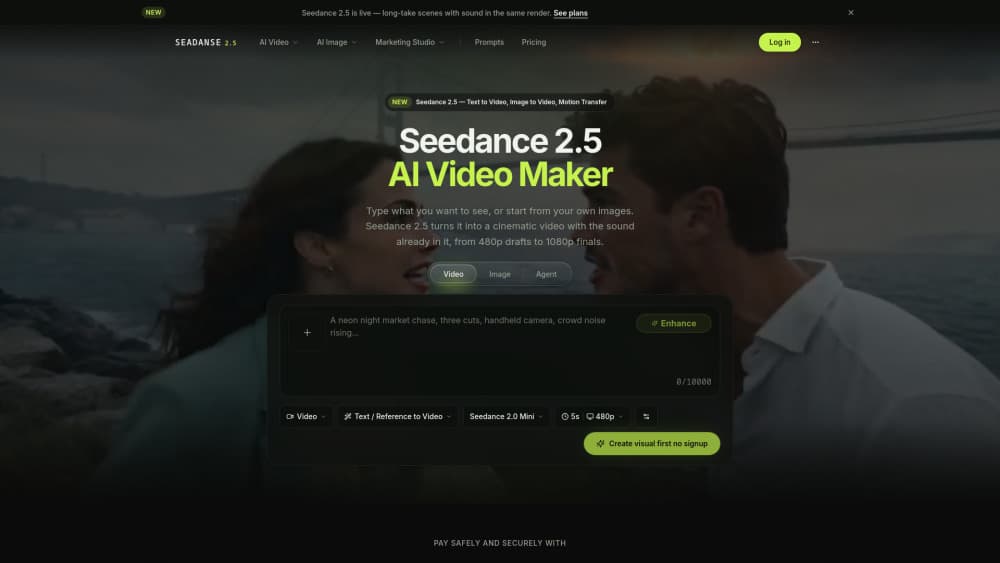
About Seadanse
What Is Seadanse
Seadanse is a web app that puts Seedance 2.5 front and center and wraps it in a few extra tools. The pitch is simple: one credit balance covers every model. So you swap between Seedance 2.5, Hailuo 3, Kling O3, or Veo 3.1 per render instead of picking a plan that locks you into a single model and makes you pay extra for anything else on the roster.
The bigger selling point is that video and audio come out together. Seedance 2.5 generates music, foley, and ambience in the same pass as the frames, so you download one MP4 that's ready to post. No separate sound pass, no timeline to line up. That alone saves an afternoon.
There are real limits. The platform exposes fewer reference files than the model itself supports, the 180-second long-video mode isn't wired up here yet, and there's no public API. So if you need programmatic access or the full 50-reference capacity, Seadanse isn't the door.
Getting Started
- Sign up with an email address. New accounts get free starter credits, and no card is needed.
- Pick a mode. Text to video, image to video, and motion transfer are separate workflows, so start with the one that matches your source material.
- Write your prompt, or attach up to 2 reference files depending on the mode. Switch shots to 9:16, 1:1, or 16:9 as you go.
- Set duration and resolution. Clips run 5 to 30 seconds at 480p, 720p, or 1080p.
- Hit Generate. The button shows the exact credit cost before you commit, and failed renders return their credits automatically.
Product Information
A quick look at Seadanse's pricing, supported platforms, and performance.
Best for
The users, tasks, and scenarios where this tool fits best.
Users
- Short-form creators
- Ecommerce and DTC marketers
- Filmmakers and previz teams
Tasks
- Turning a single-sentence idea into a first draft
- Keeping a character consistent across clips
- Fixing one bad beat
Scenarios
- Weekly publishing schedules
- Pitching a concept to a client
- Testing a prompt before committing
Key features
Text, Image, and Reference Inputs
Seadanse accepts three input types, and each maps to its own workflow. Type a scene for text to video, upload a still for image to video, or attach a driving clip for motion transfer. The platform exposes up to 2 reference files per render. The Seedance 2.5 model underneath accepts up to 50 multimodal references, so the app is the bottleneck, not the model.
Audio-Video Joint Generation
This is where Seedance 2.5 pulls ahead of older models. Music, foley, and ambience render in the same latent space as the frames, timed to the cut. You get a single MP4 with sound instead of a silent clip and a separate audio track to match yourself. Think of it as one render, one file.
30-Second Single-Pass Scenes
Seedance 2.5 renders up to 30 seconds in one continuous generation. There are no stitch points, so lighting, cast, and pacing stay steady from the first shot to the last. Seedance 2.0 topped out at 4 to 15 seconds per pass. That gap is the whole story for multi-shot work.
Reference Lock for Faces and Products
Upload a face or a product photo once and every render keeps it consistent. Identity, wardrobe, and product details persist across shots. Why does that matter for a series? The usual problem, where a character's face drifts between clips, just goes away.
Region-Level Editing
Describing a change reshapes just that part of the frame. On Seedance 2.0 you'd re-render the whole clip to fix one shot. Here you fix the beat you don't like. The rest stays put.
AI Video Agent and Script to Video
The Agent takes a one or two-sentence brief and turns it into a structured sequence. It's aimed at people who have an idea but not a shot list, and it pairs with a separate Script to Video tool on the site.
Shared Credit Pool Across Models
Every model on the platform draws from one balance. You pick Seedance 2.5 for one render, Kling O3 for the next, and Veo 3.1 after that, without buying a plan per model. Models sit inside the subscription rather than behind separate add-ons.
Pros and cons
Pros
- Sound ships with the picture, so you skip the separate audio pass entirely.
- One credit balance covers all 11 models, which removes the usual per-model subscription trap.
- Reference locking keeps faces and products consistent across separate renders.
- The Generate button shows the exact credit cost before you submit, and failed renders refund automatically.
- No watermark plus a commercial use license sits on every paid tier.
Cons
- No public API means you can't wire Seadanse into a production pipeline or automate renders.
- The platform caps references at 2 files per render, well below the model's 50-input ceiling.
- The 180-second long-video mode exists at the model level but isn't available on Seadanse yet.
- Plan credits expire at the end of each 30-day cycle and don't roll over, so unused credits are gone.
Frequently asked questions
Seadanse is a browser-based AI video platform built on ByteDance's Seedance 2.5 model. You write a prompt or upload a reference and render clips with sound baked in. It's an independent web app, not an official ByteDance product.
Related content
Explore related tools, skills, and articles for Seadanse.
Seadanse Alternatives

X Ray Interpreter
X-ray Interpreter · ImageX Ray Interpreter is a web-based AI radiology tool that turns X-rays, CT scans, MRI, ultrasound, and PET images into plain-language reports. You upload a scan, get a preliminary X-ray interpretation in moments, then ask follow-up questions if something needs explaining. It works as a second opinion and a learning aid, not as a medical diagnosis.

Aieasypic
AIEasyPic · ImageAIEasyPic is an AI image generator that turns plain text prompts into finished artwork in seconds. You can also train custom models on your own photos, swap faces in existing images, and create short video clips from text, all from a browser. It suits casual creators who want quick visuals and hobbyists who want to build a personal model without touching any code.

Chargen
Chargen · ImageChargen is an AI character generator and worldbuilding toolkit built for Dungeons & Dragons and other tabletop RPGs. It turns a one-line idea into a painted character portrait, spins up NPCs, monsters, maps and encounters from the same session, and keeps every creature's details close at hand. The tabletop RPG art side runs on a credit system called Gold, while the text generators stay free for everyone.