

Sheet+
FormulasHQ · Productivity
Sheet+ turns plain English into working Excel and Google Sheets formulas, explains each part and helps debug errors. It now runs inside FormulasHQ.
About Sheet+
What Is Sheet+
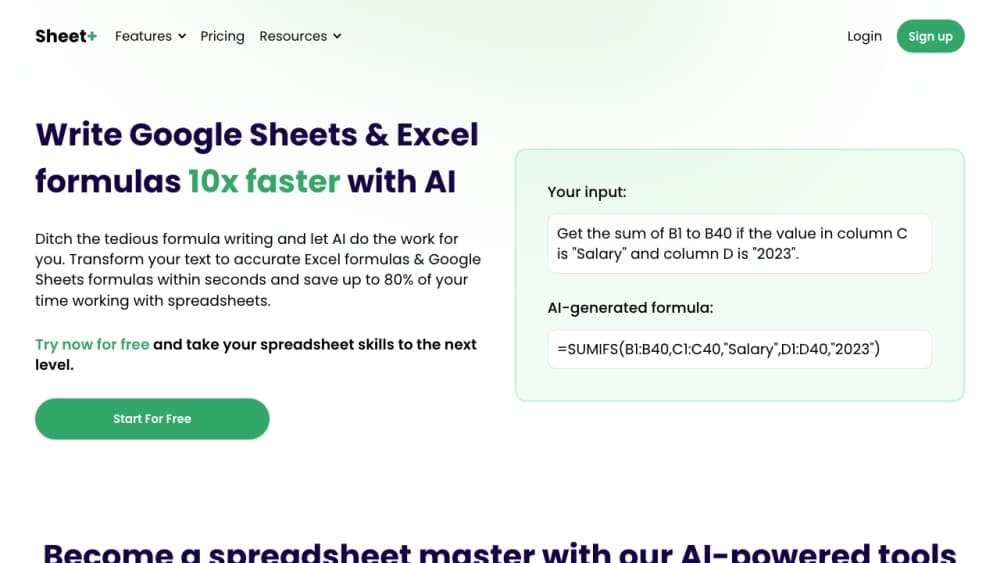
Sheet+ is an AI spreadsheet tool with one narrow job: getting a formula right without memorizing syntax. You type the calculation the way you'd explain it to a coworker, choose Excel or Google Sheets, and the Sheet+ AI formula generator returns the formula plus a plain English breakdown of what each piece does.
It started as a side panel that sat inside the spreadsheet, so the answer arrived without a tab switch. The formula generator covered the usual trouble spots: SUMIFS versus SUMIF, INDEX/MATCH, nested IFs, lookups that return #N/A for no obvious reason.
In January 2024 Sheet+ merged with FormulasHQ, and both products now run under the FormulasHQ brand. The old sheetplus.ai address is gone. What survived is the formula engine, now sitting next to VBA, Apps Script, regex, Python and Salesforce formula tools in one web app.
Three limits are worth knowing before you sign up. The tool writes formulas, it doesn't restructure your sheet or fix messy source data for you. Free accounts get five generations a month, which disappears fast on a real project. And every output still needs a test run in your own workbook, because column letters and sheet names have to match what you actually have.
Getting Started
- Open formulashq.com and pick the Excel formula generator, or sign in at app.formulashq.com for the full tool set.
- Set the spreadsheet type to Excel or Sheets, then choose Generate or Explain.
- Describe the calculation in plain words and name the ranges, columns and conditions involved.
- Copy the result into your workbook. If it throws an error, paste the broken version back and describe what should happen.
- Check the generation history when you need an earlier answer, or move to Pro once the free quota runs out.
Product Information
A quick look at Sheet+'s pricing, supported platforms, and performance.
Best for
The users, tasks, and scenarios where this tool fits best.
Users
- Spreadsheet beginners
- Finance and operations analysts
- Salesforce admins
- Students and career switchers
Tasks
- Writing a formula you can't quite remember
- Debugging a formula someone else wrote
- Understanding inherited work
- Building a Google Sheets formula from a plain request
- Producing a regex or a small script
Scenarios
- A report due tomorrow and a lookup returning #N/A
- Taking over a workbook with no documentation
- A recurring weekly summary
- Learning Excel for a new role
Key features
Plain English Formula Generation
Type what you want to calculate and the tool returns a formula that fits the selected spreadsheet type. It recognizes the difference between Excel and Sheets syntax, including dynamic array functions such as FILTER, SORT and UNIQUE that trip up people moving between the two. Each result arrives with an explanation, not a bare string to paste and pray.
Formula Explanations, Line by Line
The explain action takes an existing formula and breaks it into readable parts: what the outer function does, what each range refers to, and where the logic branches. This is the feature that turns the tool into a learning aid. Read three or four of these and nested IFs start to look less like noise.
Debugging Broken Formulas
Paste a formula that errors out, describe the result you expected, and the tool points at the clause that fails. Common cases include mismatched range sizes, text stored as numbers, and criteria that never match because of a trailing space. The fix comes with a reason, so the same error doesn't return next month.
Excel, Sheets, VBA and Apps Script in One Place
The formula box sits beside generators for VBA macros, Google Apps Script, Python and regex. A task that starts as a formula and turns into automation doesn't need a second product. Switching the output type takes one click, and the prompt carries over.
Salesforce Formula Support
Salesforce formula fields, validation rules and flow formulas use a syntax that general AI chatbots handle badly. This generator checks whether the request is possible in Salesforce at all, then writes something that saves without a syntax error. That saves a round trip through a sandbox.
AI Chat and CSV Analysis on Pro
Pro adds an AI formula assistant chat that accepts file uploads, plus a Data Wizard for CSV work. You can drop in a messy export, ask for a summary or a cleaned column, and get an answer without opening a spreadsheet. The Analyzer plan goes further with site level content analysis, which most spreadsheet users won't need.
Pros and cons
Pros
- Answers arrive with an explanation, which makes the tool useful for learning and not only for copying.
- Excel and Google Sheets syntax are handled separately, so dynamic array formulas don't come back in the wrong dialect.
- One subscription covers formulas, VBA, Apps Script, regex, Python and Salesforce rules.
- The free tier needs no card, and five generations are enough to judge whether the answers hold up.
- Generation history keeps earlier prompts and results, which helps when a formula gets reused months later.
Cons
- Five free generations a month run out in a single afternoon of real work.
- Formulas still depend on accurate range and column names, so vague prompts produce plausible but wrong results.
- There's no mobile app, and the workflow assumes a desktop browser next to your spreadsheet.
- The 2024 merger means older Sheet+ tutorials and links point to a domain that no longer hosts the product.
Frequently asked questions
Yes, under the FormulasHQ brand. Sheet+ merged with FormulasHQ in January 2024, and the formula generator, explainer and debugger now live at formulashq.com.
Related content
Explore related tools, skills, and articles for Sheet+.
Sheet+ Alternatives

Swms
Swms AI · Writing · Productivity · BusinessSwms is an AI safety compliance tool that turns a plain description of a job into ready-to-use safety documents. Describe your project, trade, and known hazards, and it writes a safe work method statement, job hazard analysis, safe work procedure, RAMS, or safety data sheet in seconds. It also ships with Oscar, a chat assistant that answers workplace safety questions in any language. Teams in construction, mining, transport, and warehousing use it to cut the paperwork that usually eats into a workday.

Wordly AI Translation
Wordly · Voice & Language · ProductivityWordly AI Translation is a real-time AI translation and captioning platform built for meetings, conferences, and events. It delivers live translation, captions, transcripts, and summaries in more than 60 languages, and attendees join by scanning a QR code or opening a link instead of using dedicated headsets. The platform works with Zoom, Microsoft Teams, Google Meet, and Webex, and it's designed for organizations that want multilingual access without hiring human interpreters for every session. Simple as that.

Rows
Rows (Superhuman) · Productivity · BusinessRows is an AI spreadsheet and data analysis tool that imports live data from more than 50 sources, then lets you work with it using plain language instead of SQL queries or nested formulas. You can pull numbers out of PDFs, connect ad platforms, databases, and bank accounts, and ask the AI to build reports, merge datasets, or set up models that recalculate themselves. It runs in the browser, works like a spreadsheet, and now sits under the Superhuman umbrella.