

Silenttype
Silenttype (Litgrades) · Productivity
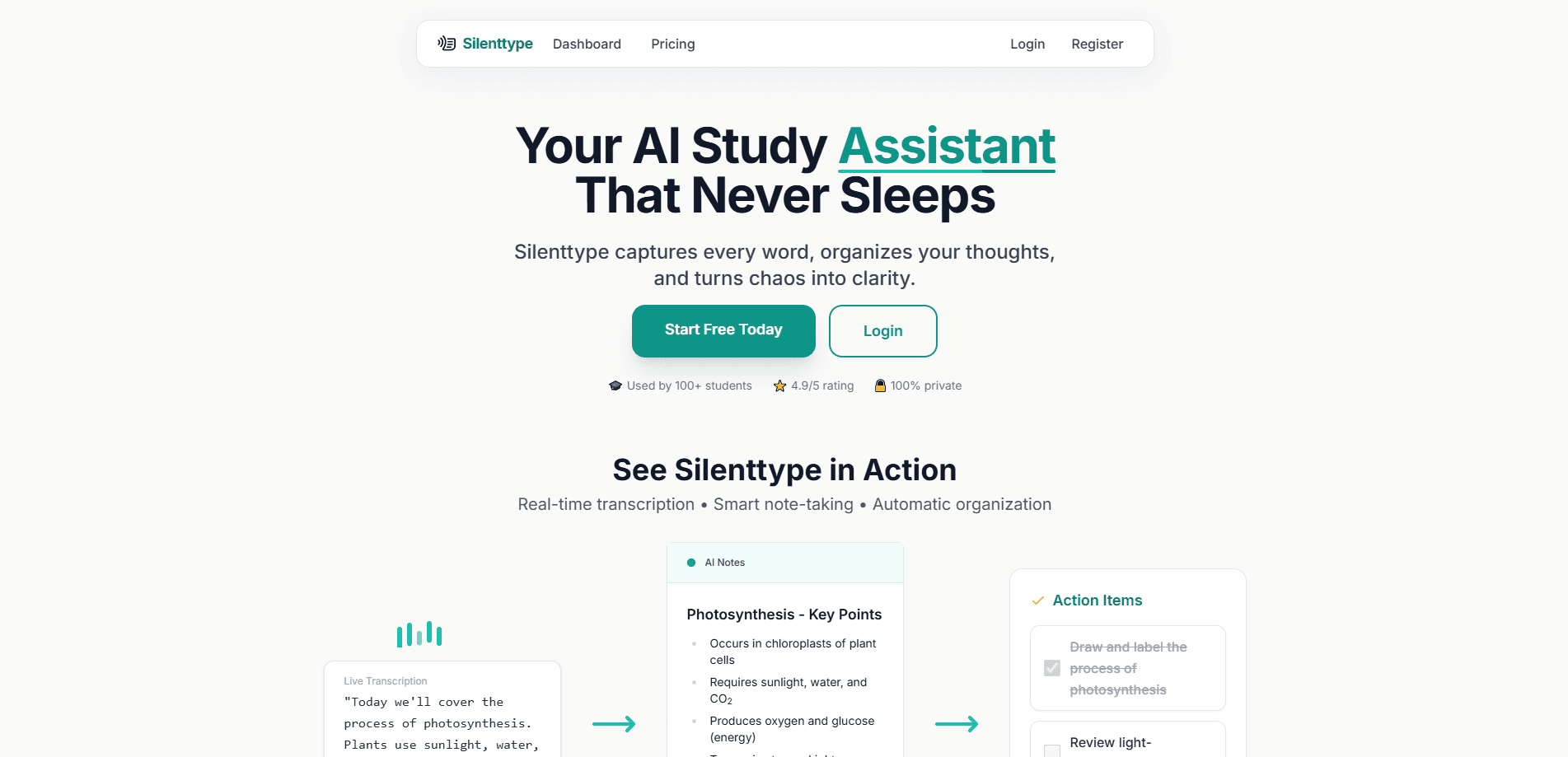
Silenttype is an AI note taker for students and teachers. It records a lecture live, transcribes it, then turns the audio into structured notes with tasks, ready to export to Notion.
About Silenttype
What Is Silenttype
Silenttype is a web app that listens to a lecture or class session and writes the notes for you. You open it, start a session and it captures the audio in real time. From there the AI transcribes what was said, pulls out the key points and formats everything into a clean page you can read and keep.
The problem it targets is focus. Taking notes by hand pulls your attention away from listening, and most people end up with either a full transcript they never reread or a page of fragments they can't place later. Silenttype sits in the middle. It keeps the recording, the transcript and an organized summary together, so recall doesn't depend on how fast you can type. In that sense it's less a recorder and more automatic note taking, with the AI lecture notes ready before you've left the room.
The limits matter too. It runs in the browser rather than as a native desktop app, and the free plan caps transcription at a fixed number of hours each month. Unused hours don't carry over. The company also states that accuracy sits above 95% for clear audio, which means a noisy room or a heavy accent can pull the notes down.
Getting Started
- Create a free account at silenttype.ai, with no credit card required
- Choose the student or teacher view, since each organizes sessions a little differently
- Open a session and let Silenttype capture the lecture in real time
- Read the auto-generated notes, then send them to Notion or copy them out as text
Product Information
A quick look at Silenttype's pricing, supported platforms, and performance.
Best for
The users, tasks, and scenarios where this tool fits best.
Users
- Students in lecture-heavy courses
- Teachers and lecturers
- Self-directed learners
- Study groups and tutors
Tasks
- Live lecture capture
- Automatic note structuring
- Homework and to-do extraction
- Notion export
- Marking moments to revisit
Scenarios
- A dense lecture where writing pulls you off the speaker
- A teacher running repeated classes
- Reviewing before an exam
- Catching a missed assignment
- Remote or recorded classes
Key features
Real-Time Recording and Transcription
Silenttype captures a lecture as it happens and transcribes it live. You start a session and leave it, and the app builds a running transcript without a separate recording step. That makes it a workable AI study tool for anyone who wants the audio and the text in one place. The recording and the text stay tied to the same session, so you can check what was actually said against the note that was written.
AI-Powered Note Structuring
The raw transcript becomes a formatted page rather than a wall of text. Silenttype organizes a session into sections, bullet points and tables where they fit, so the output reads like notes someone took carefully. This is the piece that separates it from a plain transcription tool, which stops once the words are on the page.
Smart Task Extraction
Homework, assignments and follow-ups get pulled out of the session as checklist items. The app reads the transcript for task language and lifts those lines into a to-do list, so deadlines don't depend on you catching them in the moment. For teachers, the same step generates action items aimed at students.
Voice Confusion Cues and Explain Later
Say "Silenttype: confused" out loud and the app marks that moment for review. Later you get a simplified explanation of the flagged concept instead of replaying the audio. It's a small feature, but it turns a live session into something you can flag in the moment and fix afterward.
Notion Integration
Each session becomes a formatted Notion page through a native integration. You link your workspace in the Integrations area and pick where notes should land, then the structured output goes straight in. Teachers can keep separate collections for each class, which keeps a busy timetable from turning into one long document.
Auto-Organization by Subject and Class
Sessions are grouped by subject and timeline rather than left in a single feed. On the teacher side, class-wise organization and per-class Notion exports come with every plan. The result is a set of notes you can navigate weeks later instead of a flat list you have to search.
Pros and cons
Pros
- Starts free, with 5 hours of transcription a month, and no credit card to sign up
- Combines recording, transcription and note formatting in one session, so there's no separate transcription step
- Pulls homework and action items out automatically, which is rare in a note taker
- Native Notion export with per-class collections built in for teachers
- Class and subject grouping keeps a long semester of sessions navigable
Cons
- Browser-only, so there's no installable desktop or mobile app for offline capture
- Free plan is capped at 5 hours a month and unused hours don't roll over
- Accuracy drops in noisy rooms or with strong accents, per the company's own 95%+ figure for clear audio
- No public API or documented developer access
Frequently asked questions
Silenttype records a lecture or class session live, transcribes the audio and turns it into structured notes with headings, bullet points and extracted tasks. Everything stays tied to the session, and you can export the result to Notion or copy it out as text.
Related content
Explore related tools, skills, and articles for Silenttype.
Silenttype Alternatives

Swms
Swms AI · Writing · Productivity · BusinessSwms is an AI safety compliance tool that turns a plain description of a job into ready-to-use safety documents. Describe your project, trade, and known hazards, and it writes a safe work method statement, job hazard analysis, safe work procedure, RAMS, or safety data sheet in seconds. It also ships with Oscar, a chat assistant that answers workplace safety questions in any language. Teams in construction, mining, transport, and warehousing use it to cut the paperwork that usually eats into a workday.

Wordly AI Translation
Wordly · Voice & Language · ProductivityWordly AI Translation is a real-time AI translation and captioning platform built for meetings, conferences, and events. It delivers live translation, captions, transcripts, and summaries in more than 60 languages, and attendees join by scanning a QR code or opening a link instead of using dedicated headsets. The platform works with Zoom, Microsoft Teams, Google Meet, and Webex, and it's designed for organizations that want multilingual access without hiring human interpreters for every session. Simple as that.

Rows
Rows (Superhuman) · Productivity · BusinessRows is an AI spreadsheet and data analysis tool that imports live data from more than 50 sources, then lets you work with it using plain language instead of SQL queries or nested formulas. You can pull numbers out of PDFs, connect ad platforms, databases, and bank accounts, and ask the AI to build reports, merge datasets, or set up models that recalculate themselves. It runs in the browser, works like a spreadsheet, and now sits under the Superhuman umbrella.