

SiteSpeakAI
SiteSpeakAI · Coding · Chatbot
SiteSpeakAI is an AI chatbot builder that trains on your website, docs, PDFs, and videos, then answers customer questions in 95+ languages and runs actions like order lookups from one script tag.
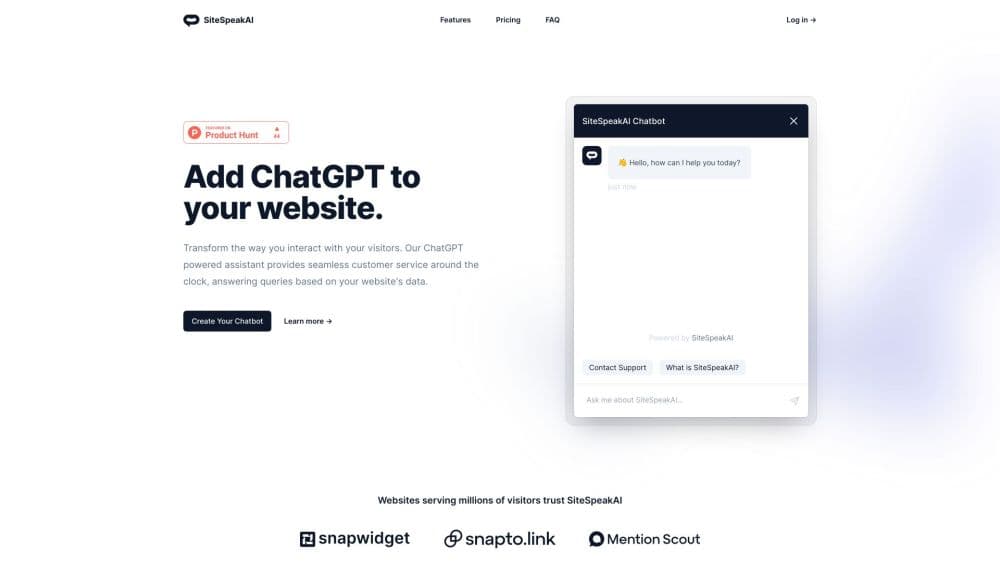
About SiteSpeakAI
What Is SiteSpeakAI
SiteSpeakAI is a website chatbot platform for AI customer support. It puts a trained AI agent on your own site. You point it at the pages you already publish, add help docs or PDFs if you have them, and the agent starts answering visitor questions about shipping, pricing, returns, or setup. The pitch is straightforward: stop paying people to answer the same ten questions.
The piece that separates it from a plain FAQ bot is the action layer. On the Pro plan and up, the agent can call your REST APIs, a database endpoint, or an MCP server, so "where's my order" turns into a live Shopify lookup instead of a canned reply. Agencies get a second angle too, with a white-label dashboard and separate client sub-teams on the agency plans.
The limits are real, so read the plan table before you commit. The free tier caps you at 30 message credits a month and 10 training sources, which is enough to test the idea and nothing more. Refunds aren't offered on payments already made, so the 7-day trial is the only safety net. And the best models sit behind Pro, meaning the cheapest useful configuration is $79 a month.
Getting Started
- Create an account at sitespeak.ai with an email address. No credit card is needed for the free tier, and every paid plan opens with a 7-day trial.
- Enter your website URL, then add extra sources such as help centers, PDFs, Notion pages, or YouTube videos. Indexing begins as soon as the first source lands, and most sites finish within minutes.
- Style the AI chat widget. Set colors, logo, agent name, welcome message, suggested questions, and the personality you want in replies.
- Test in the live preview with questions your customers actually ask. Watch for gaps, then add sources or adjust the default response to cover them.
- Paste the script tag before the closing body tag on your site, or use a native plugin for WordPress, Shopify, Wix, Webflow, and similar builders. Handoff to a human and lead capture are configured in the dashboard.
Product Information
A quick look at SiteSpeakAI's pricing, supported platforms, and performance.
Best for
The users, tasks, and scenarios where this tool fits best.
Users
- Small business owners
- SaaS and e-commerce support teams
- Marketing agencies
Tasks
- Answering repeat support questions
- Capturing leads mid-conversation
- Looking up order and account data
- Serving visitors in other languages
Scenarios
- A product launch week when ticket volume spikes
- Agencies onboarding a new client
- Documentation gaps you didn't know about
Key features
Training From Your Own Content
The agent learns from the URLs, sitemaps, PDFs, and documents you supply, with up to 20,000 training sources on the top plan. You don't write answer scripts. You point it at what you've already published and correct the gaps as they appear. Most sites are indexed within a few minutes, and paid plans can resync sources automatically.
Actions Beyond Answers
On plans that include actions, the agent can call a REST API, hit an MCP server, or use built-in Shopify and HubSpot connections to fetch live data. That's what turns a support widget into something that can check an order, book a meeting, or create a contact record. Each plan includes a fixed number of actions per agent, so heavy automation needs the Growth plan or higher.
Human Handoff With Full Context
When a conversation needs a person, the agent passes it to your team along with the chat history, so nobody asks the customer to repeat themselves. Teams pick it up in the shared inbox, reply as a human, and the visitor sees one continuous thread. Escalation to a human is available on Starter and above.
Language Detection Across 95+ Languages
The agent detects the visitor's language and answers in it, with no separate setup per locale. SiteSpeakAI lists Spanish, French, German, Portuguese, Japanese, Chinese, and Arabic among the supported set. For a store selling into several markets, that covers most of the long tail without extra translation work.
Chatbot Pricing That Scales With Message Volume
The chatbot pricing follows message credits rather than agents or seats, which keeps the bill predictable as traffic grows. Starter runs $29 a month for 1,000 credits, Pro $79 for 3,000, Growth $249 for 10,000, and Business $499 for 20,000. Yearly billing costs the same as ten months, and extra credits are sold at $25 per 1,000.
Analytics That Point At Content Gaps
The dashboard tracks conversations, messages per conversation, the share of questions answered successfully, and which topics come up most. Top sources get ranked alongside link clicks, so you can see which pages drive the most questions. Teams typically use this to rewrite help docs rather than to count chats.
White-Label Agency Dashboard
Agency plans run multiple client agents from one workspace, with a custom app domain, branded emails, and a dashboard that carries the agency's identity. Client sub-teams keep each account's conversations and sources separate. The agency tier starts at $399 a month, which only makes sense once you're managing several clients.
Pros and cons
Pros
- Setup needs no code beyond one script tag, and WordPress, Shopify, Wix, Webflow, Bubble, Framer, and Notion all have documented installs.
- The action layer handles real tasks like order status and meeting booking, not just FAQs, once an API or MCP server is connected.
- Language support covers 95+ languages automatically, which matters for stores and SaaS products with international traffic.
- The free tier is genuinely usable for testing, with 30 message credits and 10 sources and no card required.
- Agency plans bundle white-label branding, custom domains, and client sub-teams in one subscription.
Cons
- Message credits gate everything. When they run out the agent stops answering and tells visitors so, and extra credits cost $25 per 1,000.
- The free and Starter plans are limited to basic AI models, so better model quality requires the $79 Pro plan.
- There's no refund policy on completed payments, which makes the 7-day trial the only real test window.
- Actions per agent are capped even on Growth and Business, so complex workflows may need several agents or a custom arrangement.
Frequently asked questions
Indexing starts the moment you add the first source, and most sites are ready within a few minutes. Sites with hundreds of pages take longer, but answers become available as pages finish crawling, so you can start testing while the rest processes.
Related content
Explore related tools, skills, and articles for SiteSpeakAI.
SiteSpeakAI Alternatives
Forefront
Forefront · CodingForefront is a web platform for building with open-source AI. It lets you fine-tune leading open-source language models on your own data, evaluate how they perform, and run them through an API or export them to host yourself. Developers who want the convenience of a closed-source platform but insist on owning their models and data are the target audience here.

Startkit
StartKit.AI · CodingStartkit is a boilerplate for building AI SaaS and AI wrapper products. Think of it as an AI startup boilerplate with the boring parts already wired up: authentication, Stripe and Lemon Squeezy payments, usage limits, transactional email, and an AI API starter that talks to OpenAI, Anthropic, Groq, or Llama. You clone the repo, set your price, and start on the part of your product that people actually pay for. It's Next.js under React and Tailwind, so most of the boilerplate code already feels familiar.
Testim
Tricentis · CodingTestim is an AI-powered test automation platform for building and running end-to-end tests across web, mobile, and Salesforce applications. It leans on machine learning to keep tests stable when an interface changes, so teams spend less time fixing broken selectors. Not bad for an automated testing tool you can start using today. You create tests by recording actions in a browser, then optionally add JavaScript when you need more control. It's a solid pick for busy QA teams.