

SlaySchool: AI Notetaker
Slay School · Leaning
SlaySchool: AI Notetaker is an AI study tool that turns notes, PDFs and lecture videos into flashcards, quizzes and essays for students.
About SlaySchool: AI Notetaker
What Is SlaySchool: AI Notetaker
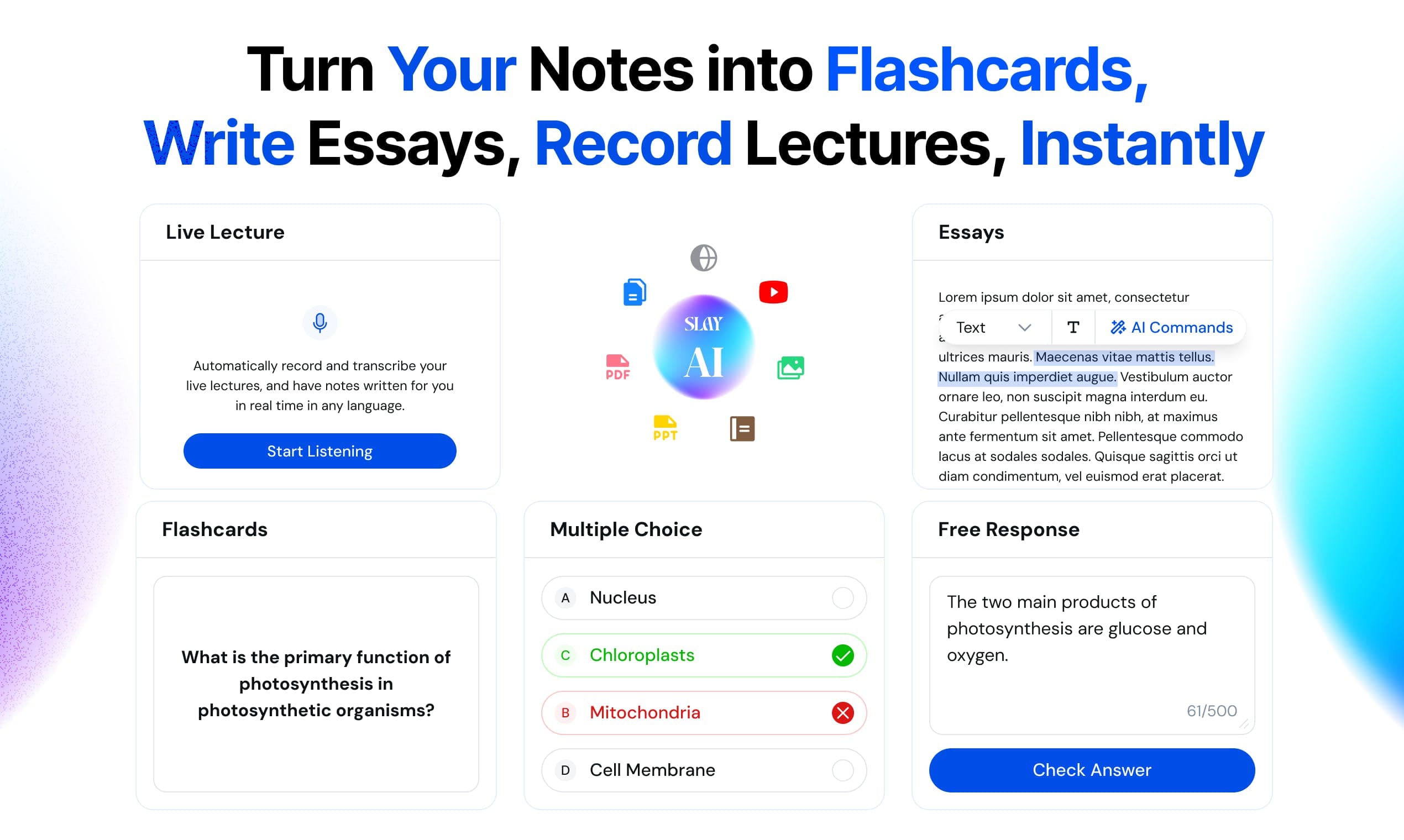
SlaySchool is an AI notetaker built for students who spend more time making study material than actually learning it. You upload a file, paste notes, drop a YouTube link or import a Google Doc, and the tool reads the content and writes flashcards, multiple-choice questions and quizzes from it. The whole point is to skip the busywork of building a deck by hand. So you stop playing cardsmith and start studying.
The app leans on two ideas from learning science. First, your working memory holds only about four things at once, so wondering where to start costs you focus. Second, spaced repetition works better than cramming, so reviewing the same cards at growing intervals beats one long session. SlaySchool handles the logistics of both so you can just show up and answer questions. It's a study app that removes decisions, not effort.
The catch is limits. The free tier caps uploads at three files per week and 15 pages per document, so heavy users hit a wall fast. It's also aimed at text-heavy material. Audio and handwritten notes are supported on paid plans, but the tool is at its best when your source material is already readable. Is that a dealbreaker? Only if you live on scanned, illegible scans.
Getting Started
- Create a free account at app.slayschool.com or install the mobile app.
- Upload a PDF, paste text, add a YouTube link, or import from Google Docs.
- Let the AI generate a flashcard deck from your material.
- Edit, add or delete any card, then test yourself with a quiz.
- Export your deck to Anki or Quizlet, or keep studying inside the app.
Product Information
A quick look at SlaySchool: AI Notetaker's pricing, supported platforms, and performance.
Best for
The users, tasks, and scenarios where this tool fits best.
Users
- University students who record lectures and need study material fast, provided they stay within the weekly upload cap on free.
- Medical and nursing students preparing for heavy content exams, since the Curated Question Bank and OSCE Virtual Patient match their material.
- High school and language learners who want quick quizzes from web articles or notes, in any language the site supports.
Tasks
- Converting a lecture recording into a flashcard deck
- Turning dense PDFs into multiple-choice questions, which is far quicker than writing questions by hand.
- Drafting essays and written assignments with the AI writing assistant instead of starting from a blank page.
- Reviewing weak spots with instant feedback on typed answers and generated question variants.
Scenarios
- Night before an exam
- Semester-long review
- Group study
Key features
Automatic Flashcard Generation
The core of SlaySchool is converting raw material into study cards. Upload a PDF, a video, a link or a handwritten note, and it produces bite-sized flashcards you can edit before saving. You can add image occlusion and cloze deletions for anatomy, diagrams and fill-in-the-blank recall. Editing is quick. Exporting to Anki or Quizlet means your deck doesn't stay locked inside SlaySchool. Your cards, your call.
Quizzes With Instant Feedback
Beyond flashcards, the tool generates multiple-choice questions and online quizzes that test the same material from a different angle. You type an answer, get immediate feedback on it, then spin up variants so you're tested on the same idea in a new way. That feedback loop matters more than a simple right-or-wrong score, because it tells you why an answer missed. Sounds small. It isn't.
AI Notetaker and Transcription
Record a lecture or upload audio, and SlaySchool transcribes it and pulls out the takeaways for you. Paid plans include hours of lecture transcripts, so you're not limited to a handful of short clips. The transcript then feeds straight into flashcard and quiz generation, so one upload does double duty. Record once, study twice.
Writing Assistant
A built-in writing tool helps you draft essays and written assignments faster. Yearly and unlimited plans include a set number of writing assistant files, and the assistant works alongside the same source material you've already uploaded. It's aimed at getting a first draft down, not replacing your own editing. Draft first, polish later. Think of SlaySchool as a flashcard maker and quiz maker in one. Instead of choosing between the two formats, you pick whichever suits the material and switch as your exam gets closer.
Anki, Quizlet and UWorld Integration
SlaySchool understands that students already have a study system in place. Decks export to Anki and Quizlet, and the app works with UWorld. You keep your existing workflow. That compatibility is often the deciding factor for anyone already deep into a spaced-repetition routine, since rebuilding hundreds of cards from scratch is the fastest way to abandon a new app. Switching costs nothing.
Curated Question Bank and Groups
Paid tiers open up a curated question bank with online quiz features, and the app adds a social layer. You study alongside friends and compete on a leaderboard. That bit of pull helps on days when motivation is thin. The Cram Plan tier also opens an OSCE Virtual Patient for clinical practice.
Pros and cons
Pros
- Generates flashcards and quizzes from almost any input, including PDFs, videos and YouTube links.
- Export to Anki and Quizlet means you keep your existing decks and study habits.
- Instant feedback on quiz answers and generated variants make active recall easier to sustain.
- Free tier is genuinely usable, with unlimited flashcards and chat with your notes at no cost.
- Leaderboards and group study add a social pull that solo apps lack.
Cons
- Free plan limits you to three uploads per week and 15 pages per file, so anyone who studies from long textbooks or multi-chapter slide decks will burn through the quota in a single sitting.
- Audio transcription and handwritten note support sit behind paid tiers, so free users can't lean on them.
- The tool leans on text-heavy, already-readable material, so messy or unreadable sources produce weaker cards.
- No confirmed public API, so building your own integrations on top of it isn't currently an option.
Frequently asked questions
Yes. The free plan covers unlimited flashcards and chat with your notes, but caps you at three uploads per week and 15 pages per file. Paid plans lift those limits and add transcription, extra uploads and the question bank.
Related content
Explore related tools, skills, and articles for SlaySchool: AI Notetaker.
SlaySchool: AI Notetaker Alternatives

Lune
Retrograde Labs · Productivity · LeaningLune is a research search engine for scientific AI agents. It runs as an MCP server that lets Claude, ChatGPT and Cursor search peer-reviewed computer science papers and cite them.
Coddy
Coddy · Coding · LeaningCoddy is a gamified platform to learn to code through short interactive lessons in 20+ languages, with a browser editor, an AI tutor and free certificates.

Marv
Cameron (independent developer) · Coding · Productivity · LeaningMarv is an AI cursor companion for Windows and Mac. It sees your screen, answers out loud, and draws arrows and highlights that show you the next click.