
SmartEdit
SmartEdit · Video
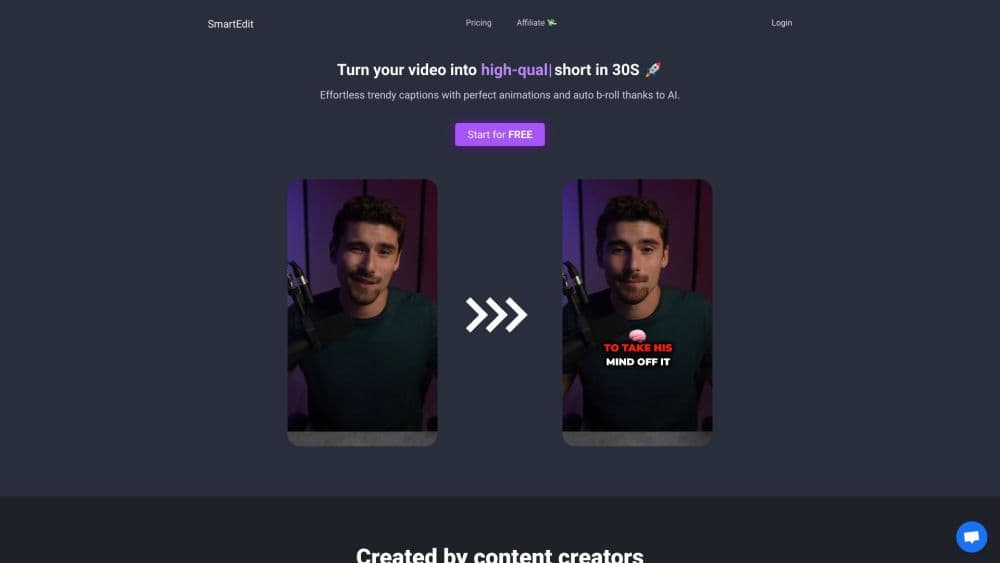
SmartEdit is a browser-based AI video editor that turns vertical clips into captioned shorts with auto B-roll, zoom, translation, and export to Premiere Pro or DaVinci Resolve.
About SmartEdit
What Is SmartEdit
SmartEdit is a web app built for one job: taking a vertical video and returning a finished short with animated captions already in place. You upload an MP4 or MOV, pick the spoken language, and the editor transcribes the audio, times each word, and lays stylized subtitles over the footage. The company says its speech recognition runs at 99.8% accuracy across 15 languages.
The product sits between a caption tool and a full editor. It handles the repetitive parts of short-form video, meaning transcription, emoji placement, B-roll insertion, zooms, and transitions. You still fix misheard words and adjust timing by hand, but you start from a finished draft rather than a blank timeline.
The main limit is format. SmartEdit only accepts vertical 9:16 footage at up to 1080x1920, so a widescreen YouTube recording has to be cropped before it goes in. Upload length and file size depend on your plan, and the free tier won't let you download the result. SmartEdit is a production shortcut for people who already shoot vertical video, not a converter for any footage you happen to have.
Getting Started
- Sign in at smartedit.co with a Google account or an email address. The free edition gives you three uploads and needs no card.
- Create a project and upload a vertical MP4 or MOV. Keep it inside your plan's size and duration cap, and make sure the resolution stays at or below 1080x1920.
- Choose the language spoken in the clip, then start the edit. SmartEdit transcribes the audio and builds the first cut with captions, emojis, and suggested B-roll.
- Fix any wrong words in the caption panel, restyle the text to match your channel, and switch on zoom, transitions, or a call to action.
- Export as a video file, or send the project to Premiere Pro or DaVinci Resolve and finish it in your usual editor.
Product Information
A quick look at SmartEdit's pricing, supported platforms, and performance.
Best for
The users, tasks, and scenarios where this tool fits best.
Users
- Solo creators who post daily
- Social media managers running several accounts
- Freelance editors who bill per short
Tasks
- Captioning talking-head clips
- Repurposing a podcast or interview
- Producing TikTok captions and Reels at volume
Scenarios
- A week of content in one sitting
- A client needs a Spanish version by Friday
- Pulling a moment from a long YouTube video
Key features
Auto Captions in 15 Languages
Speech recognition turns the audio track into timed words, and each word stays editable. The supported list covers English, French, Spanish, German, Italian, Portuguese, Dutch, Swedish, Norwegian, Russian, Turkish, Hindi, Japanese, Korean, and Indonesian. Accuracy varies with audio quality, so a clean microphone recording needs fewer corrections than a clip with background noise.
Caption Animations and Brand Styling
Captions arrive with word-by-word highlights, pop-in effects, bounce, glow, and shake, and each effect has sliders for speed and intensity. You can upload your own font, set a highlight color, and save a look that matches your channel. This is the part that separates SmartEdit from plain subtitle generators, which usually stop at a static text block.
Auto B-roll, Zoom, and Transitions
SmartEdit reads the transcript and inserts stock clips or images that match the words being spoken, then adds zooms on the parts it thinks matter. Trendy transitions and an optional call to action fill the gaps that usually need manual editing. The result looks busy in the way short-form video is supposed to look, and you can swap out any clip that doesn't fit.
Video Translation and Dubbing
Subtitles can be translated into another language, and the audio can be dubbed with a voice from the built-in library. Voice cloning is available as a paid extra, so a creator can keep a familiar voice across languages without recording every version. Dubbing quality depends on pacing, and the app warns when a translated line is too long or too short for natural speech.
Smart Clipping from YouTube Links
On the Pro plan, you can paste a regular YouTube URL and let the tool find the best moments in the video. It builds a short from those segments instead of making you scrub a timeline. YouTube Shorts links are rejected, so the source has to be a standard upload.
Descriptions and Hashtags
A generate button produces a caption and a set of hashtags for the post itself, separate from the on-screen subtitles. The copy is a starting point for TikTok, Instagram, or YouTube descriptions, and it saves the step of writing a hook for every upload.
Export to Premiere Pro and DaVinci Resolve
Finished shorts download as video files, and paid plans add export to Premiere Pro as a .mov plus a DaVinci Resolve handoff. Rendering runs at Full HD and 60 fps, and you can keep your own fonts through the export. For editors with an existing pipeline, this is the difference between a standalone toy and a tool that fits the work.
Pros and cons
Pros
- Fast first cut: a short comes back captioned and styled in roughly the time it takes to upload, which beats assembling subtitles by hand.
- Caption control: every word is editable, and the animation sliders go further than most auto caption tools.
- Translation in the same project: subtitles and audio can both move to another language, which covers the growing demand for multi-language shorts.
- Professional handoff: Premiere Pro and DaVinci Resolve exports mean the output can enter a normal editing workflow instead of dead-ending in the browser.
- Simple pricing ladder: $12/mo buys 30 shorts, and the $30 Pro plan removes the monthly count entirely.
Cons
- Vertical video only: horizontal footage gets rejected, so you have to crop and re-export before uploading, which adds a step to every repurposed video.
- The free plan can't export: three uploads let you preview the editor, but there's no download at all, so you can't publish a test short.
- Upload ceilings are tight: the uploader states a 120 second maximum, and file size runs from 300 MB to 600 MB depending on the plan, so long recordings need cutting first.
- Dubbing and voice cloning cost extra: the base subscription covers subtitles, and the voice features sit behind an add-on that isn't included in the plan price.
Frequently asked questions
SmartEdit is a web-based AI video editor for vertical short-form video. It transcribes your clip, adds animated captions, inserts B-roll, and exports a finished short or a project file for Premiere Pro and DaVinci Resolve.
Related content
Explore related tools, skills, and articles for SmartEdit.
SmartEdit Alternatives

Vadu AI
Vadu AI · Image · VideoVadu AI is a web-based AI video generator that turns written prompts or still images into short clips, and it can also generate images on its own. You type what you want, pick a model and style, and the platform renders the result in minutes. A free plan covers light testing, while paid tiers run from $9 to $77.40 per month based on how many credits you burn.

Mykaraoke Video
MyKaraoke Video · VideoMykaraoke Video is an online karaoke video maker and lyric video maker that turns any song into a finished, lyrics-synced video right in your browser. It handles the slow part for you. The AI pulls vocals out of the mix and locks the lyrics to the beat, then lets you customize background, fonts, and colors before exporting in 1080p MP4. If you make lyric videos for social media, party nights, or music promotion, it skips the software installs and manual timing work entirely. Want a karaoke video generator that doesn't eat your whole evening? That's the pitch here.

Finalframe
Finalframe · VideoFinalframe is a set of free, browser-based tools for grabbing exact frames out of a video clip. Its best-known feature, the Final Frame Extractor, lets you extract the last frame of any video so you can use it as the starting image for AI video tools like Luma Dream Machine, Runway, or Kling. Want to keep a clip going? That last frame is your starting point. The tool runs locally in your browser, needs no sign-up, and costs nothing. A separate paid AI video-generation app from the same team is currently offline while it's rebuilt.