

SnapShift
SnapShift · Image
SnapShift is an AI selfie app that turns your photos into artistic portraits, for casual creators who want striking profile pictures and shareable AI art.
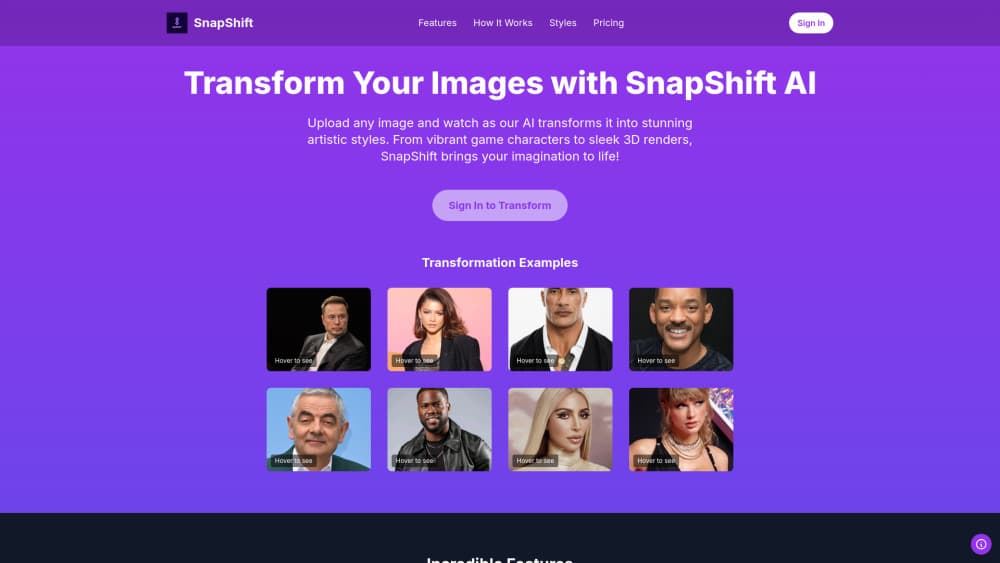
About SnapShift
What Is SnapShift
SnapShift is a web-based AI portrait generator. You upload a selfie, pick an artistic style, and the service generates a new version of your face in that look within seconds. The catalog leans on bold, stylized results rather than subtle retouching. So the output feels like a piece of art you'd post, not a filter you'd hide. Is it a filter? No. SnapShift aims for a full transformation.
The styles span a dozen AI art looks. There's Pixelated, Anime, Cyberpunk, Cell Shaded, Puppet, Impressionist, Comic Book, 3D Cartoon, Plastic Doll, Game Character, Oil Painting and Plastic Toy. That mix serves two crowds at once: people who want a fun avatar for Discord, TikTok or a game profile, and people who want a portrait that reads as illustration or painting.
Because everything runs in the browser, there's no app to install. The site is responsive, so it works on phones, tablets and desktops. You do need an account, but sign-in uses a magic email link, which means no password to remember or reset. Your portrait is generated and delivered instantly, and you can download it and share it wherever you like. If you've ever abandoned a signup because it asked for a password you'd never reuse, this removes that whole step from the process.
Getting Started
- Open the SnapShift site and sign in with a magic email link.
- Upload a photo or capture a selfie with your face clearly visible in good light.
- Choose an artistic style from the collection.
- Wait a few seconds while the AI generates your portrait.
- Download the result and share it, or run another style on the same photo.
Product Information
A quick look at SnapShift's pricing, supported platforms, and performance.
Best for
The users, tasks, and scenarios where this tool fits best.
Users
- Casual creators who want a distinctive avatar or profile picture without design skills.
- Social media users who chase trend-style selfies for TikTok, Instagram or Discord.
- Fans of anime, game art and retro pixel looks who want themselves reimagined in that style.
Tasks
- Turning a single selfie into a stylized portrait in one of a dozen art styles.
- Producing several variations of the same photo to compare looks before sharing.
- Generating shareable art without learning photo-editing software.
Scenarios
- Quick profile-picture refresh for a game account or chat app.
- Fun side-by-side before-and-after posts for social feeds.
- Gifting a custom stylized portrait made from a friend's photo.
Key features
A Dozen Distinct Art Styles
SnapShift ships with styles that range from cartoon to fine art. You can go Anime or Cyberpunk for a modern look, Plastic Toy or Puppet for something playful, or Oil Painting and Impressionist for a classic feel. Pixelated, Comic Book, Cell Shaded, 3D Cartoon, Game Character and Plastic Doll fill out the set. Each style changes both color and line work, which is why the results read as illustration rather than as a softened version of an ordinary photograph you took at home.
Style Preview Gallery
Before you spend anything, the site shows real before-and-after examples for every style. Each tile carries an "After" label and opens into a full-size preview. You see the direction first, then decide. It's handy when you want a cyberpunk photo app look and aren't sure which style fits.
Instant Generation in Seconds
After you pick a style, the portrait is generated in just a few seconds. When demand is high it can take a little longer. There's no long render queue to babysit and no export step to configure. You just wait, then collect the finished portrait and move on to the next style if you want to compare a few different directions on the same face.
Pay-Per-Portrait Pricing
SnapShift avoids subscriptions. You buy transformations in three packs: one portrait for $1, three for $2, or ten for $5. The ten-pack is the cheapest per image, which suits people who want to test several styles on the same face. If you only ever need one portrait for a single profile picture, the dollar entry is low enough that you aren't committing to a monthly bill you might forget to cancel.
Passwordless Login
Signing in uses a magic email link instead of a password. You confirm your address through the link and you're in. It keeps the account barrier low while still tying purchases to a real account.
Works in Any Browser
The tool runs fully in the browser on phones, tablets and desktop computers. The layout adapts to the screen. On a phone at home the flow is the same as on a laptop at a desk. There's no download, no update prompt and no storage to manage, which keeps the whole experience light for anyone who only wants a portrait every once in a while.
Download and Share
Every generated portrait is delivered instantly and can be downloaded right away. That makes it simple to drop the result into a profile, a post or a message without any extra processing. Because the file arrives ready to use, you skip the resizing and sharing detours that usually slow down a quick avatar swap on a phone or a laptop.
Pros and cons
Pros
- No subscription pressure; you only pay for the portraits you actually make.
- Twelve clearly named styles give real variety, from anime to oil painting.
- Passwordless email login removes the usual signup friction.
- Runs in the browser on any device, so nothing has to be installed.
- Before-and-after examples let you see the style direction before paying.
Cons
- There's no free tier, so you must pay before you see your own transformed result.
- Portraits are final once generated; no refunds are offered for digital output.
- Results depend on photo quality, so dim or poorly lit selfies turn out weaker.
- No dedicated mobile app, which may matter if you prefer an app-store experience.
Frequently asked questions
SnapShift turns a selfie into an artistic portrait in a style you choose, such as Anime, Cyberpunk or Oil Painting. It's built for creating shareable profile pictures and stylized self-portraits rather than for professional photo retouching.
Related content
Explore related tools, skills, and articles for SnapShift.
SnapShift Alternatives

X Ray Interpreter
X-ray Interpreter · ImageX Ray Interpreter is a web-based AI radiology tool that turns X-rays, CT scans, MRI, ultrasound, and PET images into plain-language reports. You upload a scan, get a preliminary X-ray interpretation in moments, then ask follow-up questions if something needs explaining. It works as a second opinion and a learning aid, not as a medical diagnosis.

Aieasypic
AIEasyPic · ImageAIEasyPic is an AI image generator that turns plain text prompts into finished artwork in seconds. You can also train custom models on your own photos, swap faces in existing images, and create short video clips from text, all from a browser. It suits casual creators who want quick visuals and hobbyists who want to build a personal model without touching any code.

Chargen
Chargen · ImageChargen is an AI character generator and worldbuilding toolkit built for Dungeons & Dragons and other tabletop RPGs. It turns a one-line idea into a painted character portrait, spins up NPCs, monsters, maps and encounters from the same session, and keeps every creature's details close at hand. The tabletop RPG art side runs on a credit system called Gold, while the text generators stay free for everyone.