

SnapTodo
SnapTodo (independent developer) · Productivity
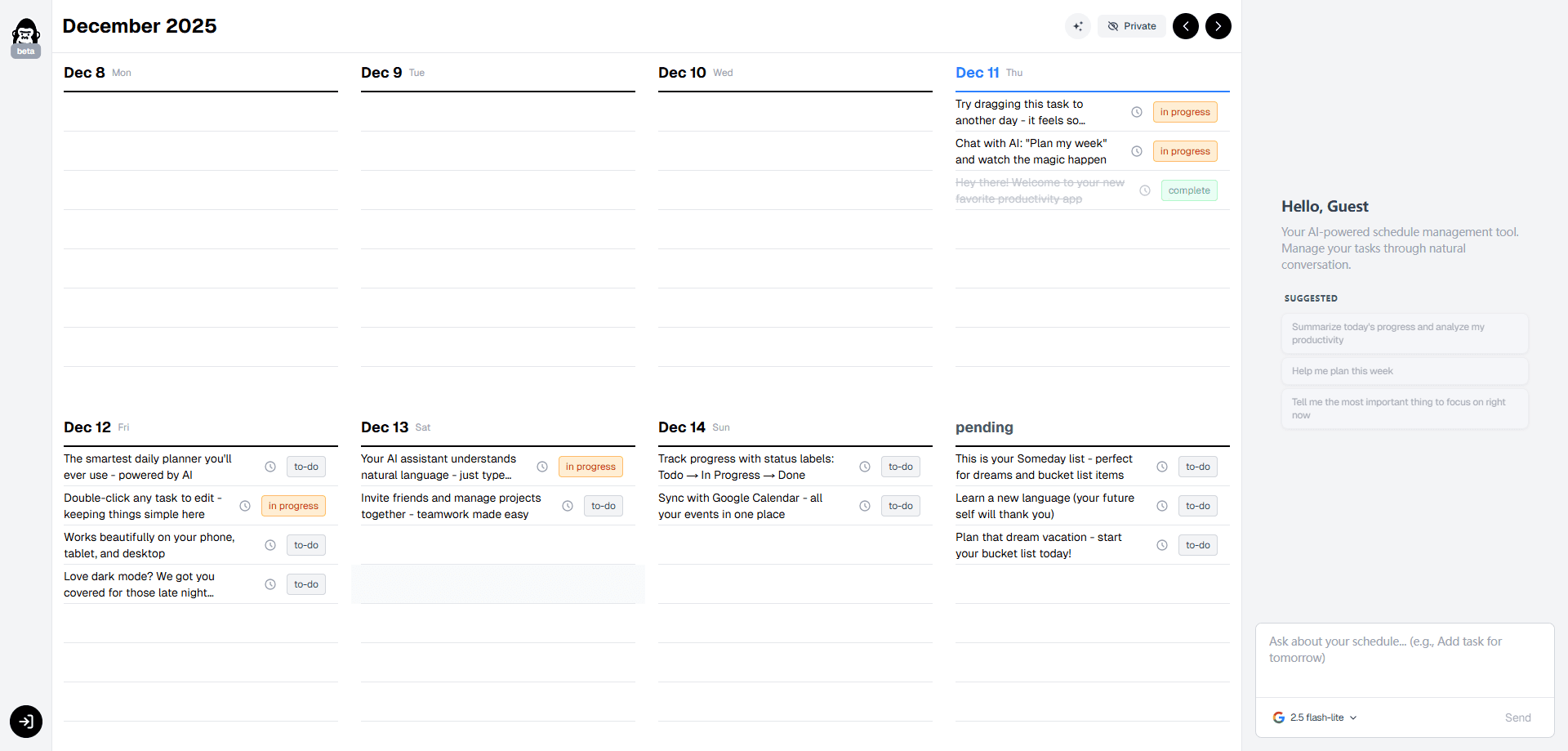
SnapTodo is an AI weekly planner and todo app that mixes a drag-and-drop calendar with a to-do list, then lets AI sort the mess you leave behind. It works as a daily planner too. You drop tasks onto a week view, park the rest in a "Someday" section, and let the assistant rewrite, rank, and clean up the plan when it gets crowded. Think of it as a task management app with AI scheduling built in. It runs on the web, syncs with Google Calendar, and gives you a shareable booking page that turns appointment requests into tasks.
About SnapTodo
What Is SnapTodo
SnapTodo is a visual task manager built around one idea: AI should sit in the core of a planner, not get bolted on as an extra button. The app fuses a weekly calendar, a todo list, and an AI scheduling assistant into a single screen, so planning a week feels more like moving sticky notes than filling in forms. It's a simple pitch. But it changes how you plan.
It targets people whose plans pile up faster than they clear them. Freelancers, students, small teams, and anyone juggling repeated appointments can drag items around, push low-priority work into the Someday bucket, and ask the assistant to rework the whole week when the layout stops making sense. The app also handles the scheduling plumbing: a booking page converts incoming appointment requests into tasks, and Google Calendar sync keeps everything in one place. No more double booking.
The biggest limit is scale. SnapTodo is an indie project that keeps evolving, and the official website now shows the service has ended, so new signups may not be available. So is it worth your time? Treat it as a lightweight, personal-scale planner rather than a team platform. There's no public API. Anyone who needs shared multi-user workspaces or long-term data guarantees should weigh that before committing.
Getting Started
- Create an account on the SnapTodo website using your email or a linked sign-in.
- Connect your Google Calendar so existing events land in the weekly view.
- Drag tasks onto the days you want them, and drop the ones you can't place yet into the Someday section.
- Open the booking page and share its link so appointment requests turn into tasks automatically.
- Ask the AI assistant to rewrite or reorder your week whenever the plan gets cluttered, then adjust by hand.
Product Information
A quick look at SnapTodo's pricing, supported platforms, and performance.
Best for
The users, tasks, and scenarios where this tool fits best.
Users
- Freelancers
- Students
- Small teams and solo operators
- Visual planners
Tasks
- Sorting a messy to-do list
- Turning appointment requests into tasks
- Weekly reviews
- Parking low-priority work
Scenarios
- Planning a packed week on Sunday evening
- Managing a side project alongside a day job
- Running a small service business
- Recovering after a schedule falls apart
Key features
AI Assistant Built Into the Planner
The assistant isn't a separate chatbot; it works directly on your schedule. Ask it to rewrite, reorder, or clean up the week, and it reshuffles tasks across days while you keep the final say. It's the AI task scheduler and the planner in one place. SnapTodo's own pitch is that the AI sorts the chaos you haven't worked out yet, which is the part most planners leave to you.
Drag-and-Drop Weekly Calendar
The whole week sits on one screen, so you move tasks by hand instead of typing dates into fields. Drag an item to a different day, stretch it across a block, or pull it out entirely. That's it. That direct manipulation keeps the planning step fast, and it's the reason the app appeals to people who find list view planning tedious.
Someday Section for Unscheduled Work
Not every task belongs on a specific day. The Someday section holds work you want to remember but can't place yet, keeping it out of the way without deleting it. Simple, and it works. When a slot opens up, you pull items from Someday into the week, which turns a vague backlog into a real schedule.
Friend-Only Sharing and Booking Page
SnapTodo keeps collaboration small on purpose. You can share your planning view with friends rather than publishing it broadly, and a booking page captures appointment requests and turns each one into a task. That's a small but useful touch. It's a neat fit for freelancers who take recurring bookings but don't want a full scheduling suite. It's a neat fit for freelancers who take recurring bookings but don't want a full scheduling suite.
Google Calendar Sync
Google Calendar sync pulls your existing events into the weekly view so you plan around what's already booked. That matters. Instead of maintaining two calendars, you see fixed commitments and flexible tasks side by side, which makes it easier to see where free time actually exists.
Cross-Device Access
SnapTodo runs on the web and keeps your plan available across multiple devices, so the schedule you build on a laptop is there on your phone. Good enough. For a small indie product, that portability matters more than deep platform-specific features.
Pros and cons
Pros
- AI scheduling sits in the core of the planner, so cleanup happens where you work instead of in a separate tool.
- Drag-and-drop on a single weekly view suits visual planners who bounce off list-based apps.
- The Someday section keeps unscheduled tasks visible without crowding the current week.
- Google Calendar sync means you plan around real commitments, not a blank page.
- The booking page turns appointment requests into tasks, which covers a job most todo apps ignore.
Cons
- The official site now states the service has ended, so new signups and ongoing availability aren't guaranteed. That's a real risk if you're deciding where to commit your task data.
- No public API, so you can't wire SnapTodo into your own tools or scripts.
- It's a small indie project without a track record on large, shared team workspaces, so collaborative teams should look elsewhere.
Frequently asked questions
SnapTodo is an AI-powered weekly planner that combines a todo list with a drag-and-drop calendar. You use it to lay out a week, park unscheduled tasks, and let the AI assistant clean up and reorder your plan. It also syncs with Google Calendar and offers a booking page for appointment requests.
Related content
Explore related tools, skills, and articles for SnapTodo.
SnapTodo Alternatives

Swms
Swms AI · Writing · Productivity · BusinessSwms is an AI safety compliance tool that turns a plain description of a job into ready-to-use safety documents. Describe your project, trade, and known hazards, and it writes a safe work method statement, job hazard analysis, safe work procedure, RAMS, or safety data sheet in seconds. It also ships with Oscar, a chat assistant that answers workplace safety questions in any language. Teams in construction, mining, transport, and warehousing use it to cut the paperwork that usually eats into a workday.

Wordly AI Translation
Wordly · Voice & Language · ProductivityWordly AI Translation is a real-time AI translation and captioning platform built for meetings, conferences, and events. It delivers live translation, captions, transcripts, and summaries in more than 60 languages, and attendees join by scanning a QR code or opening a link instead of using dedicated headsets. The platform works with Zoom, Microsoft Teams, Google Meet, and Webex, and it's designed for organizations that want multilingual access without hiring human interpreters for every session. Simple as that.

Rows
Rows (Superhuman) · Productivity · BusinessRows is an AI spreadsheet and data analysis tool that imports live data from more than 50 sources, then lets you work with it using plain language instead of SQL queries or nested formulas. You can pull numbers out of PDFs, connect ad platforms, databases, and bank accounts, and ask the AI to build reports, merge datasets, or set up models that recalculate themselves. It runs in the browser, works like a spreadsheet, and now sits under the Superhuman umbrella.