

Snipo
Snipo (Dima Nabok) · Productivity · Leaning
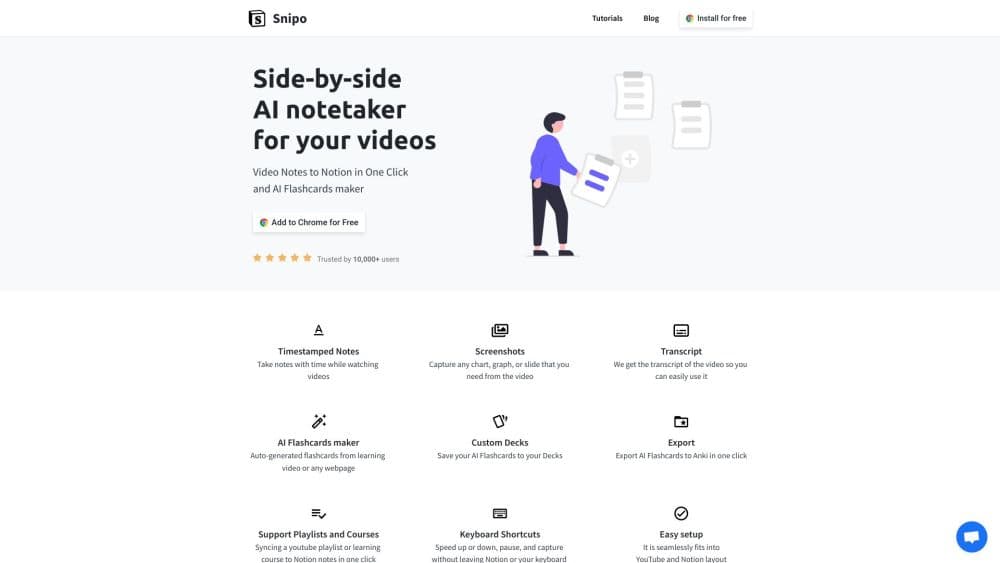
Snipo is a browser extension that turns YouTube and online course videos into timestamped Notion notes, screenshots, and AI flashcards you can send to Anki.
About Snipo
What Is Snipo
Snipo is a note taking extension for people who learn from video. It opens a panel next to the player, so a lecture, tutorial, or conference talk runs on one side while your Notion page sits on the other. Every line you type gets the current video timestamp attached, and one click writes the session into Notion.
The product solves a narrow problem well. Watching a 40 minute video with a separate notes app means pausing, switching tabs, and guessing later where a quote came from. Snipo keeps the video and the page in step, then adds screenshots, transcripts, and auto-generated cards on top.
The limits are worth knowing up front. Everything lands in Notion, so you need a workspace and a page to sync into. It runs in Chrome, Firefox, and Edge on desktop, with no mobile app. Flashcard quality also follows the video transcript, so a clip without captions produces thinner decks.
Getting Started
- Install the extension from the Chrome Web Store, Firefox Add-ons, or Microsoft Edge Add-ons.
- Connect your Notion account and choose the page or database that should receive notes.
- Open a video, start the Snipo panel, and type as it plays. Screenshots and timestamps are added with the shortcut keys.
- Review the synced page in Notion, then save the generated cards to a deck or export them to Anki.
Product Information
A quick look at Snipo's pricing, supported platforms, and performance.
Best for
The users, tasks, and scenarios where this tool fits best.
Users
- Students working through recorded lectures
- Self-taught developers and designers
- Online course learners on Udemy, Coursera, Skillshare, or LinkedIn Learning
- Researchers and writers who mine talks and interviews
Tasks
- Taking timestamped notes during a lecture
- Building revision decks
- Capturing a diagram or slide
- Turning a course into a written summary
Scenarios
- Working through a multi-part course over several weeks
- Last-minute exam revision
- Watching a conference talk for work
Key features
Timestamped Notes in Notion
The core loop is simple. You type a note while the video plays, and Snipo stamps it with the current timecode before writing it to your page. Click that timestamp later and you're back at the second it refers to. For video notes to Notion, this is the part that saves the most time, because nothing gets copied by hand.
Screenshot Capture
A shortcut grabs the frame on screen and drops it into the page with a timestamp label attached. Diagrams, code snippets, and slides survive the session without a separate screenshot tool. On a technical tutorial, that alone replaces a folder of loose images.
AI Flashcards and Custom Decks
Snipo generates question and answer cards from the video you just watched, or from any webpage you open. Cards go into decks you name yourself, which keeps a semester of material sorted by topic. Treat the output as a first pass and edit the wording before you trust a card for an exam.
Anki Export
One click sends a deck to Anki, the flashcard app many students already use for spaced repetition. Anki export keeps cards in the same review queue as the rest of your material, so revision doesn't split across two systems.
Playlist and Course Sync
Point Snipo at a YouTube playlist or a course on Udemy, Coursera, Skillshare, or LinkedIn Learning, and it builds the matching structure in Notion. A long program becomes an outline with a page per lesson rather than one wall of text. The official site also lists TED, Vimeo, Rumble, and Bilibili as supported providers.
Keyboard Shortcuts and Player Control
Speed up, slow down, pause, and capture without leaving the Notion tab. The panel is built into the YouTube and Notion layouts, so it doesn't cover the player controls. Small detail, but it decides whether you still use the extension after week one.
Pros and cons
Pros
- Timestamped notes and screenshots reach Notion in one pass, so there's no second cleanup step.
- AI flashcards plus Anki export cover the loop from first watch to revision.
- Playlist and course sync handles multi-hour programs without manual page creation.
- A free tier covers the core workflow, so you can test it on one lecture before paying.
- Keyboard shortcuts keep your hands off the mouse during playback.
Cons
- Notion is mandatory. Without a workspace and a target page, the extension has nowhere to put your work.
- Desktop browsers only. There's no iOS or Android app, so notes from a phone lecture aren't possible.
- Flashcard quality follows the transcript. Videos with weak or missing captions produce thin decks.
- Generated cards still need editing before serious study, an extra step the sales page doesn't mention.
Frequently asked questions
It takes notes from videos and writes them into Notion with the video timestamp attached. Screenshots, transcripts, and AI generated flashcards come along with those notes.
Related content
Explore related tools, skills, and articles for Snipo.
Snipo Alternatives

Swms
Swms AI · Writing · Productivity · BusinessSwms is an AI safety compliance tool that turns a plain description of a job into ready-to-use safety documents. Describe your project, trade, and known hazards, and it writes a safe work method statement, job hazard analysis, safe work procedure, RAMS, or safety data sheet in seconds. It also ships with Oscar, a chat assistant that answers workplace safety questions in any language. Teams in construction, mining, transport, and warehousing use it to cut the paperwork that usually eats into a workday.

Wordly AI Translation
Wordly · Voice & Language · ProductivityWordly AI Translation is a real-time AI translation and captioning platform built for meetings, conferences, and events. It delivers live translation, captions, transcripts, and summaries in more than 60 languages, and attendees join by scanning a QR code or opening a link instead of using dedicated headsets. The platform works with Zoom, Microsoft Teams, Google Meet, and Webex, and it's designed for organizations that want multilingual access without hiring human interpreters for every session. Simple as that.

Rows
Rows (Superhuman) · Productivity · BusinessRows is an AI spreadsheet and data analysis tool that imports live data from more than 50 sources, then lets you work with it using plain language instead of SQL queries or nested formulas. You can pull numbers out of PDFs, connect ad platforms, databases, and bank accounts, and ask the AI to build reports, merge datasets, or set up models that recalculate themselves. It runs in the browser, works like a spreadsheet, and now sits under the Superhuman umbrella.