

Spriteflow
Spriteflow · Image
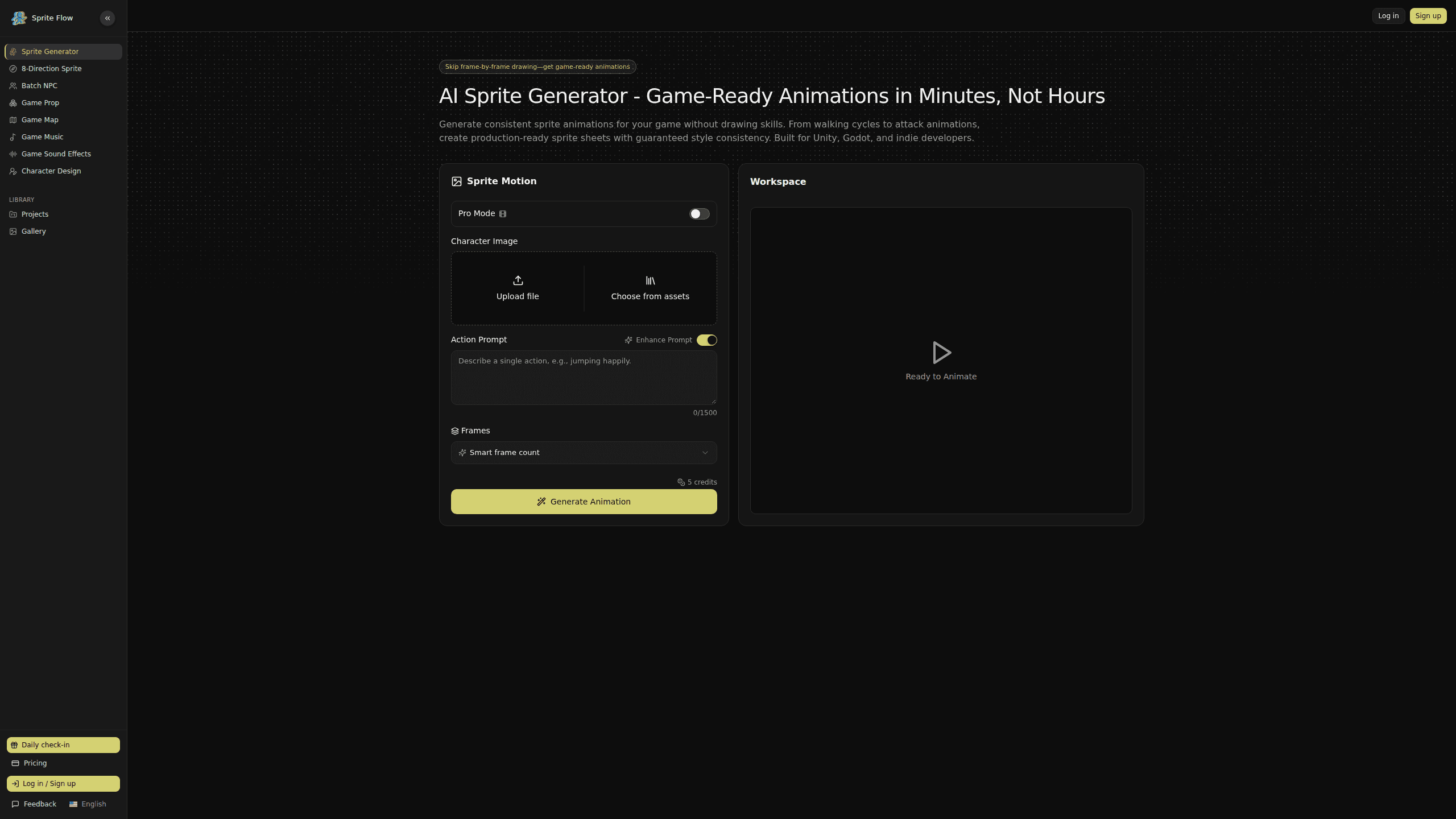
Spriteflow is an AI sprite generator and sprite sheet maker built for indie game developers who need character animations without drawing every frame by hand. You describe a character once, and it produces walking cycles, idle loops and attack animations as ready-to-use sprite sheets. The output keeps a single, consistent art style across every frame, and exports land in Unity, Godot or Unreal Engine without extra cleanup.
About Spriteflow
What Is Spriteflow
Spriteflow is a web-based sprite animation generator aimed at solo developers, small studios and anyone doing a game jam. It works as a game sprite maker and, in practice, as an AI pixel art generator too. Instead of painting pixels in Aseprite or Photoshop one frame at a time, you write a short prompt, pick a motion, and let the tool produce the frames for you. A walking cycle that might take hours of manual work comes back in minutes. That gap is the whole appeal.
The hard part of sprite work isn't drawing one frame, it's keeping frame 1 and frame 30 looking like the same character. Colors drift. Line thickness changes. Proportions creep. Spriteflow tackles that directly by fixing a style before generation, so every frame in a sprite sheet lines up. That's why most people reach for it over a generic image model.
The limits are worth knowing up front. It's a generator for 2D character animation, not a full animation studio. If you need hand-tuned keyframes, complex rigging or a specific pixel-perfect look, you'll still touch a real editor afterward. Spriteflow gets you a strong first pass fast, and you finish the details elsewhere.
Getting Started
- Open the Spriteflow site and start a new project or character in the workspace.
- Describe your character in the prompt box, or upload a reference image, then set the motion you want such as idle, walk or attack.
- Adjust the frame count and review the preview, regenerating if the pose reads wrong.
- Export the sprite sheet and atlas file, then import it into Unity, Godot or Unreal Engine.
Product Information
A quick look at Spriteflow's pricing, supported platforms, and performance.
Best for
The users, tasks, and scenarios where this tool fits best.
Users
- Solo indie developers who can't afford an animator and need usable character frames fast
- Game jam teams working under a weekend deadline, where speed matters more than polish
- Small studios prototyping a cast of characters before committing art time
- Non-artists who can describe a character in words but can't draw one
Tasks
- Generating walking cycle animations without hand-drawing each frame
- Building consistent sprite sheets across multiple characters in one project
- Producing idle, attack and NPC variation loops from a single style reference
- Exporting animation data that drops straight into a game engine
Scenarios
- Prototyping a 2D platformer and needing placeholder-to-final character art quickly
- Adding NPC variety to an existing RPG without matching a whole new art pass
- Testing whether a character concept works before hiring an artist to refine it
Key features
Style consistency across every frame
This is the feature that separates Spriteflow from general image generators. You lock a style once, and the AI applies the same palette, detail level and proportions to every frame it produces. For a walking cycle spread over eight frames, that means no color shifts and no changing character size between poses. It solves the single biggest reason AI sprite output usually looks broken.
Text-to-animation generation
You don't need a reference file to start. Type a description of the character and the motion, and Spriteflow generates the animation frames from that prompt. A walk cycle can come back in a few minutes, which is the core pitch against manual pixel art. Want to test an idea in-engine today? This is the fastest route from concept to something playable.
Motion presets like walk, idle and attack
Rather than building motion from scratch, you pick from common animation types game developers actually need. Walking cycles, idle loops, attack swings and NPC variations are the usual starting points. Each preset maps to a known game need, so you spend your time choosing, not rigging.
Game engine exports
Spriteflow outputs sprite sheets and atlas files meant for real projects, with Unity, Godot and Unreal Engine named as supported targets. The point is to skip the conversion step where you'd normally slice frames by hand and rebuild an atlas. You export once. Then you import into your engine of choice.
Image upload for style reference
If you already have a character or an art style you like, you can upload a reference image instead of relying purely on text. The generator then matches that look. This matters for studios extending an existing game, where a new sprite has to sit next to art you made months ago.
Pros and cons
Pros
- Fast sprite sheet production, cutting animation work that would take hours into minutes
- Style consistency holds across frames, so sheets don't look stitched together
- Engine-ready exports for Unity, Godot and Unreal Engine save manual slicing
- Works from text alone, so no drawing skill is required to start
- Free tier lets you test the workflow before paying
Cons
- No public API, so it can't be wired into an automated art pipeline
- Output still needs cleanup for pixel-perfect or highly specific art styles
- Best suited to 2D character animation, not a full animation or rigging tool
Frequently asked questions
It generates 2D character animations as sprite sheets and atlas files. You describe a character and a motion, and it returns frames such as walking cycles, idle loops or attacks ready to import into a game engine.
Related content
Explore related tools, skills, and articles for Spriteflow.
Spriteflow Alternatives

X Ray Interpreter
X-ray Interpreter · ImageX Ray Interpreter is a web-based AI radiology tool that turns X-rays, CT scans, MRI, ultrasound, and PET images into plain-language reports. You upload a scan, get a preliminary X-ray interpretation in moments, then ask follow-up questions if something needs explaining. It works as a second opinion and a learning aid, not as a medical diagnosis.

Aieasypic
AIEasyPic · ImageAIEasyPic is an AI image generator that turns plain text prompts into finished artwork in seconds. You can also train custom models on your own photos, swap faces in existing images, and create short video clips from text, all from a browser. It suits casual creators who want quick visuals and hobbyists who want to build a personal model without touching any code.

Chargen
Chargen · ImageChargen is an AI character generator and worldbuilding toolkit built for Dungeons & Dragons and other tabletop RPGs. It turns a one-line idea into a painted character portrait, spins up NPCs, monsters, maps and encounters from the same session, and keeps every creature's details close at hand. The tabletop RPG art side runs on a credit system called Gold, while the text generators stay free for everyone.