
SuperHQ
SuperHQ · Coding
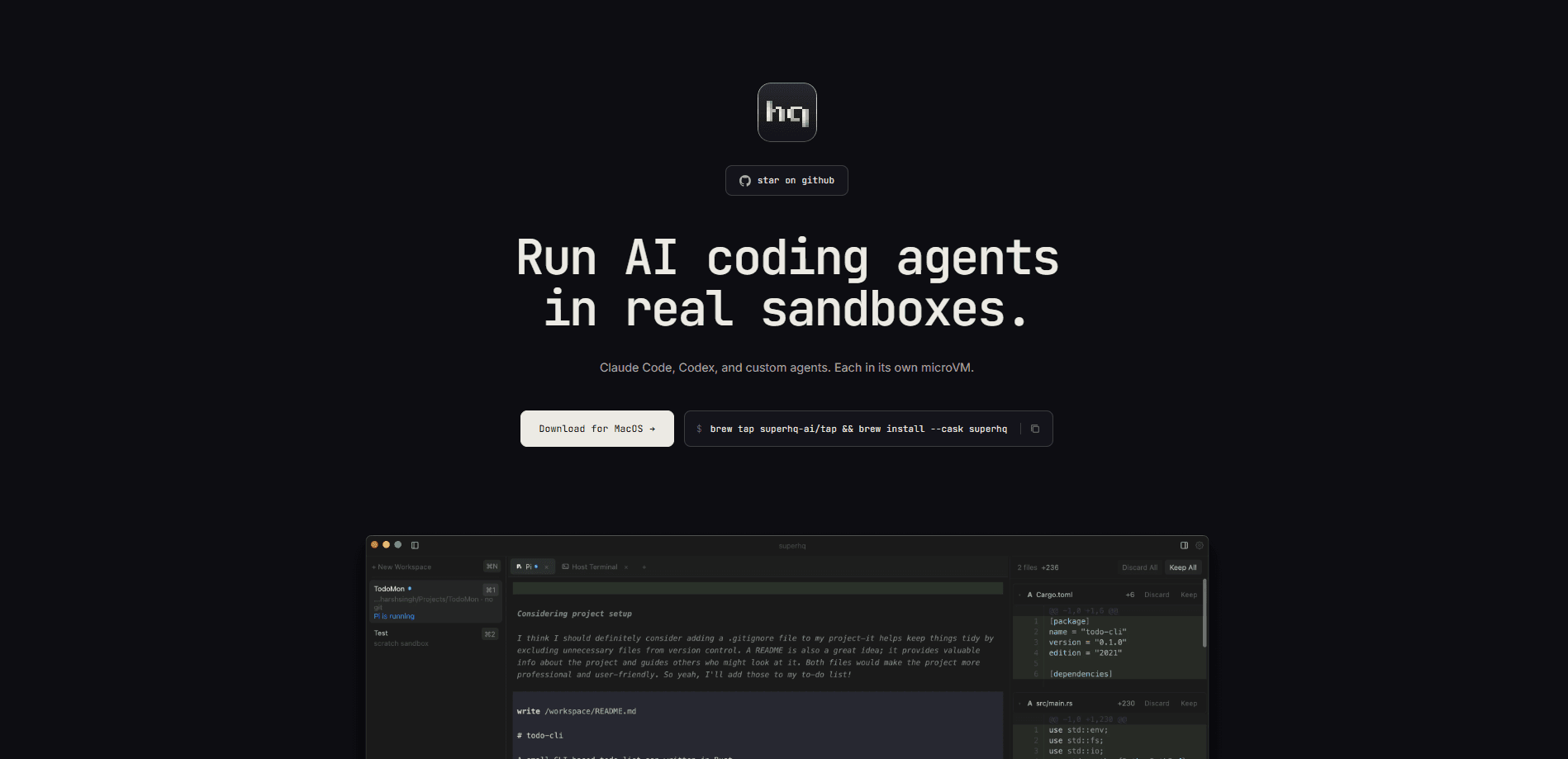
SuperHQ is a macOS desktop application that runs AI coding agents like Claude Code, OpenAI Codex, and Pi inside isolated microVMs. Each agent works in its own sandboxed workspace with a separate filesystem and network, so it can edit real repositories without touching the files on your Mac. You watch what every agent is doing, review the file changes in a unified diff view, and merge only the work you actually want.
About SuperHQ
What Is SuperHQ
SuperHQ is a sandboxed AI agent orchestration platform built with Rust and GPUI, the GPU-accelerated UI framework from the Zed editor. It targets one specific worry: letting an autonomous coding agent loose on a real repo. Instead of trusting the agent to behave, SuperHQ gives every workspace its own isolated VM, so a runaway command, a bad refactor, or a network call can't reach your actual project files.
The tool is aimed at developers who already pay for Claude Code or OpenAI Codex and want to run several of them side by side. You get a launch pad for agents, a review panel, and secure credential handling in one window. Simple pitch.
So what's the catch? Maturity. SuperHQ is a very early alpha, and the developers say so on the repo page. Expect rough edges, missing features, and breaking changes. It also requires macOS 14 or newer on Apple Silicon, and it isn't notarized yet, so Gatekeeper blocks it on first launch until you allow it manually.
Getting Started
- Install SuperHQ with
brew tap superhq-ai/tap && brew install --cask superhq, or grab the latest .dmg from the GitHub Releases page. - On first launch, open System Settings > Privacy & Security, find the SuperHQ warning, and click Open Anyway to get past Gatekeeper.
- Wait for the Shuru runtime to download. It needs about 500 MB of disk space the first time.
- Create a workspace with Cmd+N, then add an agent tab with Cmd+T and pick Claude Code, OpenAI Codex, or Pi.
- Sign in to the agent through the auth gateway, point it at a repo, and watch its work in the review panel before you merge the diff.
Product Information
A quick look at SuperHQ's pricing, supported platforms, and performance.
Best for
The users, tasks, and scenarios where this tool fits best.
Users
- Developers who already use Claude Code or OpenAI Codex and want to run more than one agent at once.
- Solo coders handling large repos who want an autonomous agent to attempt changes without risking the main branch.
- Teams that review AI-generated code and need a clear diff before anything gets merged.
Tasks
- Running the same task through two agents and comparing their file changes side by side.
- Letting an agent refactor or fix code in a scratch workspace before you commit anything.
- Reviewing a long session of agent edits in a unified diff view instead of scrolling through terminal logs.
- Checking on a running agent from a phone while away from the Mac.
Scenarios
- Experimenting with an unfamiliar AI agent on a live project without exposing your API keys or files.
- Keeping multiple parallel workspaces open for different features and switching between them with a keyboard shortcut.
- Auditing what an agent changed on disk before approving a merge.
Key features
Isolated microVM Workspaces
Every workspace in SuperHQ runs in its own microVM sandbox with a separate filesystem, network, and resource limits. That means an agent doing something destructive is contained to its sandbox. The approach uses a tmpfs overlay, so the workspace stays clean while the agent works freely. You decide what leaves.
Multi-Agent Tabs
You can run Claude Code, OpenAI Codex, and Pi side by side, each in a tab inside the same window. Switching workspaces and tabs is keyboard-first, with shortcuts like Cmd+T for a new agent tab and Ctrl+1 to Ctrl+9 for jumping between them. Comparing a Claude Code sandbox against an OpenAI Codex sandbox on the same problem takes a couple of keystrokes.
Secure Auth Gateway
Agents never see your real API keys. SuperHQ runs a reverse proxy on the host that injects credentials into outgoing requests, so a compromised or curious sandbox can't read your Anthropic or OpenAI keys. Your keys stay private. For Codex with OAuth, the gateway also handles token refresh and forwards requests to ChatGPT, which means a ChatGPT Plus or Pro subscription works without extra setup.
Unified Diff Review
The review panel shows every file change an agent made in a unified diff, so you read the actual patch instead of trusting a summary. You approve or reject changes from there. Useful, not nerve-wracking.
Remote Control from Your Phone
Scan a pairing QR code on your Mac, open remote.superhq.ai on a phone, and your workspaces come with you. You can review diffs, reply to an agent, and run commands from mobile. There's no app to install on the phone, just the URL. It works.
Port Forwarding
SuperHQ manages ports in both directions: you can forward a sandbox port to the host, or expose a host port to a sandbox. If an agent spins up a local server, you can reach it without leaving the app. The ports panel lives behind Cmd+Shift+P.
Pros and cons
Pros
- True isolation means a runaway agent can't wreck your real project files.
- Runs the three agents developers actually use: Claude Code, OpenAI Codex, and Pi.
- The auth gateway keeps real API keys out of reach of the sandbox.
- Keyboard-first design keeps workspace and tab switching fast.
- Remote control lets you check diffs and reply to agents from a phone.
Cons
- Very early alpha, so expect missing features and breaking changes, and it's not ready for production use.
- macOS 14+ on Apple Silicon only, so Windows, Linux, and Intel Mac users are left out for now.
- The app isn't notarized, which means an extra Gatekeeper step on first launch and a manual unblock.
Frequently asked questions
SuperHQ runs AI coding agents in an AI coding agent sandbox so they can work on real projects without risking your files. You watch their changes, review the diffs, and merge what you approve. It's a control layer for autonomous coding agents, not a coding agent itself.
Related content
Explore related tools, skills, and articles for SuperHQ.
SuperHQ Alternatives
Forefront
Forefront · CodingForefront is a web platform for building with open-source AI. It lets you fine-tune leading open-source language models on your own data, evaluate how they perform, and run them through an API or export them to host yourself. Developers who want the convenience of a closed-source platform but insist on owning their models and data are the target audience here.

Startkit
StartKit.AI · CodingStartkit is a boilerplate for building AI SaaS and AI wrapper products. Think of it as an AI startup boilerplate with the boring parts already wired up: authentication, Stripe and Lemon Squeezy payments, usage limits, transactional email, and an AI API starter that talks to OpenAI, Anthropic, Groq, or Llama. You clone the repo, set your price, and start on the part of your product that people actually pay for. It's Next.js under React and Tailwind, so most of the boilerplate code already feels familiar.
Testim
Tricentis · CodingTestim is an AI-powered test automation platform for building and running end-to-end tests across web, mobile, and Salesforce applications. It leans on machine learning to keep tests stable when an interface changes, so teams spend less time fixing broken selectors. Not bad for an automated testing tool you can start using today. You create tests by recording actions in a browser, then optionally add JavaScript when you need more control. It's a solid pick for busy QA teams.