

Superset
Superset · Coding · Other
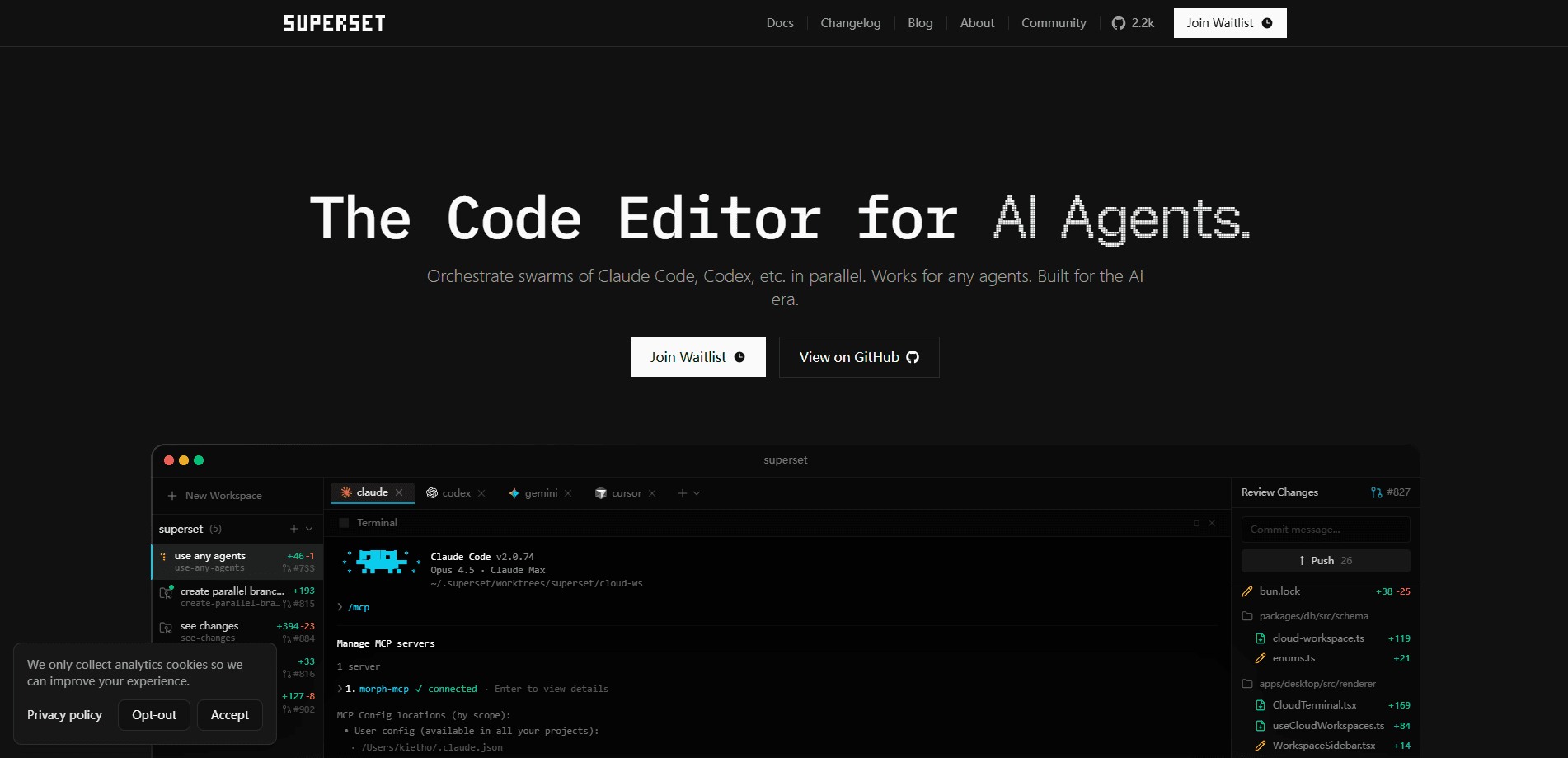
Superset is a terminal application that lets you run multiple AI coding agents at the same time, each in its own isolated Git worktree. Instead of juggling branches by hand, you point Claude Code, Codex, OpenCode, or another agent at a task, watch the status at a glance, and merge the work you like through ordinary branches and pull requests. It runs on desktop and mobile, and you can add a remote machine as a host so long-running workspaces keep going after your laptop sleeps.
About Superset
What Is Superset
Superset is an orchestration layer for AI coding agents. It gives every task its own Git worktree, which means each agent edits a separate copy of your codebase. Two agents can work on the same repository without touching each other's files. No stashing. No shuffling branches. No merge conflicts showing up out of nowhere.
The bigger idea is parallelism. One agent handles a feature, another fixes a bug, a third reviews an open PR, and all three run at once. You get a live view of what's working, what's blocked, and what's waiting on you. The catch? Superset doesn't write code for you. It coordinates tools that do, so the quality of your results still depends on the agent you plug in and how well you brief it.
Getting Started
- Install the desktop app, then add the Superset CLI with
brew install superset-sh/tap/superset. - Connect a repository through the GitHub integration and let Superset create a workspace for it.
- Spawn an agent for a specific task, choosing Claude Code, Codex, OpenCode, or the built-in chat.
- Check status in the dashboard, open the diff viewer for any workspace, and review the changes.
- Stage, commit, push, and open a pull request when the work looks right.
Product Information
A quick look at Superset's pricing, supported platforms, and performance.
Best for
The users, tasks, and scenarios where this tool fits best.
Users
- Developers who already use one AI coding agent and want to run several at once without branch chaos
- Small engineering teams that need reviewable output from many agents in one place
- Solo builders who want remote workspaces that keep running when their laptop closes
Tasks
- Running a feature, a bug fix, and a PR review in parallel instead of one after another
- Racing the same prompt across multiple agents and merging the best diff
- Scheduling recurring chores like issue triage, changelog drafts, and dependency bumps
Scenarios
- Kicking off a batch of refactors overnight and waking up to a reviewable workspace
- Checking on a running agent from your phone while away from your desk
- Keeping a long build going on a home machine while you work from a laptop elsewhere
Key features
Parallel Agent Execution
Superset is built to scale past a handful of agents. You can launch work across features, bug fixes, and refactors all at once, and the status view separates agents that are working from ones that are blocked or waiting on you. The practical payoff is throughput. You stop waiting on one agent before starting the next task.
Isolated Git Worktrees
Every agent gets its own Git worktree, which is a separate working copy tied to the same repository. Changes stay isolated, so two agents editing similar files won't overwrite each other. You review and merge work when you're ready, on your own schedule rather than the agent's.
Bring Any Agent
Superset doesn't lock you to one model or tool. You can use Claude Code, Codex, OpenCode, Amp, Gemini, or the built-in chat, and switch between them per task. Workspaces, branches, and the review flow stay the same no matter which one you pick.
Scheduled Automations
Recurring work can be turned into scheduled agents. Issue triage, changelog drafts, and dependency bumps run on their own and open pull requests for you to review. It's a way to push routine maintenance off your plate. No separate CI pipeline required.
Remote Hosts and Mobile Access
You can add any machine as a host and reach those workspaces through a relay. That means long tasks keep running when your laptop sleeps, and you can check in from your phone. For anyone who works across two machines, this removes the need to keep everything on one device.
CLI, SDK, and MCP
The whole tool is scriptable. You spawn workspaces and agents from the CLI, wire Superset into CI with the SDK, or let your own agent drive it over MCP. Teams that want automation beyond the desktop app can build it without waiting for features to ship.
Open in Any IDE
One click jumps you into your editor of choice: VS Code, Cursor, Xcode, JetBrains IDEs, or a plain terminal. Superset opens worktrees exactly where you need them, so it fits into an existing setup instead of replacing it.
Pros and cons
Pros
- Running many agents in parallel on isolated worktrees removes the branch juggling that usually slows multi-agent work
- Supports Claude Code, Codex, OpenCode, Amp, Gemini, and the built-in chat, so you're not tied to one agent
- Free plan covers individuals with local workspaces, desktop app, GitHub integration, and CLI
- Remote hosts plus a mobile app mean long-running workspaces survive closing your laptop
- CLI, SDK, and MCP support make it scriptable for teams that want automation
Cons
- Superset coordinates agents rather than writing code, so output quality still depends on whichever agent you use
- Remote access, automations, Linear and Slack integrations sit behind the $20 per user per month Pro plan
- Enterprise features like SSO, SCIM, audit logs, and SOC 2 reporting need custom annual pricing
- The desktop-first, terminal-driven workflow is a poor fit if you don't already code with AI agents
Frequently asked questions
It runs multiple AI coding agents at the same time, giving each one its own isolated Git worktree. You review the results and merge the branches you want, instead of managing branches by hand.
Related content
Explore related tools, skills, and articles for Superset.
Superset Alternatives
Forefront
Forefront · CodingForefront is a web platform for building with open-source AI. It lets you fine-tune leading open-source language models on your own data, evaluate how they perform, and run them through an API or export them to host yourself. Developers who want the convenience of a closed-source platform but insist on owning their models and data are the target audience here.

Startkit
StartKit.AI · CodingStartkit is a boilerplate for building AI SaaS and AI wrapper products. Think of it as an AI startup boilerplate with the boring parts already wired up: authentication, Stripe and Lemon Squeezy payments, usage limits, transactional email, and an AI API starter that talks to OpenAI, Anthropic, Groq, or Llama. You clone the repo, set your price, and start on the part of your product that people actually pay for. It's Next.js under React and Tailwind, so most of the boilerplate code already feels familiar.
Testim
Tricentis · CodingTestim is an AI-powered test automation platform for building and running end-to-end tests across web, mobile, and Salesforce applications. It leans on machine learning to keep tests stable when an interface changes, so teams spend less time fixing broken selectors. Not bad for an automated testing tool you can start using today. You create tests by recording actions in a browser, then optionally add JavaScript when you need more control. It's a solid pick for busy QA teams.