

Synthesia
Synthesia · Video
Synthesia is an AI video generator that turns a script, document, or prompt into a studio-quality video with AI avatars and voiceovers in 140+ languages.
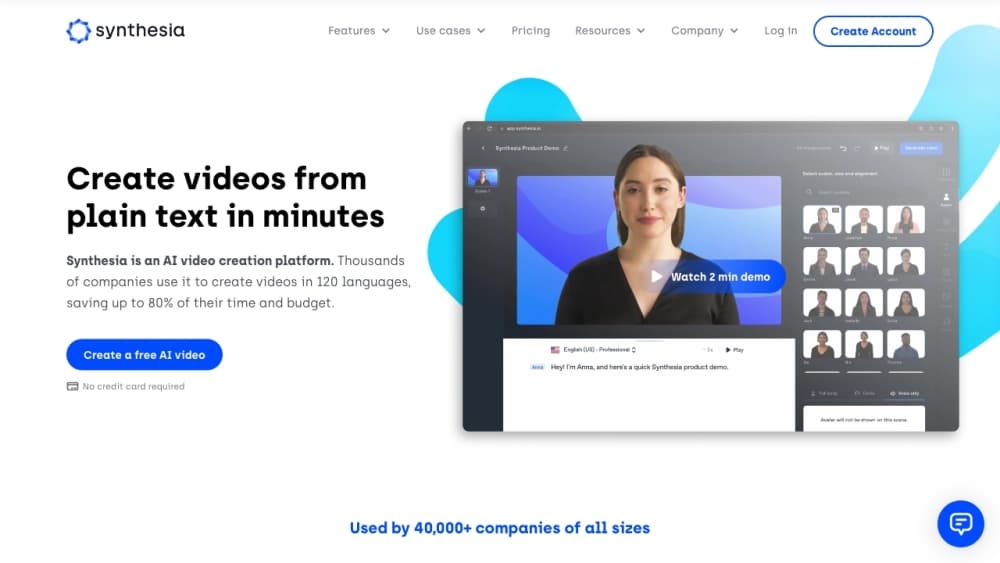
About Synthesia
What Is Synthesia
Synthesia is a web platform for making videos without a camera, a crew, or editing skills. You pick or build an AI avatar or AI avatar generator, type a script, and the tool generates a presenter who speaks your words with matching lip-sync and voice. It is one of the best known tools for corporate training video and AI avatar video. It's built for the kind of video that usually needs a shoot: training modules, product walkthroughs, sales updates, and internal comms.
The audience is mostly teams, not individual creators. Learning and development, HR, sales enablement, and marketing groups use it to produce videos at a scale that filming cannot match. A single script can publish across a whole catalog in dozens of languages, and edits push to every shared link, embed, and LMS package automatically.
The catch is the format it's good at. Synthesia shines at talking-head explainer and training content, where a presenter reads to camera over slides or B-roll. It is not a tool for cinematic storytelling, action footage, or anything that needs real-world filming. Video length on lower plans is also capped, and heavier usage runs on a shared credit pool.
Getting Started
- Create a free account at synthesia.io. No credit card is needed to start.
- Pick a starting point: choose a stock avatar, or build a personal avatar from a photo and a short recording.
- Write your script in the editor, or import a document, PowerPoint, or link for the AI Video Assistant to turn into a scene outline.
- Add voice, background, and on-brand visuals, then generate the video.
- Download the MP4, share it as a link or embed, or export it as a SCORM package for your LMS.
Product Information
A quick look at Synthesia's pricing, supported platforms, and performance.
Best for
The users, tasks, and scenarios where this tool fits best.
Users
- Learning and development teams
- HR and internal comms staff
- Sales enablement teams
- Small marketing teams
Tasks
- Turning documents into training video
- Translating an existing video
- Making a video in many languages
- Building an interactive avatar into an app
Scenarios
- You need 40 onboarding videos by Monday
- Your compliance policy changed and 10,000 courses need updating
- You run roleplay training for a sales team
Key features
AI Avatars and Personal Avatars
Synthesia offers a library of stock avatars with natural gestures, plus the option to build a custom avatar from a single photo and clone your voice. The Enterprise plan opens the full 240+ avatar set, while lower plans cap how many you can use. Presenters speak with matched lip-sync and expressions, so a video looks like someone talking rather than an animation.
Text to Video From Documents and Prompts
The AI Video Assistant turns a document, PowerPoint, or pasted link into a script and scene breakdown you can edit before rendering. You describe the video you want and it drafts the structure, which cuts the blank-page problem for people who know their message but not how to lay it out. A short video typically consumes a set range of credits, so generous imports still have a cost.
One-Click Translation and Dubbing
Any Synthesia video can be translated into 140+ languages in a click, keeping names, terms, and pronunciation consistent through glossary controls. Dubbing also works on videos you did not make, with lip-sync and voice preservation. Translation keeps the same presenter and layout across every language, which is the part that usually breaks when you scale content by hand.
Interactive Avatars and the API
Through the API and an SDK, Synthesia streams avatars that listen, talk, and respond live inside your own product or tool. You connect your own language model, and Synthesia handles the avatar layer for sales, support, training, or onboarding conversations. This is the developer-facing path and needs an API key and a coding setup.
Roleplay and Survey Sessions
Roleplay Sessions let teams practice sales calls, feedback talks, and customer complaints against a custom AI roleplay, with coaching and progress tracking. Survey Sessions run one-to-one interviews around the clock and summarize the key themes automatically. Both are aimed at teams that need scale in practice and research, not just video output.
Manage, Publish, and Measure
A Brand Kit locks company colors, fonts, and logo so every video stays on message, and role controls decide who can publish. Videos share as a link, embed, or SCORM package, and an edit updates every live version automatically. Built-in analytics track views, clicks, and completion, and let you compare by language or version.
Pros and cons
Pros
- Cuts video production time and cost sharply for training, comms, and explainer content that would otherwise need a shoot.
- Translation and dubbing into 140+ languages keep a single presenter and layout consistent across every market.
- The free plan is genuinely usable, with 10 minutes of video a month and 3-minute clips, so you can test before paying.
- Native publishing to link, embed, and SCORM means updates flow to your LMS without re-uploading anything.
- An API and interactive avatars let developers embed conversational video into their own products.
Cons
- It is built for presenter-led talking-head video, so it does not fit cinematic, action, or narrative filming.
- The free and Starter plans cap video length at 3 minutes and limit avatar choices, which gets tight for longer courses.
- Usage beyond the monthly allowance runs on credits, so heavy dubbing or many revisions can add up.
- A lifelike personal avatar needs a recording and a consent check, so setup takes longer than picking a stock face.
Frequently asked questions
Synthesia is used to make presenter-led videos without filming, mainly for training, onboarding, internal comms, product explainers, and sales content. If your video is one person talking over slides or footage, it fits; a cinematic shoot does not.
Related content
Explore related tools, skills, and articles for Synthesia.
Synthesia Alternatives

ngram 2.0
ngram · Video · Marketingngram 2.0 is an AI video generator for teams. It turns a prompt, a screen recording, or a product URL into a narrated explainer, product demo, or AI avatar video, and every scene stays editable.

OpenScreen 2
OpenScreen (open-source project) · Video · ProductivityOpenScreen 2 is a free, open-source screen recorder and demo video editor for Windows, macOS, and Linux, with automatic zooms, styled frames, local captions, and agent edits.

Skreno
Skreno · Video · ProductivitySkreno is a browser screen recorder that captures a tab, a window or your whole display, then attaches AI transcripts, summaries and console logs to one share link.