

T-Rex Label
IDEA Research · Image · Coding
T-Rex Label is a browser-based AI annotation tool that labels objects in images from a box you draw or a text prompt, cutting manual work in computer vision datasets.
About T-Rex Label
What Is T-Rex Label
T-Rex Label is an online data annotation platform built by the IDEA Research team, the group behind the open-set detection models Grounding DINO and T-Rex2. It runs in a browser, so there's nothing to install, and it labels images by detection rather than by hand.
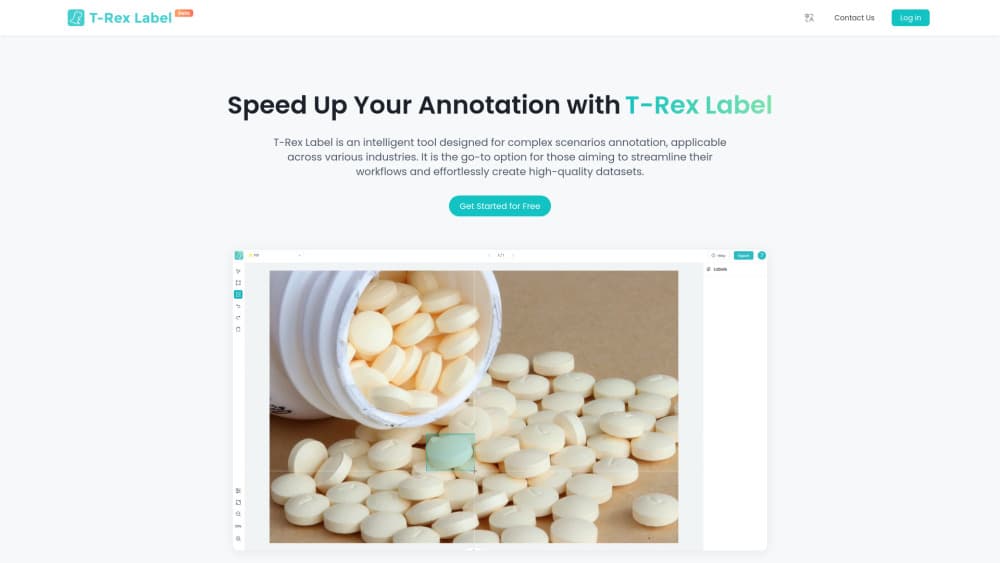
The tool has two modes. Interactive annotation uses a visual prompt: you draw a box around one object, and the model finds the rest of the objects like it. A batch carry feature spreads that prompt across other images. AI pre-annotation uses a text prompt: you name the classes you want, and the model labels a whole set of images on its own. That second mode runs on open-set models such as DINO-X and Grounding DINO 1.6.
The draw is speed on messy data. Open-set detection means the model can find objects it was never trained on, so you skip the collect, label, fine-tune, and redeploy loop that a closed model forces. The trade-offs are real: interactive annotation centers on bounding boxes and masks rather than full semantic segmentation, text-prompt pre-annotation is billed by image count and model, and output accuracy still depends on the model handling your specific scene.
Getting Started
- Open trexlabel.com in a browser and sign in, or start from one of the sample image sets the platform provides.
- Upload your own images or videos, or load a public dataset to try the workflow.
- Choose Interactive AI Annotation or AI Pre-annotation from the start screen.
- For interactive mode, draw a box or mask around a target and let the model mark similar objects; for pre-annotation, name your classes and run the batch.
- Review the results, fix any mistakes by hand, then export in a common dataset format.
Product Information
A quick look at T-Rex Label's pricing, supported platforms, and performance.
Best for
The users, tasks, and scenarios where this tool fits best.
Users
- Computer vision engineers
- Data annotation teams
- Researchers and students
- Startups without a labeling budget
Tasks
- Drawing bounding boxes on many images
- Naming classes for a full run
- Creating masks for irregular objects
- Handling rare or hard-to-describe objects
- Exporting to a training pipeline
Scenarios
- Labeling a densely packed scene
- Reworking a dataset when classes change
- Kicking off a project with no training data
- Checking a model's output
Key features
Interactive annotation with visual prompts
Draw a box around one target and T-Rex Label finds the rest of the objects like it, on that image and across a batch. This is the core workflow, and it uses visual prompts rather than text, so you don't spend time wording a request that a model might misread. It suits objects that are hard to describe, like a specific texture or an odd shape. This mode is free to use and runs on T-Rex2 and its upgraded models.
AI pre-annotation with open-set models
Give the tool a class list and it labels every image in a set on its own, using open-set detection models such as DINO-X and Grounding DINO 1.6. Because those models recognize objects outside their training set, you can label rare items that a closed model would miss. This is the mode built for scale, and it's billed by image count and model, so cost tracks how much you run. It's also the fastest route to a first annotation pass on a new dataset.
Automatic mask and smart segmentation
Beyond bounding boxes, T-Rex Label adds automatic mask annotation. A free smart segmentation tool traces the outline of an object. That helps with irregular shapes a rectangle can't cover, like animal outlines or overlapping parts. The mask feature runs inside the interactive annotation service, which the platform keeps free for the community. It rounds out the bbox tools that the platform started with.
Cross-image batch labeling
One prompt can spread across many images. That spread is what makes the tool fast on large sets. When you mark one object, the prompt carries to other images so you don't repeat the same step each time. This is the difference between labeling a set one image at a time and building a dataset in a sitting. It ties directly into the interactive workflow and needs little setup.
Dataset import, export, and integration
T-Rex Label imports and exports popular dataset formats, which keeps it in step with a visual AI pipeline instead of apart from it. It lists support for Kaggle Datasets, Roboflow Universe, ModelScope, Hugging Face, Label Studio, and FiftyOne on the data side, plus PyTorch, TensorFlow, Keras, and Roboflow Train on the model side. For a team, that means labeled data moves into training without a conversion step. It's the feature that decides whether the tool fits an existing workflow or sits off to the side.
Browser-based, zero-install workflow
The whole tool runs in a browser, so there's no local install, no environment to configure, and no maintenance to keep up with. A new teammate can start annotating in minutes rather than after a setup session. For teams spread across machines and operating systems, that removes the usual friction of desktop annotation software. It's a simple point that matters when the people labeling data aren't engineers.
Pros and cons
Pros
- Visual prompts skip the wording problem, so objects that are hard to describe in text are still easy to mark.
- Open-set detection labels objects the model never trained on, cutting the fine-tune and redeploy loop.
- The interactive annotation mode is free, which lowers the cost of a first dataset.
- The batch workflow spreads one prompt across many images, so large sets move faster than one-by-one labeling.
- It runs in a browser with no install, so teams start in minutes across any operating system.
Cons
- The tool centers on bounding boxes and masks, so it doesn't replace a full platform for segmentation, video, or text annotation.
- AI pre-annotation is billed per image and per model, so heavy use on large sets adds up.
- Accuracy on a specific scene still depends on the model, and dense or low-contrast images may need manual fixes.
- Automatic annotation can miss or misplace objects, so a human review pass is still part of the job.
Frequently asked questions
T-Rex Label is a browser-based AI data annotation tool from the IDEA Research team. It labels objects in images using visual prompts, like a box you draw, or text prompts for whole-set pre-annotation. It's aimed at building computer vision datasets without training a model first.
Related content
Explore related tools, skills, and articles for T-Rex Label.
T-Rex Label Alternatives

Tractionwave
TractionWave · Image · MarketingTractionWave is an AI attention heatmap tool for static ads. Upload a PNG or JPG and it returns predicted attention, ranked hotspots, and fixes before you spend budget.

Imejis.io
Imejis.io · Image · MarketingImejis.io is an AI design studio for agents and marketing teams. Describe an image in plain words, and it writes the copy, builds the layout, reflows it to every size, then exports a finished file.

Layoutr
Van Dijk Ontwikkeling · Image · China AILayoutr is a browser floor plan tool that scales your own plan, places furniture at true size, shows the room in 3D and renders it with AI.